
Case Cover for Pico: 5 Enclosures Compared by Fit

Pico Snap Case, Carbon Black is the closest match for most Raspberry Pi Pico setups because its snap-fit shell has ventilation slots and a Micro-USB cutout. Choose a different enclosure if you need confirmed support for Pico W or Pico 2, or want access to GPIO pins and a reset button.
A Pico case is an enclosure around the microcontroller board; openings must line up with the board’s ports and pins.
We earn a commission if you buy through links on this page. As an Amazon Associate I earn from qualifying purchases. Products are compared on manufacturer specifications, not hands-on testing.
- Best overall: Pico Snap Case, Carbon Black – Snap-fit assembly, top ventilation slots and front Micro-USB access suit a straightforward Pico enclosure.
- Best for screw fastening: Pico PLA+ Case, Translucent Top – Four screws and nuts secure the board, with cutouts for USB, reset and status LED.
- Best for GPIO access: C4Labs Zebra Pico W Case, Single Pack – The compact design provides access to GPIO and debugging pins as well as the button.
| Product | Best for | Color | Dimensions (L × W × H) | Board retention | Shop |
|---|---|---|---|---|---|
| Pico Snap Case, Carbon Black | Ventilated enclosure | Carbon black | 1 × 2.5 × 0.75 in | Snap-fit | Check Price on Amazon |
| Pico Snap Case, Black | Plain black shell | Black | 1 × 2.5 × 0.75 in | Snap-fit | Check Price on Amazon |
| Pico PLA+ Case, Translucent Top | Screw-fastened board | White and black | 2.09 × 0.87 × 0.35 in | Four screws and nuts | Check Price on Amazon |
| C4Labs Zebra Pico W Case, Single Pack | GPIO and debug access | Black Ice | 2.25 × 1.25 × 0.5 in | — | Check Price on Amazon |
| Pico Snap Case, Blue | Blue ventilated shell | Blue | 1 × 2.5 × 0.75 in | Snap-fit | Check Price on Amazon |
Case Covers for Pico
Compare color, enclosure dimensions and fastening style, then match openings to your board and connection needs.
Pico Snap Case, Carbon Black

Pico Snap Case, Carbon Black pairs a carbon black plastic shell with top ventilation slots and a front Micro-USB cutout. The snap-fit assembly is tool-free, and the case is 1 inch long, 2.5 inches wide and 0.75 inch high. It suits a Pico setup that needs USB access without removing the enclosure. The product is identified for Raspberry Pi Pico boards, so buyers using a Pico W or Pico 2 should confirm that the board and port openings align before ordering.
Bottom line: Pick this for a Pico setup that needs snap-fit assembly, ventilation and front USB access.
Pico Snap Case, Black
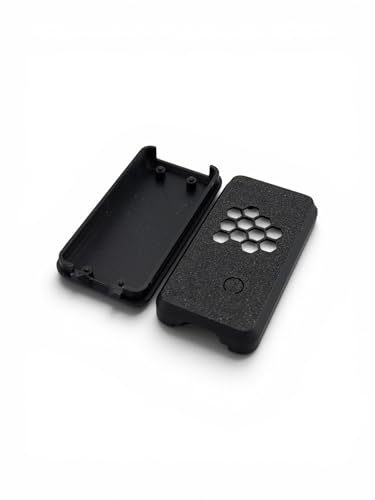
Pico Snap Case, Black has the same snap-fit construction, top ventilation slots, Micro-USB access and 1 × 2.5 × 0.75-inch dimensions as the other black-style snap enclosure, but its color is black rather than carbon black. That makes color the practical distinction for a buyer choosing between these closely matched shells. Tool-free assembly keeps installation simple. Its board fit is Raspberry Pi Pico, so a different Pico-family board may require checking the port and board alignment before purchase.
Bottom line: Choose this when a black finish matters more than a different enclosure style.
Pico PLA+ Case, Translucent Top

Pico PLA+ Case, Translucent Top is the screw-fastened option, using four screws and nuts to hold the board rather than a snap-fit shell. Its translucent top and bottom frame a black middle section, and cutouts provide access to the USB port, reset button, status LED and GPIO pins. The case is about 2.09 × 0.87 × 0.35 inches. It is identified for Pico, Pico W, Pico 2 and Pico 2 W, making it a useful choice when those named board variants or pin access matter; fastening takes more steps than tool-free assembly.
Bottom line: Pick this when screw fastening and access to the reset button and GPIO pins are priorities.
C4Labs Zebra Pico W Case, Single Pack

C4Labs Zebra Pico W Case, Single Pack is a compact 2.25 × 1.25 × 0.5-inch design with access to GPIO and debugging pins, plus full button functionality. Its compatibility covers the original Pico, Pico W, Pico 2 and Pico 2 W. The single pack version is black ice. Unlike the other enclosures here, its features emphasize pin and button access rather than a snap-fit or screw-fastening method, so it suits projects where those connections remain in use.
Bottom line: Choose this for a named Pico-family board when GPIO and debugging access are central.
Pico Snap Case, Blue

Pico Snap Case, Blue provides the same features as the other snap-fit shells—top ventilation slots, front Micro-USB access and tool-free assembly—in a blue finish. Its dimensions are 1 × 2.5 × 0.75 inches. Color is the deciding difference for buyers comparing the three similar enclosures; the blue version keeps USB and power connections accessible while installed. The fit is for Raspberry Pi Pico boards, so confirm alignment if the board is a Pico W or a later model.
Bottom line: Pick this when you want the ventilated snap-fit style in blue.
How to Choose a Case Cover for Pico
Choose by board fit first, then by which connections must stay reachable. A standard Raspberry Pi Pico board measures about 51 × 21 mm and has 40 GPIO pins arranged in two rows at 2.54 mm pitch. USB access, pin access and button access depend on the enclosure’s cutouts, not just its outside dimensions. For a project that uses GPIO jumpers, favor a case that leaves the pins accessible; for routine programming, a USB opening may be the key requirement. A useful decision rule is to choose a screw-fastened design when you want the board held by four fasteners, and a snap-fit design when tool-free assembly is more important. Check board-variant fit before purchase when the case names only the original Pico.
Pico Board Fit and Port Clearance
Board fit depends on the model and the locations of its USB connector, buttons, LEDs and pin rows. The Pico, Pico W, Pico 2 and Pico 2 W use the same general board outline, but an enclosure still needs correctly positioned openings to provide access. A case that leaves a port covered can require removal for programming or power, while blocked GPIO pins prevent direct jumper connections. Check the case’s named board compatibility and compare openings against the particular board before choosing. The included cases range from 0.35 to 0.75 inch tall, but outer height alone does not establish internal clearance. Avoid forcing a board into a shell: a tight fit can stress the board or case.
Snap-Fit and Screw-Fastened Pico Cases
Snap-fit cases close by pressing their parts together, while screw-fastened cases use hardware to hold the board or enclosure. Snap closures avoid a tool during assembly, but repeated opening can wear plastic tabs; screw-fastened designs take longer to assemble and need the included fasteners kept together. A case with open GPIO access is useful when wiring stays connected, whereas a more enclosed shell suits a setup that mainly needs USB access. Compare the access style against the project before focusing on appearance. This table groups the main design choice with the setup it supports.
| Design | Useful when | Trade-off |
|---|---|---|
| Snap-fit shell | Tool-free assembly and USB access matter | Access depends on its cutouts |
| Screw-fastened shell | Board is secured with included hardware | Assembly takes more steps |
| GPIO-access case | Pins or debugging connections stay in use | More board area remains exposed |
Frequently Asked Questions
Will a Pico case fit a Pico W?
Some cases explicitly support Pico W, but compatibility should not be assumed from the word Pico alone. Choose one that names Pico W or confirm that the USB and board openings align.
How many GPIO pins does a Raspberry Pi Pico have?
The Pico has 40 GPIO pins arranged in two rows, with 2.54 mm spacing between adjacent pins. A case needs pin access if jumpers will remain connected while the board is enclosed.
Does a Pico case need ventilation slots?
A microcontroller enclosure does not always need ventilation for basic operation, but airflow can matter when components or add-on boards produce heat. Keep the case’s openings unobstructed and assess heat in the complete project, not just the bare Pico.
Can I program a Pico without removing its case?
Yes, if the case opening lines up with the board’s USB connector and leaves room for the cable. Check the connector clearance before choosing an enclosure, especially if the cable plug has a wide housing.
What is the difference between snap-fit and screw-fastened cases?
Snap-fit cases close without tools, while screw-fastened cases use hardware to hold parts together or secure the board. For frequent access, consider how often the enclosure will be opened and whether its tabs or screws will be manageable.