
10G SFP to RJ45: Three Copper Modules Compared

For a 10G SFP to RJ45 transceiver with multi-rate support, choose QINIYEK 10G SFP+ RJ45, 4-Pack; it supports 10G, 5G, 2.5G and 1.25G, while 10Gtek 10G-T SFP+ RJ45, 10-Pack is the named 10Gtek module and 10Gtek 10G-T SFP+ RJ45, Single is a single-module 10Gtek alternative.
These modules convert an SFP+ port to a copper RJ-45 connection; check your device’s compatibility before choosing, since the 10Gtek options exclude several major switch brands and 10Gtek 10G-T SFP+ RJ45, Single can run hot.
We earn a commission if you buy through links on this page. As an Amazon Associate I earn from qualifying purchases. Products are compared on manufacturer specifications, not hands-on testing.
- Best overall: QINIYEK 10G SFP+ RJ45, 4-Pack – Supports four data rates and lists compatibility with Ubiquiti and several other switch brands.
- Best for multi-device installs: 10Gtek 10G-T SFP+ RJ45, 10-Pack – Includes 10 modules, with reach up to 30 meters.
- Best for a single 10G link: 10Gtek 10G-T SFP+ RJ45, Single – A single-module 10Gtek option with CAT.6a/CAT7 support and reach up to 30 meters.
| Product | Best for | Data rates | Pack size | Shop |
|---|---|---|---|---|
| QINIYEK 10G SFP+ RJ45, 4-Pack | Multi-rate networks | 10G, 5G, 2.5G, 1.25G | 4 modules | Check Price on Amazon |
| 10Gtek 10G-T SFP+ RJ45, 10-Pack | Multiple 10G ports | 10G | 10 modules | Check Price on Amazon |
| 10Gtek 10G-T SFP+ RJ45, Single | Single 10G port | 10G | 1 module | Check Price on Amazon |
10G SFP to RJ45 Transceivers
Compare data rates, reach and pack size, then verify that your switch or other SFP+ device supports the chosen module.
QINIYEK 10G SFP+ RJ45, 4-Pack
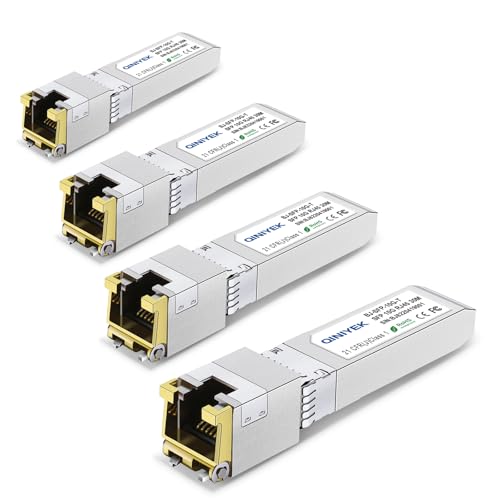
QINIYEK stands apart with four supported data rates rather than a 10G-only rating. The 4-pack uses RJ-45 and CAT.6a/CAT7 cabling, with reach up to 30 meters; the maker says it is hot-pluggable and plug-and-play in compatible equipment. Its compatibility list includes Ubiquiti, MikroTik, QNAP, Cisco, TP-Link and other open switches, making it the broadest fit here for a mixed-device network. The limitation is that the specifications do not give a temperature recommendation, so verify operating conditions for your installation.
Bottom line: Choose this when you need multiple modules or want support for rates below 10G.
10Gtek 10G-T SFP+ RJ45, 10-Pack

For outfitting several ports at once, this 10Gtek option supplies 10 modules, more than the other choices. It converts an SFP+ connection to RJ-45, accepts CAT.6a/CAT7 cable and has reach up to 30 meters. The compatibility list covers Cisco, Fortinet, Netgear, TP-Link, Meraki and other open switches. The key limitation is device fit: it is explicitly incompatible with HP-ProCurve, HP-H3C, HP-Aruba, Intel, Arista, Mellanox, Dell Force10, Extreme, Brocade and Juniper equipment, so confirm your hardware model before selecting it.
Bottom line: Pick this for several compatible 10G ports when the exclusions do not apply.
10Gtek 10G-T SFP+ RJ45, Single

Unlike the 10-module 10Gtek option, this is a single transceiver built around a Marvell AQR113C IC. It supports 10G over RJ-45 using CAT.6a/CAT7 cabling and reaches up to 30 meters. The maker warns that the module may get hot during operation and recommends ambient temperatures below 50°C. It shares the other 10Gtek option’s compatibility list and exclusions, so its one-module format is most useful when you need a single matching port rather than a multi-rate module.
Bottom line: Choose this for one compatible 10G connection if the below-50°C recommendation fits your environment.
How to choose a 10G SFP to RJ45 module
Start with the host device’s SFP+ compatibility, then match the module’s data rates and cable run. SFP+ is the 10-gigabit interface; an RJ-45 transceiver allows a twisted-pair Ethernet cable to connect to that port. The products here list CAT.6a/CAT7 and a maximum run of 30 meters, not the longer distances often associated with fiber SFP+ optics. For a run longer than 30 meters, do not assume these copper modules will reach it; choose a link type rated for the actual distance. For a single-rate 10G network, either 10Gtek option fits the rate, while the QINIYEK option also specifies 5G, 2.5G and 1.25G rates.
Check switch and device compatibility
Verify the transceiver against the exact switch, router, server or network-interface-card model before purchase; an SFP+ cage alone does not guarantee that a device accepts every module. The 10Gtek options share a list of exclusions that includes HP-ProCurve, HP-H3C, HP-Aruba, Intel, Arista, Mellanox, Dell Force10, Extreme, Brocade and Juniper. The QINIYEK compatibility list names Ubiquiti, Cisco, Meraki, MikroTik, Supermicro, Linksys, QNAP, D-Link and TP-Link. A manufacturer name is not the same as confirmed support for every model or firmware version.
Plan the copper run and operating conditions
Keep the cable run within the 30-meter maximum stated for these modules and use CAT.6a or CAT7 cable as specified. Cable category alone does not override the module’s reach limit: a longer run needs a transceiver and link design rated for that distance. Copper SFP+ modules can draw more power and produce more heat than fiber modules, so airflow and device temperature matter in tightly packed switches. For the single 10Gtek module, the maker recommends ambient temperatures below 50°C and warns that the module may get hot. If the installation cannot stay below that ambient limit, choose a different option or confirm suitability with the equipment manufacturer before deploying it.
Common 10G SFP to RJ45 selection mistakes
The most common mistake is treating “10G” as proof of compatibility with every SFP+ port. Check the host’s supported transceiver list and the exact device model before installing a module; unsupported optics can fail to establish a link or trigger a device warning. A second mistake is overlooking pack count: the 10-module pack is intended for several ports, while the single-unit choice is not a multiport supply. A third is planning a 10GBase-T run beyond 30 meters because CAT.6a or CAT7 appears on the cable. These modules cap reach at 30 meters, so select a different medium or module for longer distances rather than assuming a higher cable category extends the rating.
Frequently Asked Questions
How far can a 10G SFP to RJ45 module reach?
The modules in this comparison specify a maximum reach of 30 meters. Keep the full copper channel within that limit, including any patch leads.
Which cable works with these SFP+ RJ45 modules?
The products specify CAT.6a or CAT7 copper Ethernet cable. Cable type does not extend the 30-meter maximum run.
Will any SFP+ switch accept an RJ45 transceiver?
No; support depends on the exact device and its firmware or transceiver policy. Check the host model’s compatibility before inserting a module, especially for devices named in the 10Gtek exclusions.
Can a 10G RJ45 SFP+ module also run slower speeds?
The QINIYEK option specifies 10G, 5G, 2.5G and 1.25G rates. The 10Gtek options specify 10G, so do not assume they support lower rates.
Do 10GBase-T SFP+ modules need extra cooling?
Heat can matter because copper transceivers can run hot in dense switch installations. The maker of the single-module 10Gtek option recommends ambient temperatures below 50°C; maintain airflow and stay within that recommendation.