
Best Gun Attachment for Oculus Quest 2 Compared

The X-SUPER HOME VR Gunstock suits most Oculus Quest 2 players because its magnetic controller mounts and adjustable 11-to-14.5-inch length let you tune the fit. Choose a Quest 2-specific mount instead if you want a shoulder strap or a simpler fixed setup; a VR gunstock holds the controllers in a rifle-like position.
For any stock, keep the Quest 2 tracking cameras clear of your hands and the frame, since the headset needs camera visibility to track the controllers.
We earn a commission if you buy through links on this page. As an Amazon Associate I earn from qualifying purchases. Products are compared on manufacturer specifications, not hands-on testing.
- Best overall: X-SUPER HOME Adjustable VR Gunstock – Magnetic controller mounts and a hand-adjustable 11-to-14.5-inch length suit different grip preferences.
- Best for a shoulder strap: Hounyoln Quest 2 Magnetic Gunstock – Quest 2-specific magnetic stock includes a shoulder strap.
- Best for a simple gun handle: VR000104 Quest 2 Gun Handle – The molded handle is designed for Quest 2 FPS play and installs without tools.
| Product | Best for | Compatibility | Controller mount | Shop |
|---|---|---|---|---|
| X-SUPER HOME Adjustable VR Gunstock | Adjustable grip | Quest 2, Quest 3, Quest 3S, Quest Pro | Magnetic | Check Price on Amazon |
| Hounyoln Quest 2 Magnetic Gunstock | Shoulder strap | Quest 2 controllers | Magnetic | Check Price on Amazon |
| VR000104 Quest 2 Gun Handle | Simple gun grip | Quest 2 | Controller handle mount | Check Price on Amazon |
Oculus Quest 2 gun attachments
Compare these Quest 2-compatible gun-style accessories by controller connection and fit options.
X-SUPER HOME Adjustable VR Gunstock

The X-SUPER HOME is the adjustable option here, with a length range of 11 to 14.5 inches and magnetic controller mounts. Six hand-tightened screws let you change the length and position for a preferred rifle or shotgun-style setup, without needing a tool for those adjustments. Its cheek pad adds a contact point when you bring the stock up to aim. The broader Quest compatibility may also suit households using more than one headset model. Its adjustable frame has more parts to position than a simple handle, so choose another style if you want a minimal one-piece grip.
Bottom line: Pick this if you want to tune stock length and controller position.
Hounyoln Quest 2 Magnetic Gunstock
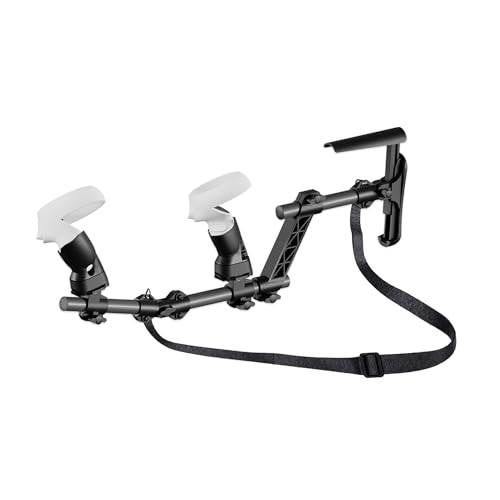
The Hounyoln stands out for including a shoulder strap while keeping its fit specific to Quest 2 controllers. Its magnetic attachment is intended to make controller connection and separation straightforward, and the stock is removable. A purpose-specific fit is useful when you only need a mount for Quest 2 rather than a model advertised for several headset generations. The specifications do not give an adjustment range, so this is a weaker match for players who need to set a particular stock length; confirm fit and strap positioning before play.
Bottom line: Choose this if a shoulder strap and Quest 2-only fit are priorities.
VR000104 Quest 2 Gun Handle

The VR000104 uses a gun-style handle rather than a length-adjustable shoulder stock, making it the simplest form factor among these choices. The specifications describe an installation that needs no additional tools and a body made from ABS plastic. The handle is aimed at Quest 2 FPS play, so it is a direct fit for a player seeking a basic two-controller aiming aid.
Bottom line: Pick this for a straightforward Quest 2 gun handle setup.
How to choose a Quest 2 gun attachment
Choose by mount style and adjustment first: magnetic stocks separate from controllers quickly, while a fixed handle keeps the setup simpler. A longer adjustable stock can make a two-handed rifle grip feel more natural, but it also takes more positioning than a short handle. Quest 2 uses inside-out tracking, so headset cameras must see the controllers; a frame or grip that blocks a camera can disrupt tracking. Before playing, raise the attachment into your normal aiming position and check that the controllers remain visible to the headset. If the grip or stock obscures a camera in that position, reposition your hands or choose a different form.
Quest 2 controller fit and tracking
Quest 2 accessories should attach to Quest 2 controllers rather than relying on a similar-looking controller from another headset generation. Controller rings and tracking cameras have specific geometry, and a mount that pinches a ring or covers an infrared LED can interfere with tracking. Keep a clear view between the headset and controller during aiming; inside-out tracking can lose a controller when it moves outside the headset cameras’ field of view. Confirm the mount seats securely without forcing the controller into place, and test the full aiming motion in a clear play area before using it in a fast game.
Gunstock, magnetic mount and handle differences
A gunstock joins two controllers to create a rifle-like grip, while a pistol-style handle supports a shorter aiming position. Magnetic mounts make it easier to remove and replace controllers, whereas a fixed clamp may require a separate release step. The right type depends on how you hold and move the controllers, not just the accessory’s shape. Use this quick comparison to match a form factor to a specific need.
| Type | Useful when | Trade-off |
|---|---|---|
| Adjustable stock | You want to set length or controller position | More parts to position |
| Magnetic stock | You remove controllers between rounds | Mount alignment still matters |
| Gun handle | You want a simple compact grip | No shoulder-stock length adjustment |
Choose an adjustable stock if you need a measurable change in reach; otherwise, prioritize controller fit and tracking clearance.
Safe setup and common mistakes
Use a clear play area and keep the stock away from people, furniture and the headset cable while turning. A gunstock changes how far the controllers extend from your body, so clear space around your full aiming arc before starting; never swing a rigid attachment near another person. Attach controllers firmly and check that magnets or clamps hold before raising the setup. Do not overtighten a mount against a controller ring, and stop if the attachment shifts during movement. A clear camera view matters as much as a snug fit: tracking trouble often begins when hands, rings or the accessory frame block the headset’s view.
Frequently Asked Questions
Do Quest 2 gunstocks work with every VR shooter?
A physical stock can be used only where the game accepts the Quest 2 controllers in a compatible aiming style. Game handling and virtual weapon alignment differ, so test a comfortable grip in the game’s calibration or practice area before a match.
How can I check a gunstock does not block tracking?
Hold the stock in your normal aiming position and make sure the headset cameras can still see the controllers. Move through your usual aiming arc; if tracking drops when a hand or frame covers a camera view, reposition the grip.
Should I choose a magnetic or fixed controller mount?
Choose a magnetic mount if you expect to remove controllers often between rounds. A fixed mount may suit a setup that stays assembled, but check that its release method does not require pulling against the controller ring.
How much room do I need to use a VR gunstock?
Leave enough clear space for the full length of your arms and the stock as you aim in every direction. Remove nearby obstacles and people from that arc before play, since a rigid accessory extends beyond the controllers.
Can I use a Quest 2 gunstock with Quest 3 controllers?
Only use a mount specifically compatible with the controller model in question. Quest 2 and Quest 3 use different controller designs, so a Quest 2-specific mount should not be assumed to fit Quest 3.