
Shinecon Virtual Reality Glasses: Phone Fit Compared

For Shinecon virtual reality glasses, choose VR Shinecon Smartphone VR Glasses for its named support for 360-degree video and VR games, or VR Shinecon 4.7–6.8-Inch Headset if your phone has a 4.7- to 6.8-inch screen and you want a remote.
Phone-based VR viewers use a smartphone for the display and apps; buyers seeking a headset with its own processor and display need a different type of VR system.
We earn a commission if you buy through links on this page. As an Amazon Associate I earn from qualifying purchases. Products are compared on manufacturer specifications, not hands-on testing.
- Best overall: VR Shinecon Smartphone VR Glasses – Supports 360-degree video and VR-supported games, with an adjustable head strap.
- Best for wider phone fit: VR Shinecon 4.7–6.8-Inch Headset – Its compatibility covers smartphones with 4.7- to 6.8-inch screens.
- Best for focus adjustment: 5–7-Inch VR Headset with Controller – Offers FD and OD adjustments and supports 5.0- to 7.0-inch phones.
| Product | Best for | Phone screen fit | Controls or audio | Weight | Shop |
|---|---|---|---|---|---|
| VR Shinecon Smartphone VR Glasses | 360 video | — | Head-tracked viewing | 0.75 lb | Check Price on Amazon |
| VR Shinecon 4.7–6.8-Inch Headset | Larger phone range | 4.7–6.8 in | Remote control | 0.99 lb | Check Price on Amazon |
| Phone VR Headset with Remote | Remote included | 4.7–6 in | Bluetooth remote | 1.25 lb | Check Price on Amazon |
| Foldable VR Glasses with Bluetooth Audio | Travel audio | — | Bluetooth audio | 0.88 lb | Check Price on Amazon |
| 5–7-Inch VR Headset with Controller | Focus adjustment | 5–7 in | Wired phone control | — | Check Price on Amazon |
Shinecon virtual reality glasses and phone VR alternatives
These smartphone viewers differ most in phone fit, adjustment options and included controls or audio.
VR Shinecon Smartphone VR Glasses

VR Shinecon Smartphone VR Glasses is the Shinecon option here that explicitly names 360-degree video and VR-supported games. The smartphone supplies the screen and apps, while the adjustable strap helps secure the viewer as you look around. Its weight is 0.75 pound. The phone screen range is a key fit check for buyers, since the specifications do not give one; confirm your phone fits before ordering. This model suits someone prioritizing named 360-degree viewing support over bundled controls.
Bottom line: Pick this if 360-degree phone video and an adjustable strap are your priorities.
VR Shinecon 4.7–6.8-Inch Headset
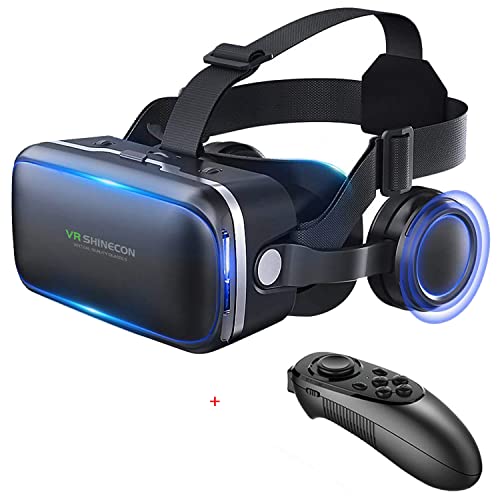
VR Shinecon 4.7–6.8-Inch Headset gives the clearest phone-size range among the Shinecon-branded choices, covering screens from 4.7 to 6.8 inches, and includes a remote control. The maker says its lenses block 72% of blue light; that product claim does not replace taking breaks during viewing. At about 0.99 pound, it is heavier than VR Shinecon Smartphone VR Glasses. Screen diagonal alone does not guarantee a fit because phone width and case thickness also matter. It suits buyers whose phone falls within the range and who want remote operation.
Bottom line: Pick this for a Shinecon viewer with a phone screen between 4.7 and 6.8 inches.
Phone VR Headset with Remote

Phone VR Headset with Remote is a non-Shinecon alternative with an included Bluetooth remote and a 4.7- to 6-inch phone range. It is a phone viewer rather than a standalone headset: the maker says it has no built-in system, preinstalled apps or movie resources, so the smartphone must run compatible VR content. Phone and app compatibility both matter, not just headset fit. At 1.25 pounds, it is the heaviest option here with a weight. Choose it when remote control matters and the phone sits inside its narrower size range.
Bottom line: Pick this if your 4.7- to 6-inch phone and a Bluetooth remote are the deciding factors.
Foldable VR Glasses with Bluetooth Audio

Foldable VR Glasses with Bluetooth Audio stands apart with a foldable design and a Bluetooth stereo headset built into its headband, combining viewing and audio without separate headphones. Its 52 mm PMMA lenses and 110-degree field of view are specified, and its weight is 0.88 pound. This general phone VR alternative suits travel use when folding and integrated Bluetooth audio matter more than a confirmed screen-size range.
Bottom line: Pick this if foldability and integrated Bluetooth audio matter most.
5–7-Inch VR Headset with Controller

5–7-Inch VR Headset with Controller is the larger-fit alternative for phones from 5.0 to 7.0 inches, and it offers FD and OD adjustments to help align the lenses with viewing distance and eye spacing. Its phone-connected controller can play or pause music and adjust volume, according to the maker. The specifications give no weight, so weight-conscious buyers should compare the actual unit before choosing. A media controller should not be assumed to navigate every VR app; check app control support if interaction is important. It fits buyers who need the larger phone range and adjustable viewing alignment.
Bottom line: Pick this for a 5- to 7-inch phone and adjustable lens alignment.
How to choose a phone VR headset
Start with phone fit, then check controls and audio. Screen diagonal runs corner to corner, but two phones with the same diagonal can differ in width, camera bump and case thickness; compare the actual phone dimensions with the holder opening. Remove a bulky case if it prevents the phone from sitting flat. Phone viewers split the display into two images, so look for VR or side-by-side content in a compatible app rather than assuming ordinary video will appear in 3D. A remote can control only functions supported by the phone and app, while Bluetooth audio needs pairing and power. If you wear glasses, check eye clearance before a long session.
Phone screen fit and headset sizing
Use a screen range as a starting point, not a universal fit guarantee. A 6.5-inch screen may fall within a holder’s rated diagonal while a thick case or wide bezel still prevents the phone from sitting securely; measure the phone body and holder opening when available. The table groups options by screen fit, so choose a range that includes your phone’s diagonal and check physical width before choosing. A phone viewer without a screen range needs an individual fit check rather than an assumption that every smartphone will fit. Keep the holder latch secure before tilting or moving your head.
Use this fit guide to narrow the options, then compare your phone body with the holder opening.
| Need | Options to consider | Fit check |
|---|---|---|
| Phone from 4.7 to 6 inches | Phone VR Headset with Remote | Check phone body width and case clearance |
| Phone from 4.7 to 6.8 inches | VR Shinecon 4.7–6.8-Inch Headset | Check holder opening and camera position |
| Phone from 5 to 7 inches | 5–7-Inch VR Headset with Controller | Check physical dimensions and alignment |
| Phone range not provided | VR Shinecon Smartphone VR Glasses or Foldable VR Glasses with Bluetooth Audio | Confirm physical fit before ordering |
What phone VR viewers can and cannot do
A phone VR viewer uses a smartphone display and lenses instead of a built-in computer, so the phone supplies both image and app. Many mobile viewers use side-by-side stereoscopic video; a standard flat video does not become immersive merely by placing it in the headset. Head tracking may respond to head movement, but interaction depends on app support and whether the headset has a compatible controller. A viewer also does not guarantee access to a particular catalog of games or movies. Confirm that the phone can run the intended app and that the app supports headset viewing; audio may come from the phone, wired earbuds or Bluetooth equipment.
Safe use and viewing comfort
Keep initial phone VR sessions short and stop if you feel dizziness, eye strain or nausea. Do not use a headset while walking, driving or near stairs; VR reduces awareness of nearby obstacles, so sit in a clear area and keep cables away from trip paths. Lens and focus adjustments can improve alignment but cannot correct every eyesight issue; users who need prescription eyewear should check clearance and comfort before prolonged viewing. Secure the phone before putting the headset on, and remove the headset before changing apps or adjusting its holder. For children, choose age-appropriate content and provide adult supervision.
Frequently Asked Questions
Does a phone VR headset work without internet?
A phone VR headset can display content stored on the phone without internet, but streaming and app downloads need connectivity. Download compatible video or apps in advance for offline use.
Can I watch regular movies in a phone VR headset?
A phone can show a regular movie inside a virtual screen, but ordinary flat video does not become stereoscopic 3D automatically. A 3D effect requires an app or video in an appropriate split-screen format.
Do phone VR glasses need a separate app?
Phone-based viewers rely on the smartphone for apps and playback. Choose an app with a headset or VR viewing mode; compatibility can vary by phone operating system and app developer.
Can I use phone VR glasses with a case on?
A slim case may fit, but a bulky case can keep the phone from sitting flat or the holder from closing securely. Check the phone body against the headset opening and remove the case if it presses on the latch.
How should I clean VR headset lenses?
Use a clean, dry microfiber cloth and wipe gently from the center outward. Avoid household glass cleaners and abrasive paper, which can damage lens coatings.