
Best Sounding Creamy Keyboards: 4 Models Compared

The AULA F75 is the best fit for most people seeking a creamy-sounding keyboard because it pairs pre-lubed linear switches with wired and wireless connection options. Choose RK ROYAL KLUDGE S98 instead if layered sound dampening and a display matter more, or HUO JI E-Yooso Z-99 if you prefer a wired 99-key layout.
“Creamy” describes a sound preference, not a standardized keyboard category; the switch, keycaps, case, and desk surface all affect the result.
We earn a commission if you buy through links on this page. As an Amazon Associate I earn from qualifying purchases. Products are compared on manufacturer specifications, not hands-on testing.
- Best overall: AULA F75 – Pre-lubed linear switches and three connection modes cover a range of setups.
- Best for sound dampening: RK ROYAL KLUDGE S98 – Five dampening layers and a top-mount design distinguish its sound-focused build.
- Best for wired 99-key layout: HUO JI E-Yooso Z-99 – A 96% wired layout keeps a number pad in a compact format.
| Product | Best for | Layout | Connection | Sound design | Shop |
|---|---|---|---|---|---|
| AULA F75 | Wireless versatility | 75% | Bluetooth 5.0, 2.4 GHz, USB-C | Pre-lubed linear switches | Check Price on Amazon |
| RK ROYAL KLUDGE S98 | Layered sound dampening | 98 keys, 96% | Bluetooth 5.0, 2.4 GHz, USB-C | Five dampening layers | Check Price on Amazon |
| HUO JI E-Yooso Z-99 | Wired number pad | 99 keys, 96% | Wired USB-C | Gasket structure, dampening foam | Check Price on Amazon |
| SOLAKAKA A99 Pro | Display and knob | 96% | Bluetooth 5.0, 2.4 GHz, USB-C | Gasket structure | Check Price on Amazon |
Creamy-Sounding Keyboards Compared
Compare each keyboard’s layout, connectivity, and sound-focused construction before choosing.
AULA F75
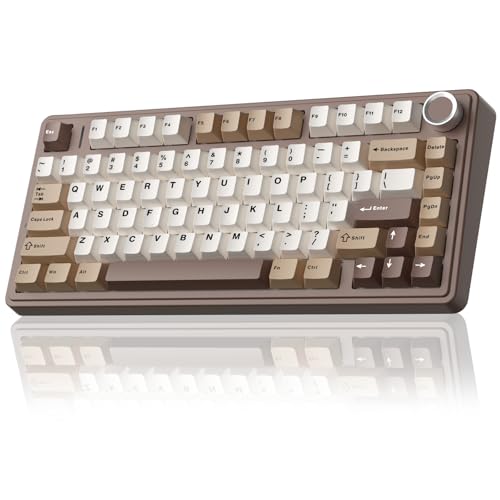
The AULA F75 is the only 75% model in this group, making it the compact choice for buyers who can give up a dedicated number pad. AULA says it supports Bluetooth 5.0, 2.4 GHz wireless, and wired USB-C, with up to five devices connected at once; it also has hot-swappable 3-pin or 5-pin switch support. Pre-lubed linear switches are intended to contribute to a creamy sound. Its 4,000 mAh battery is a practical feature for wireless setups, but shoppers who need a number pad should favor a larger layout.
Bottom line: Choose it for a compact layout with multiple connection options.
RK ROYAL KLUDGE S98

The RK ROYAL KLUDGE S98 stands out for its five-layer dampening build and top-mount design, which the maker says supports a creamy sound. It has 98 keys in a 96% layout, plus a knob and a small display for settings and status. Its three connection modes suit people who switch between wireless and wired use, and the switches are hot-swappable. The linear cream switch option is a useful starting point for someone seeking a smooth keystroke. The larger body and extra controls are less appealing if a smaller, simpler keyboard is the priority.
Bottom line: Pick it if multiple dampening layers and onboard controls matter most.
HUO JI E-Yooso Z-99
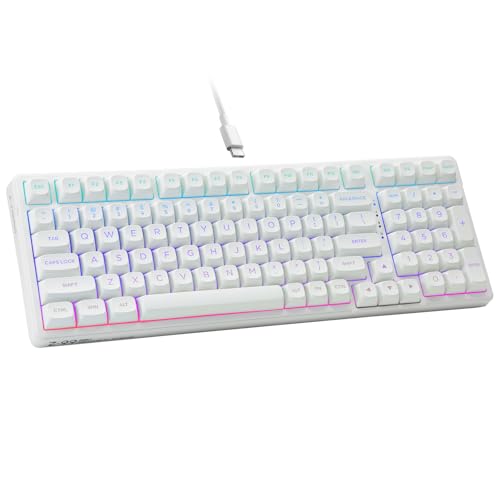
The HUO JI E-Yooso Z-99 is the wired option for shoppers who want a 99-key, 96% layout with a number pad. Its included USB-C-to-USB-A cable is 5.25 feet long, and the keyboard supports hot-swappable 3-pin or 5-pin switches. The maker says the pre-lubed linear switches, gasket structure, and sound-dampening foam create a pleasant typing sound. That combination makes it customizable without soldering. Its main limitation is straightforward: there is no wireless connection mode, so choose another model if a cable-free desk is essential.
Bottom line: Choose it for a wired compact board that retains the number pad.
SOLAKAKA A99 Pro

The SOLAKAKA A99 Pro combines a 96% layout with a screen and metal knob, setting it apart from the more basic compact boards here. Its product name identifies wireless Bluetooth 5.0, 2.4 GHz, and USB-C modes, along with hot-swap support and a gasket structure. The display can show time, date, battery level, system, and connection mode; the knob handles lighting, volume, and other controls.
Bottom line: Pick it if the screen and multi-function knob are key priorities.
How to choose a creamy-sounding keyboard
Start with layout and switch type, then treat “creamy” as a listening preference rather than a spec standard. Linear switches move without the tactile bump typical of tactile switches, while lubrication can reduce friction; neither alone guarantees a particular sound. Case construction, plate, keycaps, internal foam, and the desk surface all change the result. For a compact desk with no need for a number pad, consider a 75% layout; if you use number entry often, a 96% layout preserves a numpad in less width than a full-size board. If sound character is your top priority, compare dampening construction and switch options first, then choose the layout you can comfortably use.
Keyboard layouts and number-pad fit
A 75% keyboard usually keeps the function row and arrow keys while removing the number pad, whereas a 96% layout compresses a number pad and navigation keys into a tighter footprint. A standard full-size keyboard typically has 104 keys in the US ANSI arrangement; compact boards vary by model and key placement. The HUO JI has 99 keys and the RK has 98, while the AULA’s 75% layout is the smallest type represented here. Choose 96% when you enter numbers regularly but have limited desk width; choose 75% when reclaiming space matters more than a dedicated number pad. Check that your preferred key arrangement includes the navigation keys you use.
This quick guide maps common needs to layout choices.
| Need | Layout direction |
|---|---|
| Dedicated number pad in a compact body | 96% or 98/99-key |
| Smaller footprint without a number pad | 75% |
| Traditional full key cluster and number pad | Full-size, typically 104 keys |
Wired and wireless connection choices
Wired USB-C avoids maintaining a wireless connection and does not rely on battery charge during use; Bluetooth and 2.4 GHz add cable-free placement. Bluetooth is convenient for devices that support it, while 2.4 GHz keyboards generally use a dedicated USB receiver. Tri-mode models combine Bluetooth, 2.4 GHz, and wired USB-C, but the number of devices that can be paired or connected differs by model. The AULA says it can connect up to five devices, while the other models here advertise three connection modes without that same device-count claim. If your computer lacks a spare USB-A port, check whether the 2.4 GHz receiver can be used with your setup before choosing wireless.
What changes a keyboard’s sound
Switch travel, spring, lubrication, keycap material, and the keyboard’s internal construction all influence sound, so two boards called “creamy” can sound different. Foam and silicone layers can reduce some cavity resonance, while gasket-mounted designs use compressible material between parts of the case assembly. A top-mount structure fixes the plate to the case differently; construction labels alone do not establish a sound ranking. For a sound-focused setup, use the same desk surface and typing position when comparing boards, and remember that replacing switches or keycaps can change the result. Hot-swap sockets allow compatible switches to be changed without soldering, but confirm pin compatibility before buying replacement switches.
Frequently Asked Questions
Does a creamy keyboard have a standard sound profile?
No, “creamy” is a subjective sound description rather than a standardized keyboard specification. Switch design, lubrication, keycaps, case construction, and the surface beneath the keyboard all affect the result.
Is a 75% keyboard smaller than a 96% keyboard?
A 75% layout is generally more compact because it omits the dedicated number pad. A 96% layout keeps the pad and compresses the key arrangement; choose it if you regularly enter numbers.
Do hot-swappable keyboards need soldering for switch changes?
A hot-swap PCB accepts compatible switches in sockets, so routine replacement does not require soldering. Check whether replacement switches use 3-pin or 5-pin connections that match the board.
Can keyboard foam make every switch sound creamy?
No, foam can reduce some case resonance, but it does not determine the entire sound. Switch type, keycaps, mounting design, and desk surface remain important variables.
What is the difference between Bluetooth and 2.4 GHz keyboard modes?
Bluetooth connects through a device’s Bluetooth radio, while 2.4 GHz mode typically uses a dedicated USB receiver. Tri-mode keyboards add wired USB-C as another connection option, but receiver compatibility depends on the host device.