
Spray X Electronics Duster Alternatives Compared

Spray X is not among these electronics dusters, so choose an alternative by can volume and pack count: Staples Compressed Air Duster, 10 oz is a single 10-ounce can for everyday electronics cleaning. Choose a multipack if you clean several devices or want multiple cans on hand.
Electronics dusters use compressed propellant to blow debris from narrow gaps; they are not cans of ordinary breathable air. The right choice depends on how many cans you need, not just the size of one can.
We earn a commission if you buy through links on this page. As an Amazon Associate I earn from qualifying purchases. Products are compared on manufacturer specifications, not hands-on testing.
- Best overall: Staples Compressed Air Duster, 10 oz – A single 10-ounce can is a straightforward fit for routine keyboard and electronics cleaning.
- Best for multiple devices: Electronics Duster, 10 oz, 6-Pack – The six-pack provides six 10-ounce cans for cleaning across several devices.
- Best for a smaller can: Falcon Dust-Off DPSM, 7 oz – Its 7-ounce can is smaller than the 10-ounce options.
| Product | Best for | Can volume | Pack count | Weight | Shop |
|---|---|---|---|---|---|
| Staples Compressed Air Duster, 10 oz | Single-can cleaning | 10 oz | 1 can | 0.8 lb | Check Price on Amazon |
| Electronics Duster, 10 oz, 6-Pack | Frequent cleaning | 10 oz | 6 cans | 0.625 lb* | Check Price on Amazon |
| Office Depot Cleaning Duster, 10 oz, 3-Pack | Three-can supply | 10 oz | 3 cans | 0.625 lb* | Check Price on Amazon |
| Falcon Dust-Off DPSM, 7 oz | Smaller can | 7 oz | 1 can | 0.56 lb | Check Price on Amazon |
| Compressed Air Duster, 10 oz | Single-can alternative | 10 oz | 1 can | 0.625 lb | Check Price on Amazon |
Electronics Dusters Like Spray X
These compressed air dusters are alternatives to Spray X, with can size and pack quantity as the clearest differences.
Staples Compressed Air Duster, 10 oz
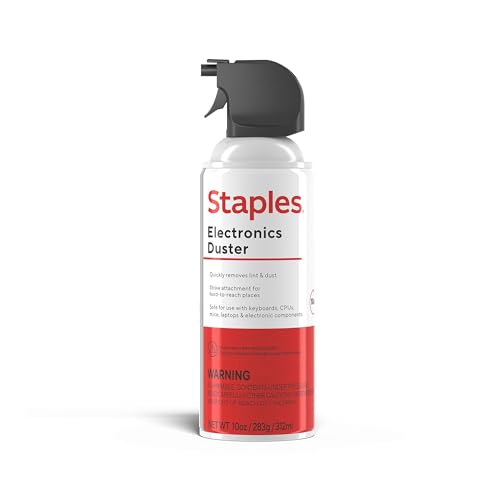
For a single 10-ounce can rather than a multipack, Staples Compressed Air Duster, 10 oz is a direct option for cleaning electronics and office equipment. Its nozzle is designed to direct airflow into vents, ports, and other narrow spaces, and the product contains a bitterant. The uses include laptops, printers, keyboards, and gaming consoles. This choice suits occasional cleaning or someone who wants one can available at a desk. It does not provide multiple cans for separate work areas; choose a multipack if you regularly clean several setups or want spares.
Bottom line: Pick this for one 10-ounce can to keep with a home or office setup.
Electronics Duster, 10 oz, 6-Pack

The six-can format sets Electronics Duster, 10 oz, 6-Pack apart: each can holds 10 ounces, making this the largest bundle by can count. The product describes a trigger for airflow control and a moisture-free, residue-free formula, with uses including keyboards, computers, printers, and gaming consoles. It is suited to a shared workspace or repeated cleaning across multiple devices. The weight is 0.625 pound, but it is not clear whether that refers to one can or the full pack, so do not use it to compare shipping or carrying weight.
Bottom line: Choose this if you want six 10-ounce cans for repeated cleaning.
Office Depot Cleaning Duster, 10 oz, 3-Pack
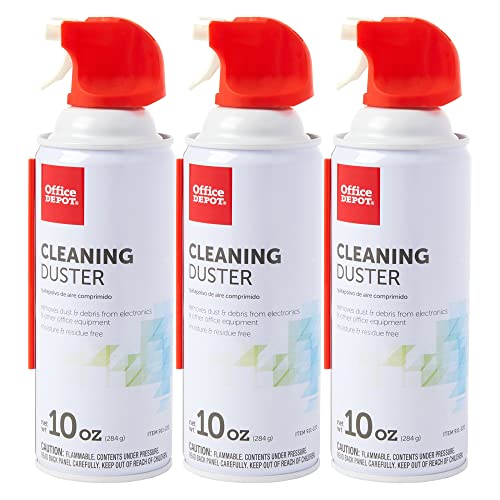
Office Depot Cleaning Duster, 10 oz, 3-Pack offers three 10-ounce cans, a middle ground between buying one can and keeping a six-can bundle. Its features emphasize removing dust, dirt, and lint from hard-to-reach areas, plus a moisture-free formula and bitterant. That makes it a practical format for splitting cans between a desk, printer area, or other electronics workspace. The weight is 0.625 pound, but the unit basis is unclear, so it cannot reliably distinguish the three-can pack from a single can by weight.
Bottom line: Pick this for a three-can supply with 10 ounces in each can.
Falcon Dust-Off DPSM, 7 oz

Falcon Dust-Off DPSM, 7 oz is the only 7-ounce option here, so it offers less can volume than the 10-ounce alternatives. It includes an extension straw for directing bursts into crevices and vents, and the product contains a bitterant. Its uses span electronics as well as car vents, blinds, and collectibles. The smaller can may suit occasional cleaning or a portable supply; buyers who clean larger areas or several devices may prefer a 10-ounce can or multipack. Can volume is not a guarantee of cleaning time because usage and burst length affect consumption.
Bottom line: Choose this if a 7-ounce single can fits your occasional cleaning needs.
Compressed Air Duster, 10 oz

Compressed Air Duster, 10 oz is another single 10-ounce can, with product claims focused on removing dust and crumbs from keyboards, laptops, PC towers, and other electronics. The uses also include cameras, car vents, and printers. Its weight is 0.625 pound, while the Staples single-can option is 0.8 pound; weight alone does not establish how much propellant or cleaning time either can provides. This option suits buyers who want one can rather than a multipack.
Bottom line: Pick this for a single 10-ounce can with broad stated device uses.
How to choose an electronics duster
Choose by can count and volume per can, then consider whether the nozzle can reach the spaces you need to clean. A 10-ounce can contains more material by volume than a 7-ounce can, but the number of bursts depends on how long and often you spray. Short bursts are generally easier to control and waste less propellant than holding the nozzle down continuously. For several workstations, compare the total number of cans; for occasional keyboard cleaning, one can may be enough. A straw helps direct airflow into narrow gaps, but it does not make a duster safe to spray into powered equipment. If your cleaning area is shared, keep the can accessible only to responsible users because aerosol propellant is not for inhalation.
Using compressed air around electronics
Turn devices off and disconnect power before cleaning; airflow can move debris, and powered equipment adds avoidable electrical risk. Hold the can upright and use brief bursts, keeping the nozzle a few inches from the surface. Inverting many aerosol dusters can release cold liquid propellant rather than a gas burst, which may damage surfaces or cause cold injury. Keep the spray away from eyes and skin, and work with ventilation because aerosol propellant should not be inhaled. Do not use a duster near flames, hot surfaces, or sparks: aerosol propellants can be flammable. Never puncture or burn a can, even when it seems empty; follow the disposal rules for aerosol containers in your area.
Can size and pack format compared
Can volume and pack count answer different buying questions: volume describes one can, while pack count tells you how many cans are supplied. Use total ounces only when comparing the amount across a bundle, not as a promise of operating time. The table separates the two so a 7-ounce single can is not confused with a multi-can package.
| Format | Can volume | Pack count | Useful when |
|---|---|---|---|
| Single smaller can | 7 oz | 1 | Occasional cleaning |
| Single standard-size can | 10 oz | 1 | One workspace |
| Multipack | 10 oz each | 3 or 6 | Several work areas or repeated use |
Common electronics duster mistakes
Do not treat a compressed air duster as harmless air: many aerosol dusters use pressurized propellant, which can be dangerous if inhaled or deliberately misused. The bitterant mentioned on several of these products is a deterrent, not a substitute for safe storage. Keep cans away from children, heat, and ignition sources, and do not spray toward a person. Avoid sustained spraying; long bursts can rapidly chill a surface or release liquid if the can is tilted. A duster also moves dust rather than capturing it, so use it where loose debris can disperse safely and avoid blowing particles toward your face. For a device-specific cleaning method, check its manufacturer’s guidance before directing airflow into openings.
Frequently Asked Questions
Can I spray an electronics duster into a running computer?
Turn the computer off and disconnect it before using a duster. Use short bursts from a few inches away so airflow does not drive dust deeper into openings.
Why should an aerosol duster stay upright?
Many aerosol dusters can release liquid propellant when inverted, and the rapid evaporation can make that liquid very cold. Keep the can upright and use brief bursts to reduce the chance of spraying liquid onto electronics or skin.
How often should I clean a computer keyboard?
There is no universal schedule; clean when visible debris accumulates or keys begin to feel gritty. For routine upkeep, a quick weekly surface wipe and occasional dusting is a practical interval, with more frequent cleaning in dusty environments.
Can compressed air remove liquid spills from electronics?
No; an air duster is intended to move loose dust and debris, not dry or repair a spill. Disconnect power immediately after a spill and follow the device maker’s service guidance before reconnecting it.
Are electronics dusters safe to use near open flames?
No; aerosol propellants can be flammable, so keep dusters away from flames, sparks, and hot surfaces. Use them in a ventilated area and never puncture or burn the can.