
Sceptre 27-Inch Monitors Compared by Refresh Rate

For a Sceptre 27-inch monitor with a useful balance of gaming refresh rate and color coverage, start with Sceptre E275W-FW100T 100Hz, which offers 100Hz and 100% sRGB. Choose Sceptre E275B-FW180T 180Hz or Sceptre C275B-FWT240 240Hz Curved instead if smoother motion matters more, or Sceptre E275W-19203R 27-Inch LED for VGA connectivity.
A 27-inch Full HD screen has about 82 pixels per inch, so buyers who prioritize fine text should consider a higher-resolution display.
We earn a commission if you buy through links on this page. As an Amazon Associate I earn from qualifying purchases. Products are compared on manufacturer specifications, not hands-on testing.
- Best overall: Sceptre E275W-FW100T 100Hz – Its 100Hz refresh rate, 100% sRGB coverage and DisplayPort plus two HDMI inputs suit mixed use.
- Best for 180Hz gaming: Sceptre E275B-FW180T 180Hz – It offers two DisplayPort and two HDMI inputs, with up to 180Hz refresh rate.
- Best for curved gaming: Sceptre C275B-FWT240 240Hz Curved – Its 1500R curve and 240Hz refresh rate distinguish it from the flat models.
- Best for VGA devices: Sceptre E275W-19203R 27-Inch LED – It includes VGA alongside two HDMI inputs for older video sources.
| Product | Best for | Refresh rate | Video inputs | Screen shape | Shop |
|---|---|---|---|---|---|
| Sceptre E275W-FW100T 100Hz | Mixed-use gaming | 100Hz | 2 HDMI, 1 DisplayPort | Flat | Check Price on Amazon |
| Sceptre E275B-FW180T 180Hz | High-refresh gaming | Up to 180Hz | 2 HDMI, 2 DisplayPort | Flat | Check Price on Amazon |
| Sceptre C275B-FWT240 240Hz Curved | Curved fast gaming | Up to 240Hz | 2 HDMI, 2 DisplayPort | 1500R curved | Check Price on Amazon |
| Sceptre E275W-19203R 27-Inch LED | VGA connectivity | 75Hz supported; 100Hz also stated | 2 HDMI, 1 VGA | Flat | Check Price on Amazon |
Sceptre 27-Inch Monitors
Compare each Sceptre monitor’s refresh rate, connections and screen shape against your computer and main use.
Sceptre E275W-FW100T 100Hz

Among these flat Sceptre monitors, Sceptre E275W-FW100T 100Hz combines a 100Hz refresh rate with 100% sRGB color coverage. It has two HDMI inputs and one DisplayPort, plus built-in speakers, an audio-in connection and a headphone jack. Blue Light Shift is included for adjusting the display’s blue light. This is a sensible match for everyday work and gaming when a 100Hz ceiling is sufficient.
Bottom line: Pick this for a flat display with broad color coverage and a 100Hz refresh rate.
Sceptre E275B-FW180T 180Hz

Sceptre E275B-FW180T 180Hz raises the refresh-rate ceiling to 180Hz and provides two HDMI ports plus two DisplayPort inputs. Its built-in speakers and audio-out jack provide audio options, while Blue-Light Shift and a minimal-bezel design round out the feature set. This flat monitor suits players who want more headroom than a 100Hz screen without choosing the curved 240Hz option. The maker does not establish a resolution or color gamut, so buyers who need a particular pixel count or color target should confirm those before deciding.
Bottom line: Choose this for a flat 180Hz monitor with four digital video inputs.
Sceptre C275B-FWT240 240Hz Curved
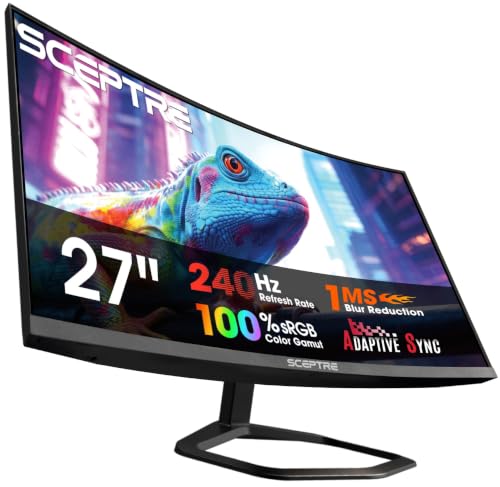
Sceptre C275B-FWT240 240Hz Curved is the curved choice, with a 1500R screen and refresh rate up to 240Hz. The VA panel is rated at 99% sRGB, and its two HDMI and two DisplayPort inputs provide four digital connections. Blue-Light Shift and built-in speakers are also included. This is the strongest fit for someone specifically seeking a curved, high-refresh gaming screen. Its resolution is Full HD, which works out to about 82 pixels per inch at 27 inches; buyers wanting sharper text or finer image detail should look for a higher-resolution screen.
Bottom line: Pick this if a 1500R curve and up-to-240Hz refresh rate are the priorities.
Sceptre E275W-19203R 27-Inch LED

Sceptre E275W-19203R 27-Inch LED stands apart with a VGA input in addition to two HDMI ports, making it the option to consider for a device that relies on VGA. It has a 1920 × 1080 LED display, adaptive sync support, VESA wall-mount compatibility and built-in speakers. The refresh-rate claims conflict: one feature states up to 75Hz, while another says 100Hz. Verify the refresh rate before ordering if it affects your choice. At 27 inches, Full HD is about 82 pixels per inch, a practical tradeoff to weigh for reading small text.
Bottom line: Choose this when VGA or VESA wall mounting matters, after confirming refresh rate.
How to Choose a Sceptre 27-Inch Monitor
Choose by resolution, refresh rate and the connections your computer can use. A 27-inch Full HD screen has roughly 82 pixels per inch; 2560 × 1440 at the same size is about 109 pixels per inch and gives text and fine detail more definition. Refresh rate is the number of screen updates per second: 100Hz is a step above 60Hz, while 180Hz and 240Hz target smoother motion. The computer and connection must support the selected resolution and refresh rate, or the monitor may run below its maximum. For a mainly text-focused desk setup, prioritize resolution; for fast games, prioritize refresh rate and confirm your graphics hardware can drive it.
Flat or Curved 27-Inch Screens
Flat screens suit conventional desk setups, while a 1500R curve bends the display around the viewer. The “R” value describes the curve radius in millimeters: 1500R is a tighter curve than 1800R. A curved screen can feel more enveloping when viewed near the center, but the curve does not increase pixel density or resolution. A useful decision rule is to choose a flat screen if several people regularly view it from different angles; consider a curve for a single centered seat. The curved Sceptre option here is Full HD, so screen shape and resolution are separate choices rather than substitutes for one another.
Check Ports and Refresh-Rate Compatibility
Match the monitor’s inputs to the computer’s available outputs before choosing. HDMI and DisplayPort are digital connections; VGA is an older analog connection that can be useful with legacy hardware. A port count alone does not guarantee a particular refresh rate: the computer, cable, selected resolution and monitor input all affect the available mode. Use the connection that supports the target mode, then select the desired refresh rate in the computer’s display settings. For the E275W-19203R, confirm whether its supported maximum is 75Hz or 100Hz before purchase because the product claims conflict.
What 27-Inch Full HD Means for Text
A 27-inch 1920 × 1080 display packs about 82 pixels into each inch, which is less dense than 24-inch Full HD at roughly 92 pixels per inch. The larger screen can make elements appear physically bigger at the same scaling, but it does not add detail. If small text looks soft, increasing operating-system scaling can make it larger, though it does not create extra image detail. Buyers who read dense documents or work with fine graphics should compare 2560 × 1440 models; that resolution at 27 inches is about 109 pixels per inch. Check the computer’s graphics capability as well, since higher resolution increases the work required to render games.
Frequently Asked Questions
Is 27-inch 1080p sharp enough for everyday work?
A 27-inch 1920 × 1080 display is about 82 pixels per inch. It is usable for everyday tasks, but 2560 × 1440 at the same size is about 109 pixels per inch and makes fine text and detail sharper.
What does a 240Hz monitor need to run at 240Hz?
The computer, graphics hardware, cable and selected monitor input must all support the target resolution at 240Hz. Connect through a compatible input and choose the refresh rate in the operating system’s display settings.
Does a 1500R monitor have a tighter curve than 1800R?
Yes. The smaller radius number indicates a tighter curve: 1500R is more curved than 1800R. Screen distance and a centered viewing position affect how noticeable the curve feels.
Can I use a Sceptre monitor with a VGA computer?
A monitor needs a VGA input or a compatible active adapter to connect to a VGA source. Of these options, the E275W-19203R includes VGA; confirm the computer’s output and the monitor’s supported display mode before connecting.
Do built-in monitor speakers replace desktop speakers?
Built-in monitor speakers can handle basic audio, but speaker volume and sound quality vary by model and are not quantified here. For stronger or more directional sound, use separate speakers or headphones through a compatible audio connection.