
PlayStation 2 AV Cable: 3 Options Compared by Fit

For most PlayStation 2 setups, PS2/PS3 RCA AV Cable, 6 ft is the straightforward pick: its 6-foot cable connects the console to a TV with RCA composite inputs. Choose a longer lead if the console sits farther away, or a bundle if you also need a power cable.
These AV leads carry composite video and stereo audio over yellow, red, and white RCA plugs; a TV without composite inputs needs a compatible converter instead.
We earn a commission if you buy through links on this page. As an Amazon Associate I earn from qualifying purchases. Products are compared on manufacturer specifications, not hands-on testing.
- Best overall: PS2/PS3 RCA AV Cable, 6 ft – A 6-foot RCA composite cable with color-coded plugs and support for PS2 Slim.
- Best for extra reach: PS1/PS2/PS3 Composite Cable, 8.2 ft – Its 8.2-foot length is the longest cable.
| Product | Best for | Length | Shop |
|---|---|---|---|
| PS2/PS3 RCA AV Cable, 6 ft | Standard reach | 6 ft | Check Price on Amazon |
| PS1/PS2/PS3 Composite Cable, 5.9 ft | Slim compatibility | 5.9 ft | Check Price on Amazon |
| PS1/PS2/PS3 Composite Cable, 8.2 ft | Longer reach | 8.2 ft | Check Price on Amazon |
PlayStation 2 AV cables
Compare the cable length, connector setup, and bundle contents before matching a lead to your console and display.
PS2/PS3 RCA AV Cable, 6 ft
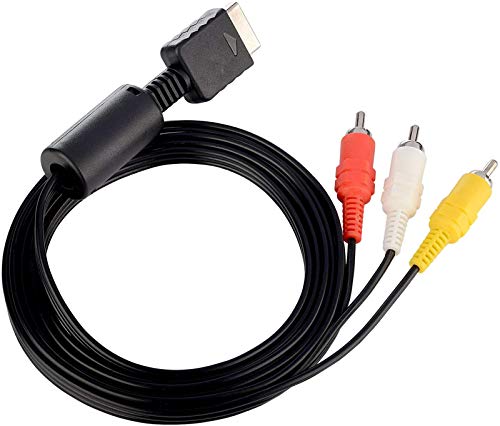
PS2/PS3 RCA AV Cable, 6 ft is a 6-foot composite lead with color-coded yellow video and red/white stereo audio RCA plugs. Its reach suits a console placed near the display, and the cable also works as a replacement for a missing or damaged lead. The main limitation is its fixed 6-foot length; measure the route from console to screen if the equipment is farther apart.
Bottom line: Choose this if 6 feet reaches your composite-input display.
PS1/PS2/PS3 Composite Cable, 5.9 ft

PS1/PS2/PS3 Composite Cable, 5.9 ft gives PS2 users a nearly 6-foot composite cable and explicitly includes PS2 Slim alongside PS1 and PS3 compatibility. Its yellow, red, and white RCA plugs carry video and stereo audio to matching TV inputs. This is a close alternative when the console-to-screen distance is about the same as the other short leads but Slim compatibility is a priority. It does not add a converter or power lead, so it will not solve a display that lacks RCA composite inputs or replace a missing console power cable.
Bottom line: Pick this for a PS2 Slim connection using existing RCA inputs.
PS1/PS2/PS3 Composite Cable, 8.2 ft
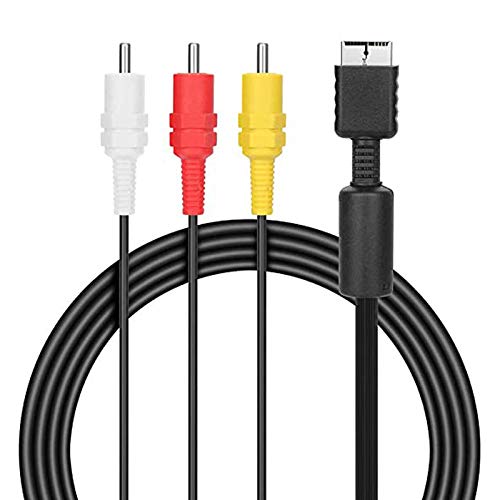
PS1/PS2/PS3 Composite Cable, 8.2 ft has an 8.2-foot lead, providing more reach than the roughly 6-foot alternatives. It uses a PlayStation connector at one end and yellow, red, and white composite RCA plugs at the other, for video and stereo audio. The maker says it is compatible with PS1, PS2, and PS3 and describes a flexible PVC housing with copper wire. The extra length can help when a console is farther from the television, but this remains a composite connection and cannot plug directly into an HDMI-only display.
Bottom line: Choose this if a shorter cable will not reach your RCA inputs.
How to choose a PlayStation 2 AV cable
Start with the TV inputs: standard PS2 AV leads use composite RCA, with yellow for video and red/white for left/right audio. Match the plugs to the TV’s composite inputs, then measure the cable route rather than the straight-line gap; allow slack at both ends and around furniture. A 6-foot lead fits nearby equipment, while an 8.2-foot option offers more reach. If the TV has HDMI but no composite inputs, an RCA-to-HDMI converter is needed, and powered converters require a USB power connection. Confirm the console connection and fit before ordering when choosing a combined accessory set.
| Need | Choose |
|---|---|
| Nearby TV with RCA inputs | About 6 ft |
| More cable reach | 8.2 ft |
| HDMI-only display | RCA-to-HDMI converter |
Composite video and display connections
Composite video carries picture on one yellow RCA plug, while the red and white plugs carry separate audio channels. Composite is a standard-definition connection; an AV cable does not turn the PS2 signal into native HD. HDMI-only televisions need an active converter that accepts composite input and outputs HDMI, not a passive plug adapter. PAL and NTSC are video formats associated with different console and display regions, so check regional compatibility when mixing equipment; the converter package here says it supports PAL/NTSC. Keep the three RCA plugs matched by color, and connect the converter’s required USB power before expecting an HDMI signal.
PS2 cable length and placement
Measure from the console’s AV port to the TV input along the actual path, including the distance down a stand or around a cabinet. A cable should reach without tension; pulling on RCA plugs can loosen connections or damage ports. The options here range from about 5.9 feet to 8.2 feet, with a bundle whose length is not given. Leave a small amount of slack rather than coiling a long surplus tightly behind hot electronics. For a route longer than 8 feet, verify the actual path and cable reach before choosing, since none of the lengths guarantees fit beyond its measurement.
Connecting and troubleshooting PS2 RCA cables
Turn the console and television off before connecting AV plugs, then match yellow to composite video and red/white to audio. Select the TV’s AV or composite input after powering the system back on; choosing the wrong input is a common reason for a blank screen. If the picture appears but audio does not, reseat the red and white plugs and check that the TV is not muted. If using an RCA-to-HDMI converter, connect its USB power lead to a 5V source as the maker directs, and confirm that the HDMI input selected on the TV matches the converter port.
Frequently Asked Questions
Do PS2 AV cables carry stereo sound?
Yes. The red and white RCA plugs carry the right and left audio channels, while yellow carries composite video. Connect all three plugs to matching inputs for picture and sound.
Can a PS2 composite cable connect to HDMI?
No, the three RCA plugs do not fit an HDMI port. An active RCA-to-HDMI converter is needed, and powered models may require a USB power connection.
How long should a PS2 AV cable be?
Choose a cable that covers the measured route with a little slack; common choices in this set are about 6 feet and 8.2 feet. Measure around furniture and stands, not just between the console and TV.
Why is my PS2 picture black and white?
A format mismatch can cause a monochrome image, particularly when PAL and NTSC equipment are mixed. Check the TV input and regional video-format compatibility; a wrong input can also produce no usable picture.
Can an AV cable improve PS2 picture resolution?
A standard composite lead carries standard-definition video and does not create an HD signal. For a screen without RCA inputs, conversion changes the connector format but does not make the console render native HD.