
XD to SD Card Adapter Options Compared

For an XD card you want to read on a computer, XD 3-in-1 Reader is the closest match because it names XD, SD, and TF support and offers Lightning, USB-A, and USB-C connections. If you mean putting a microSD card into an Olympus camera’s XD slot, choose FPOUT MASD-1 microSD-to-XD Adapter instead; it is a camera-side adapter, not a general computer reader.
We earn a commission if you buy through links on this page. As an Amazon Associate I earn from qualifying purchases. Products are compared on manufacturer specifications, not hands-on testing.
- Best overall: XD 3-in-1 Reader – Reads XD, SD, and TF cards and provides USB-A, USB-C, and Lightning connections.
- Best for Olympus cameras: FPOUT MASD-1 microSD-to-XD Adapter – Adapts a microSD/TF card for an Olympus XD camera slot.
- Best for multiple card formats: 7-in-1 USB-C/USB-A Card Reader – Includes XD alongside CF, SD, microSD, TF, and MS slots.
| Product | Best for | Card formats | Connections | Shop |
|---|---|---|---|---|
| XD 3-in-1 Reader | multi-device transfers | XD, SD, TF | Lightning, USB-A, USB-C | Check Price on Amazon |
| FPOUT MASD-1 microSD-to-XD Adapter | Olympus camera use | microSD/TF to XD | — | Check Price on Amazon |
| 7-in-1 USB-C/USB-A Card Reader | many card formats | XD, CF, SD, TF, microSD, MS | USB-C, USB-A | Check Price on Amazon |
| 3-in-1 SD/TF/XD Card Reader | Lightning and USB-C | XD, SD, SDHC, microSD | Lightning, USB-C | Check Price on Amazon |
XD to SD Card Adapters and Readers
Start by deciding whether the XD card needs to connect to a computer or whether a microSD card needs to fit an XD camera slot.
XD 3-in-1 Reader
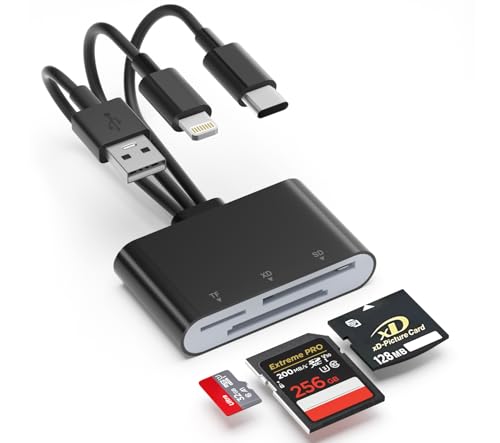
XD 3-in-1 Reader combines XD, SD, and TF card support with Lightning, USB-A, and USB-C connectors, making it the most direct choice here for moving an XD card to several kinds of devices. The maker claims plug-and-play use without apps or drivers and a 480 Mbps transfer rate. This reader suits someone who wants one accessory for a phone, tablet, or computer. Its format support is broader than an XD-to-SD conversion alone, so check which device connector you need before choosing it.
Bottom line: Pick this if you want to read XD cards across devices with different ports.
FPOUT MASD-1 microSD-to-XD Adapter

FPOUT MASD-1 microSD-to-XD Adapter works in the opposite direction from a computer card reader: it adapts a TF/microSD card for an Olympus camera’s XD-card slot. That makes it the relevant option when the camera is the destination rather than the computer. The maker says the adapter needs the camera’s USB data cable for photo reading; alternatively, remove the TF card and use a microSD reader. Its Olympus fit is narrower than a general-purpose XD reader, so it is not the right pick for directly reading an XD card in a computer.
Bottom line: Choose this to use a microSD/TF card in a compatible Olympus XD camera.
7-in-1 USB-C/USB-A Card Reader

7-in-1 USB-C/USB-A Card Reader is the broad-format option, with slots for XD, CF, SD, TF, microSD, and MS cards and both USB-C and USB-A plugs. The maker claims up to 5 Gbps transfer and says five cards can be read and written simultaneously. It suits a computer user who handles several legacy and current card types, rather than someone seeking only an XD-to-SD conversion. The extra slots may be unnecessary if XD is the sole format you need; the specifications do not identify the card capacity limits.
Bottom line: Pick this if you need an XD reader plus slots for several other formats.
3-in-1 SD/TF/XD Card Reader

3-in-1 SD/TF/XD Card Reader supports XD, SD, SDHC, and microSD cards and connects through Lightning or USB-C. Unlike XD 3-in-1 Reader, its named connector set does not include USB-A, so it is a more focused match for Lightning and USB-C devices. It suits transfers from Olympus or Fujifilm XD cards when those are the ports available. The product name also mentions PC use, but its connector design is dual-port; confirm the needed connection before ordering if your computer only has USB-A.
Bottom line: Choose this for XD transfers to Lightning or USB-C devices.
Choose the right direction for an XD adapter
An XD card reader and a microSD-to-XD camera adapter do opposite jobs. A reader accepts an XD card and connects it to a computer or mobile device; a camera adapter places a microSD/TF card in a camera’s XD slot. Decide where the card starts and where it must end before comparing ports. For moving photos off an XD card, choose a reader with an XD slot and a connector that matches the receiving device. For using microSD in an Olympus camera, verify camera compatibility and remember that some camera adapters require transfer through the camera’s USB cable. SD and XD are distinct card formats, so a reader supporting both does not itself convert one card into the other.
Match the connector to your device
USB-A is the traditional rectangular computer port, while USB-C is the smaller reversible connector used on many newer phones, tablets, and computers; Lightning is an Apple mobile-device connector. A card reader can support several card formats but still fail to connect to a device if the plug is wrong. Check both ends of the transfer path: card slot format and host-device port. USB 2.0 has a theoretical signaling rate of 480 Mbps, while USB 3.0 reaches 5 Gbps under its specification; actual card and device speeds can be lower. With a USB-A-only computer, avoid a reader whose only named connections are Lightning and USB-C.
Understand XD, SD, and microSD compatibility
XD Picture Card, SD, and microSD are different physical formats, so slot shape and format support both matter. MicroSD is also commonly called TF, and a passive camera adapter changes the physical fit rather than turning the card into a different storage technology. SDHC is the higher-capacity SD family, while an XD-only reader does not automatically support SD or microSD. Make a short compatibility check: identify the card label, check the reader’s formats, then match its connector to the destination device. Never force a card into a slot; a wrong orientation or format can damage contacts. Camera adapters can also be camera-specific, so confirm the exact camera model before relying on one.
Transfer photos without risking the card
For a camera-mounted microSD-to-XD adapter, the transfer route may be through the camera’s USB data cable rather than a conventional card reader. If that route is required, keep the camera powered during transfer and do not remove the card while files are being written. For a standalone reader, eject or safely disconnect the storage device after file copying finishes; removing cards during writes can corrupt files. Keep a second copy of important photos before formatting a card, since formatting erases its file index and may erase stored data. Treat card reader speed claims as maximum interface figures rather than guaranteed photo-copy speeds, which also depend on the card and host device.
Frequently Asked Questions
Can an XD card fit in an SD card slot?
No, XD Picture Card and SD cards use different physical formats and are not interchangeable in a plain slot. Use a reader that explicitly supports XD, or a format-specific adapter designed for the camera and card direction.
Does an XD card reader convert XD photos to SD?
No, a reader transfers files; it does not convert an XD card into an SD card. To store copies on SD, read the XD card on a device and copy the files onto an SD card separately.
What does TF mean on a card adapter?
TF is another name commonly used for microSD. Confirm that the adapter supports the microSD capacity and camera model you plan to use before inserting it.
Why does an Olympus XD adapter need a camera cable?
Some camera-side microSD-to-XD adapters are read through the camera’s USB data connection rather than a standard card reader. A second route is to remove the microSD card and place it in a compatible microSD reader.
Will a USB 3.0 reader transfer at 5 Gbps?
Five Gbps is the USB 3.0 interface’s theoretical signaling rate, not a guaranteed photo-copy speed. Actual transfer speed is limited by the card, reader implementation, connection, and receiving device.