
ORICO 5 Bay Hard Drive Enclosures Compared by Fit

The ORICO 9758C3 is the most straightforward fit for a five-drive desktop database, with support for 2.5- and 3.5-inch SATA drives up to 110TB total. Choose another model if you need a metal chassis with a fan, a faster USB interface, or a specified magnetic cover.
We earn a commission if you buy through links on this page. As an Amazon Associate I earn from qualifying purchases. Products are compared on manufacturer specifications, not hands-on testing.
- Best overall: ORICO 9758C3 5-Bay Enclosure – Supports five SATA drives up to 22TB each and includes a 2-in-1 USB/Type-C cable.
- Best for daisy-chaining: ORICO 5-Bay Daisy-Chain USB-C – Supports linking up to three enclosures for a 330TB total.
- Best for active cooling: ORICO 5-Bay Aluminum USB 3.0 DAS – Has an aluminum enclosure with an 80mm fan and tool-free hot-swap.
| Product | Best for | Drive support | Connection | Cooling or expansion | Shop |
|---|---|---|---|---|---|
| ORICO 9758C3 5-Bay Enclosure | Desktop storage | 2.5/3.5-inch SATA | USB 3.1; USB/Type-C cable | — | Check Price on Amazon |
| ORICO 5-Bay Daisy-Chain USB-C | Linked enclosures | 2.5/3.5-inch SATA | USB 3.2 Gen 2, 10Gbps | Up to 330TB chained | Check Price on Amazon |
| ORICO 5-Bay Aluminum USB 3.0 DAS | Active cooling | 3.5-inch SATA disks | USB 3.0, 5Gbps | 80mm fan | Check Price on Amazon |
| ORICO 500U3 Magnetic 5-Bay Enclosure | Tool-free access | 2.5/3.5-inch SATA | USB 3.0 | Magnetic cover | Check Price on Amazon |
ORICO 5 bay hard drive enclosures
Compare drive compatibility, connections, and expansion features to match an enclosure to your storage workflow.
ORICO 9758C3 5-Bay Enclosure

The 9758C3 emphasizes simple desktop access, using a push-to-open mechanism rather than the magnetic cover on another ORICO model. It accepts five 2.5- or 3.5-inch SATA drives, with support up to 22TB per drive and 110TB total. A 2-in-1 USB/Type-C data cable supports connection to mainstream systems, and plug-and-play operation suits a centralized personal database. The specifications does not identify an internal fan or RAID function, so buyers who need active cooling or a specified RAID mode should compare those requirements before choosing.
Bottom line: Pick this for straightforward five-drive desktop storage with a USB/Type-C cable.
ORICO 5-Bay Daisy-Chain USB-C

The daisy-chain model stands apart by allowing up to three enclosures to link for a 330TB total, while each five-bay unit supports up to 110TB. Its USB 3.2 Gen 2 interface is rated at 10Gbps, and the independent disk slots support ejecting and replacing a single drive. That arrangement is useful for growing multi-project storage without replacing a single enclosure. It is a DAS rather than a RAID or NAS system, so choose it only if direct-attached storage meets your organization and redundancy needs.
Bottom line: Choose this when linking multiple direct-attached enclosures matters more than RAID or NAS functions.
ORICO 5-Bay Aluminum USB 3.0 DAS

The aluminum USB 3.0 model is the one in this group with a specified 80mm fan and tool-free hot-swap. It accommodates five 3.5-inch SATA disks, supports up to 22TB per disk and 110TB total, and has a 150W internal power supply. The maker gives a transfer rate of up to 235MB/s; actual transfers can be limited by the drives, connection, and workload. This is a practical match for a desktop array where airflow and drive swapping matter, but its drive compatibility does not include 2.5-inch disks.
Bottom line: Pick this for a 3.5-inch drive setup where a fan and hot-swap are priorities.
ORICO 500U3 Magnetic 5-Bay Enclosure
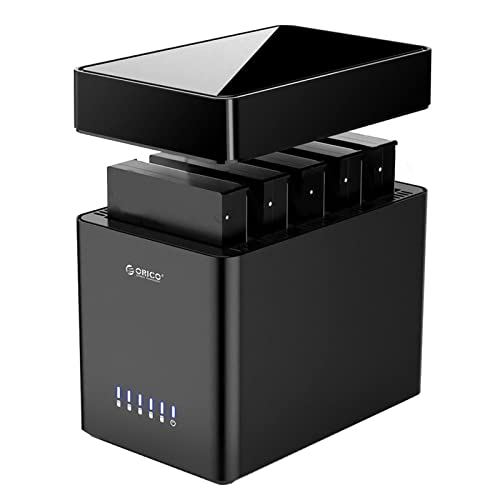
The 500U3 uses a magnetic cover for tool-free access, unlike the push-to-open design of another five-bay ORICO enclosure. It supports 2.5- and 3.5-inch SATA HDDs or SSDs up to 22TB per drive and 110TB total, with a 12V/6.5A power adapter. The maker says the drives are recognized in three seconds and claims a 1GB transfer in three seconds; those performance claims depend on the drive and setup. On Linux, the maker notes that only one hard drive can be read at a time, a key limitation for Linux users.
Bottom line: Choose this for magnetic, tool-free access, unless you need simultaneous drive access on Linux.
How to choose an ORICO five-bay enclosure
Start with the connection and the job: USB 3.2 Gen 2 is rated at 10Gbps, while USB 3.0 is rated at 5Gbps. A faster interface does not guarantee faster disk transfers; a single SATA hard drive often becomes the bottleneck well before either link reaches its rated ceiling. For a five-drive desktop storage system, verify whether you need direct-attached storage, RAID, or NAS: DAS connects to a host computer, RAID describes how disks are combined, and NAS serves files over a network. Choose daisy-chain support only when adding linked enclosures is part of the plan.
Check drive size and capacity before setup
Five-bay capacity is calculated by adding the usable capacities of installed drives, not by assuming all drives come with the enclosure. The ORICO models describe support up to 22TB per drive and 110TB total, but mixed drive sizes produce a lower combined capacity. A 2.5-inch drive and a 3.5-inch drive also differ in physical dimensions and power needs, so confirm the enclosure’s supported form factor for every drive you intend to install. With three or more bays, do not assume that a five-bay enclosure automatically pools drives into one volume; that behavior depends on the enclosure and host configuration.
USB speed, cooling, and drive replacement
USB 3.0 has a 5Gbps signaling rate and USB 3.2 Gen 2 has a 10Gbps rate; protocol overhead and drive speed reduce real-world throughput. A typical 3.5-inch hard drive transfers data far below those link ceilings, while SSDs can make interface limits more relevant. Multiple active drives also produce more heat than a single disk, so leave airflow around a desktop enclosure and avoid blocking vents. Tool-free hot-swap is not permission to pull an active disk: safely eject or unmount it first, and only replace it when the host and enclosure support that workflow.
Plan redundancy and safe backups
A five-bay enclosure is not automatically a backup system, and the models include no confirmed RAID mode. RAID can keep some systems running after a drive failure, but it does not protect against accidental deletion, malware, theft, or enclosure damage. Keep a separate copy on another device or location for important files, and periodically check that the backup can be read. Before building a large storage set, settle on a filesystem and volume layout: changing those choices later can require copying data off the drives. For Linux use with the magnetic-cover model, account for its one-drive-at-a-time reading limitation.
Frequently Asked Questions
Can an ORICO five-bay enclosure use SSDs?
Some of the models accept 2.5-inch SATA drives, which includes compatible SATA SSDs; the aluminum model specifies 3.5-inch SATA disks. Check the drive form factor and interface before installing an SSD.
Does five-bay storage automatically create RAID?
No, five drive bays alone do not establish RAID. RAID requires a supported controller or software configuration, and none of these specifications confirms a RAID mode.
How much storage can five 22TB drives hold?
Five 22TB drives add up to 110TB before formatting and filesystem overhead. A computer may display less usable capacity because storage manufacturers and operating systems report units differently.
Can I remove a drive while the enclosure is running?
Only use hot-swap when the enclosure and host support it, and safely eject or unmount the drive first. Removing a disk during a write can corrupt data, even when a bay supports tool-free removal.
What does 10Gbps USB mean for file transfers?
10Gbps is the USB 3.2 Gen 2 link rate, not a guaranteed file-copy speed. Drive performance, cable capability, protocol overhead, and the host connection all affect actual throughput.