
GE UltraPro Hover HD Amplified Antenna Compared

For an amplified antenna with a top-of-TV mount, choose GE Hover Amplified HD Antenna 37075: it combines a range of up to 55 miles with VHF and UHF reception. Choose UltraPro Hover Digital TV Antenna 83713 if you want the same hover-style placement without an amplifier, or UltraPro Amplified Bar Antenna 47331 or GE Indoor TV Antenna 48732 for a different indoor antenna shape.
We earn a commission if you buy through links on this page. As an Amazon Associate I earn from qualifying purchases. Products are compared on manufacturer specifications, not hands-on testing.
- Best overall: GE Hover Amplified HD Antenna 37075 – It is the matching GE Hover model and combines amplification, VHF/UHF reception and up to 55-mile range.
- Best Philips alternative: Philips Hover Amplified Antenna SDV7219N/27 – Its hover-style mount and amplifier offer a similar setup with a range up to 50 miles.
- Best for unamplified hover: UltraPro Hover Digital TV Antenna 83713 – It has a hover mount and 360° reception, but amplification is not among its features.
| Product | Best for | Amplified | Claimed range | Design | Shop |
|---|---|---|---|---|---|
| GE Hover Amplified HD Antenna 37075 | Amplified hover setup | Yes | Up to 55 miles | Top-mount swivel | Check Price on Amazon |
| Philips Hover Amplified Antenna SDV7219N/27 | Philips hover alternative | Yes | Up to 50 miles | Top-of-TV | Check Price on Amazon |
| UltraPro Hover Digital TV Antenna 83713 | Unamplified hover style | — | Up to 40 miles | Top-mount swivel | Check Price on Amazon |
| UltraPro Amplified Bar Antenna 47331 | Slim bar design | Yes | — | Indoor bar | Check Price on Amazon |
| GE Indoor TV Antenna 48732 | Adjustable dipoles | Yes | Up to 50 miles | Curved with dipoles | Check Price on Amazon |
GE UltraPro Hover HD Amplified Antennas
Compare amplification, stated range and antenna shape before choosing an indoor setup.
GE Hover Amplified HD Antenna 37075

GE Hover Amplified HD Antenna 37075 is the closest match for a GE amplified hover antenna, with a top-of-TV, wall or tabletop installation and horizontal swivel adjustment. GE says its PureAmp amplifier and 4G/5G LTE filter help improve reception and reduce cell-signal interference; the antenna receives VHF and UHF and is compatible with ATSC 3.0 broadcasts where available. Its range claim is up to 55 miles, not a guarantee of reception at that distance. This model suits buyers who want several placement options, but a fixed top-of-TV position may be less useful if the best reception spot is elsewhere.
Bottom line: Pick this if you want the matching amplified GE hover design and can position it where local signals reach it.
Philips Hover Amplified Antenna SDV7219N/27

Philips Hover Amplified Antenna SDV7219N/27 offers a Philips alternative with a top-of-TV mounting design and an amplifier with a 4G/5G LTE filter. Philips says TruAmp boosts signals and the antenna receives HDTV, VHF and UHF broadcasts up to 50 miles away. This is a fit for buyers who want an amplified hover antenna but are not set on GE branding. The range is shorter than the GE model’s, and neither range claim guarantees reception through walls, terrain or interference.
Bottom line: Choose this if you prefer a Philips hover antenna and its 50-mile range suits your needs.
UltraPro Hover Digital TV Antenna 83713

UltraPro Hover Digital TV Antenna 83713 keeps the hover-style top-of-TV mount and adds 360° reception, with a range up to 40 miles for VHF and UHF signals. The features describe horizontal swiveling to help optimize reception and compatibility with 4K and 8K TVs. Consider it if discreet placement and broad directional reception matter more than a built-in booster.
Bottom line: Choose this for a hover-style antenna when amplification is not a requirement.
UltraPro Amplified Bar Antenna 47331
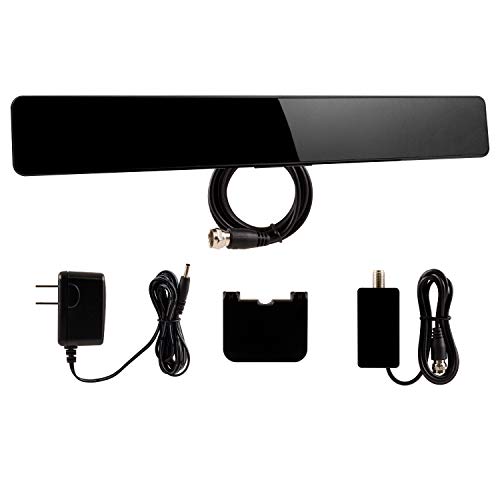
UltraPro Amplified Bar Antenna 47331 differs from the hover models with a slim indoor bar shape and an amplifier. That makes it a possible alternative for someone who wants an amplified UltraPro antenna but does not need a top-mounted hover form. The bar shape is the key tradeoff: it is not the compact over-TV design named in the search, and the available features do not establish a range for comparing distance claims.
Bottom line: Pick this if an amplified indoor bar suits your space better than a hover mount.
GE Indoor TV Antenna 48732

GE Indoor TV Antenna 48732 is another amplified GE option, but its curved shape and adjustable dipoles set it apart from the hover design. GE says PureAmp technology and a 4G/5G LTE filter boost signals and help block interference; the product receives HDTV, VHF and UHF up to 50 miles from a broadcast source. The features describe flat-surface placement and dipole adjustment. This model suits buyers who prefer adjustable elements, but it is not a hover antenna and does not match the requested mounting style.
Bottom line: Choose this if you want an amplified GE antenna with adjustable dipoles rather than a hover mount.
How to choose an indoor TV antenna
Choose by reception location and signal conditions before comparing range claims. Indoor antennas receive broadcast signals through an antenna element; an amplifier can boost a received signal but cannot create a signal where reception is absent. Broadcast reception uses VHF and UHF bands, so a model that supports both can receive channels transmitted on either band. Walls, metal surfaces, nearby electronics and distance from transmitters can all affect indoor reception. Start by placing the antenna high and near a window, then run the TV’s channel scan. If reception is poor, move the antenna and scan again before deciding that the range claim is the problem.
For these options, a top-mounted hover design prioritizes a tidy position on the television, while a bar or dipole antenna offers a different placement or adjustment approach. The claimed mile range is not a reliable substitute for testing a suitable position in your room.
Where to place a hover antenna
Place a hover antenna on top of the TV only if that position gives it a clear path toward broadcast signals. Indoor antennas often work better near a window or on a higher shelf than behind a television, inside a cabinet or beside a large metal object. After each move, rescan for channels; a small position change can affect which stations the tuner finds. The GE model can also be wall-mounted or placed on a nearby tabletop, while the Philips model’s features emphasize top-of-TV placement.
Do not assume a 40- or 55-mile claim means every station inside that radius will come in. Terrain, building materials, transmitter direction and interference matter, so if a room position repeatedly misses a desired station, try another location before relying on the amplifier.
Amplified and unamplified antennas compared
An amplifier is useful when a received signal needs a boost, but amplification does not guarantee more channels. A strong incoming signal can also become distorted when amplified excessively, so an amplifier is not automatically better in every home. The matching GE and Philips hover products identify built-in amplification; the UltraPro hover product’s features do not identify one. Use the table to compare the shape and stated range claims, not to predict reception at a particular address.
The range numbers are manufacturer claims, and the UltraPro bar model has no range figure among its features. A practical choice is to prioritize a position that can reach a window or open area, then choose a mount that can occupy that position.
| Type | Amplifier | Placement approach |
|---|---|---|
| Hover | Depends on model | TV top, some models swivel |
| Indoor bar | Depends on model | Above TV or nearby |
| Dipole style | Depends on model | Flat surface with adjustable elements |
Scanning channels and improving reception
Rescan channels after moving an antenna because the TV tuner needs to search for stations at the new position. A scan performed before the antenna is placed can miss channels that become receivable after repositioning. Keep the antenna away from enclosed cabinets and large metal objects, and try a window-facing position when practical. Antenna direction matters too: rotate or swivel the antenna, then scan again to see whether reception changes.
Broadcast reception is not the same as streaming; an indoor antenna receives over-the-air television signals and needs a TV tuner or compatible converter. Digital reception can be all-or-nothing for an individual channel, so a weak signal may cause dropouts rather than simply a softer picture. If scans repeatedly fail to find a desired station, changing placement is more useful than assuming an amplifier will solve every reception issue.
Frequently Asked Questions
Will a 55-mile antenna receive every nearby channel?
No, a 55-mile range claim does not guarantee reception of every station within that distance. Terrain, walls, antenna placement and interference affect whether a tuner can hold a channel.
Does an amplified antenna always get more channels?
No, an amplifier boosts a signal the antenna receives but cannot create a missing broadcast signal. Strong signals can also overload amplification, so test reception with placement changes.
How often should I rescan after moving an antenna?
Rescan after each meaningful move or rotation so the TV tuner searches from the new position. Even shifting an indoor antenna closer to a window can change which channels it finds.
Can an indoor antenna receive ATSC 3.0 broadcasts?
An antenna receives broadcast radio-frequency signals; a compatible TV tuner is also needed to decode a broadcast format. The matching GE model identifies ATSC 3.0 compatibility where broadcasts are available.
Should I put a TV antenna behind the television?
A spot behind the TV can work, but the television and nearby objects may obstruct signals. Try a higher position near a window and rescan to compare channel reception.