
Cushion for Edge of Desk: 3 Styles Compared

MEKASS L-Shaped Elbow Pads is the best match for most people seeking a cushion for the edge of a desk because its two L-shaped pads can be positioned separately along straight or L-shaped edges. Choose 28-Inch Memory Foam Desk Edge Pad for longer forearm coverage, or Cloud L-Shaped Elbow Rest, 2-Pack if you want a two-piece elbow rest with a leather surface.
Desk-edge cushions add a padded contact surface where your arms meet the desk; they do not replace correct chair and keyboard positioning.
We earn a commission if you buy through links on this page. As an Amazon Associate I earn from qualifying purchases. Products are compared on manufacturer specifications, not hands-on testing.
- Best overall: MEKASS L-Shaped Elbow Pads – Two L-shaped pads can be spaced to suit straight or L-shaped desks.
- Best for long coverage: 28-Inch Memory Foam Desk Edge Pad – The 28-inch pad extends support across the wrists, forearms and elbows.
- Best for dual-use pads: Cloud L-Shaped Elbow Rest, 2-Pack – Two L-shaped rests are intended for elbow support and wrist-rest use.
| Product | Best for | Length | Pieces | Shape | Shop |
|---|---|---|---|---|---|
| MEKASS L-Shaped Elbow Pads | Flexible placement | 11.8 in | 2 | L-shaped | Check Price on Amazon |
| 28-Inch Memory Foam Desk Edge Pad | Long arm coverage | 28 in | 1 | Straight pad | Check Price on Amazon |
| Cloud L-Shaped Elbow Rest, 2-Pack | Leather-surface pair | 12 in | 2 | L-shaped | Check Price on Amazon |
Cushions for Edge of Desk
Compare coverage and placement style to choose a pad that matches where your arms contact the desk.
MEKASS L-Shaped Elbow Pads

Separate placement is the main distinction here: the two L-shaped pads can be spaced along a straight or L-shaped desk edge. Each measures 11.8 by 4.3 by 0.78 inches in the product features, with memory foam and a Lycra fabric surface. The maker says the textured surface is breathable and the base is non-slip. This set suits someone who wants padding at two chosen contact points rather than one continuous strip. Its short individual pads leave gaps between them, so it is less suited to anyone seeking uninterrupted forearm coverage across a long desk edge.
Bottom line: Choose this set if you want to position two separate elbow pads around your desk layout.
28-Inch Memory Foam Desk Edge Pad

Continuous coverage distinguishes this 28-inch straight pad from the two-piece elbow rests. The product features describe memory foam and a non-slip base, with support intended to span the wrist, forearm and elbow during typing or gaming. At 3.5 inches wide, it suits users who want one extended contact surface rather than pads positioned at separate points. The long shape is less adaptable around corners than an L-shaped pair, and the features do not establish a wraparound fit for a particular desk edge; check the edge shape and available surface before choosing it.
Bottom line: Pick this if you want one long pad across a straight desk edge.
Cloud L-Shaped Elbow Rest, 2-Pack
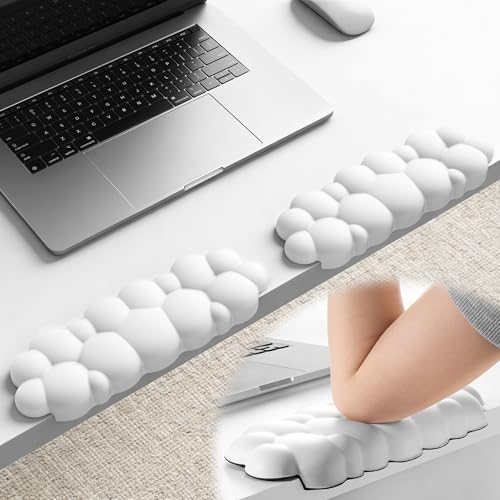
A leather surface sets this two-piece L-shaped set apart from the fabric-covered option. Each pad is 12 inches long and uses memory foam; the maker says the surface is waterproof and the base is non-slip. The pads are intended to work as elbow rests or wrist rests, making the set a fit for someone who wants two positions and can switch where the cushion contacts the arm. The pair does not create the continuous span of a long desk-edge pad, so it is a weaker match if your forearms need support along most of the keyboard area.
Bottom line: Choose this pair if you prefer a leather surface and separate elbow or wrist-rest positions.
How to Choose a Desk-Edge Cushion
Choose by the part of your arm you want cushioned and how much of the desk edge needs coverage. A 28-inch straight pad gives one continuous contact area, while two pads around 12 inches long can be placed independently; that difference matters more than the shared memory-foam construction. Measure the usable edge in inches and leave room for keyboard or mouse movement. As a positioning rule, adjust the chair so your shoulders stay relaxed and your elbows are near a right angle, with forearms roughly level as you type. A thick pad can raise the contact surface, so reassess wrist and elbow alignment after placing it rather than assuming extra padding always improves fit.
| Need | Useful format |
|---|---|
| Coverage across a long straight edge | 28-inch straight pad |
| Two adjustable contact points | Pair of L-shaped pads |
| Padding around an edge corner | L-shaped pad |
Desk Edge Fit and Pad Sizing
Measure the desk edge where your arms rest before selecting a pad. A straight pad should fit the uninterrupted span you want covered, while two-piece pads need enough clear area at both contact points; a pair will not cover the gap between them. L-shaped designs are shaped to sit against an edge, but desk thickness and corner geometry can affect how snugly a pad sits. Compare the pad’s full depth and thickness with the desk surface and nearby keyboard tray or armrests. If the desk has a beveled, curved or unusually thick edge, verify that the cushion can sit securely before ordering. Keep the pad from obstructing keyboard and mouse movement.
Memory Foam, Surface, and Cleaning
Memory foam slowly compresses under pressure and returns toward its shape after the pressure is removed; surface fabric or leather determines the feel against skin and how the pad should be maintained. The products here include Lycra fabric and leather, and one maker calls its leather surface waterproof. Waterproof wording does not establish that a whole cushion can be immersed or machine-washed, so clean only in a way the material can tolerate. Dust and skin oils collect on arm-contact surfaces; a periodic wipe or gentle cleaning helps keep the area tidy. Avoid harsh solvents unless the material maker specifically permits them, since they can damage coatings or fabric.
Desk Cushion Placement Mistakes
Place the cushion where your forearms naturally meet the desk rather than forcing the wrists onto a raised edge. A pad that is too far forward can encourage bent wrists; one that crowds a keyboard or mouse can make the arm reach awkwardly. Keep the shoulders relaxed and the elbows close to your sides while typing, then adjust chair height or keyboard position if the pad lifts your arms noticeably. A non-slip base can help resist movement, but it does not make every desk surface or edge secure. Do not use an arm cushion as a substitute for stable desk support or lean heavily on a pad that shifts.
Frequently Asked Questions
How long should a desk-edge cushion be?
Measure the edge span you want padded: a 28-inch pad covers more continuous length than two pads about 12 inches long. A pair is more flexible when you want separate elbow positions, but leaves an uncovered gap.
Where should a desk arm cushion sit?
Position it where your forearms contact the desk while your shoulders remain relaxed and elbows stay near a right angle. Keep wrists as straight as practical while typing, and move the pad if it crowds the keyboard or mouse.
Can a desk cushion fit an L-shaped desk?
Separate L-shaped pads can be placed at different points along a corner desk. Measure each usable edge and leave room for the keyboard, mouse, and corner geometry.
How do you clean a memory foam desk pad?
Use gentle surface cleaning appropriate to its fabric or leather rather than soaking the foam. A surface called waterproof does not necessarily mean the entire cushion is washable or immersible.
Does a desk-edge pad replace a wrist rest?
Some elbow pads can also be positioned as wrist rests, but a pad’s thickness and placement determine whether your wrists stay straight. Keep the keyboard close enough that you do not have to reach over the cushion.