
Spray X Electronics Duster Safety Tab and Alternatives

Quill Electronics Duster 10 oz (Q10521) is the closest match for a spray X electronics duster safety tab search because it is a 10-ounce electronics duster with extension tubes, though its fields do not identify a safety tab. Choose a different option if you need a multipack or a non-flammable formula.
Electronics dusters use propellant gas to dislodge dust without applying liquid cleaner; the spray is still an aerosol, so keep it away from heat and follow the can label.
We earn a commission if you buy through links on this page. As an Amazon Associate I earn from qualifying purchases. Products are compared on manufacturer specifications, not hands-on testing.
- Best overall: Quill Electronics Duster 10 oz (Q10521) – A 10-ounce electronics duster includes extension tubes for targeted cleaning.
- Best for fire-sensitive areas: Falcon Dust-Off DPSXLRCP 10 oz, 12 Pack – Its features state a non-flammable formula for use where fire is a concern.
- Best for multiple workstations: Electronics Duster Spray 10 oz, 6 Pack – The six-can pack offers multiple 10-ounce cans.
| Product | Best for | Can count | Safety feature | Shop |
|---|---|---|---|---|
| Quill Electronics Duster 10 oz (Q10521) | Precision dusting | 1 | Bitterant; ozone-safe | Check Price on Amazon |
| Falcon Dust-Off DPSXLRCP 10 oz, 12 Pack | Non-flammable formula | 12 | Non-flammable; ozone-safe | Check Price on Amazon |
| Electronics Duster Spray 10 oz, 6 Pack | Six-can supply | 6 | Moisture- and residue-free | Check Price on Amazon |
| Falcon Dust-Off DPSXL3 10 oz, 3 Pack | Bitterant three-pack | 3 | Bitterant; ozone-safe | Check Price on Amazon |
| iDuster Computer Air Spray 10 oz | Portable single can | 1 | — | Check Price on Amazon |
Spray X Electronics Duster Safety Tab Options
Compare these electronics dusters by pack quantity, can size, and safety features stated for each formula.
Quill Electronics Duster 10 oz (Q10521)

Quill Electronics Duster 10 oz (Q10521) stands out for its extension tubes, which help direct bursts into tight crevices around keyboards, computers, and other electronics. The 10-ounce can contains liquefied gas infused with bitterant and is described by the maker as ozone-safe. The slim can is suited to desk-side storage and occasional targeted cleaning. Its key limitation for this search is that no safety tab is identified, so buyers who specifically need a tab should confirm the can’s closure before ordering. Hold the can upright and use short bursts to reduce the chance of liquid propellant reaching components.
Bottom line: Choose this for targeted cleaning when an extension tube matters more than a multi-can pack.
Falcon Dust-Off DPSXLRCP 10 oz, 12 Pack

Falcon Dust-Off DPSXLRCP 10 oz, 12 Pack is the option here whose features explicitly call out a non-flammable formula, making that property its distinguishing point for work areas where fire is a concern. The pack contains twelve 10-ounce cans, and the maker also describes the formula as ozone-safe. The large pack suits offices or shared workbenches that need several cans; a buyer needing a specific tab style should verify that closure directly rather than infer it from the formula.
Bottom line: Pick this when a non-flammable formula and twelve-can quantity match the need.
Electronics Duster Spray 10 oz, 6 Pack

Electronics Duster Spray 10 oz, 6 Pack differs by combining six 10-ounce cans with a trigger mechanism for controlled airflow. Its features describe the formula as moisture-free and residue-free and name keyboards, computers, printers, and gaming consoles among its uses. That makes the pack a practical fit for a small shared workspace with several devices. Use compressed-gas dusters only on powered-down equipment, and avoid tilting the can during a burst.
Bottom line: Choose this for a six-can supply and trigger-based airflow control.
Falcon Dust-Off DPSXL3 10 oz, 3 Pack

Falcon Dust-Off DPSXL3 10 oz, 3 Pack offers three 10-ounce cans and a bitterant added to help discourage inhalant abuse, giving it a different quantity and stated formula emphasis than the single-can option. The maker describes it as ozone-safe and suitable for workstations, labs, repair benches, household use, and on-location photography. The three-can format suits a few stations or a modest reserve without committing to a dozen cans.
Bottom line: Pick this for a three-can set with a bitterant additive.
iDuster Computer Air Spray 10 oz
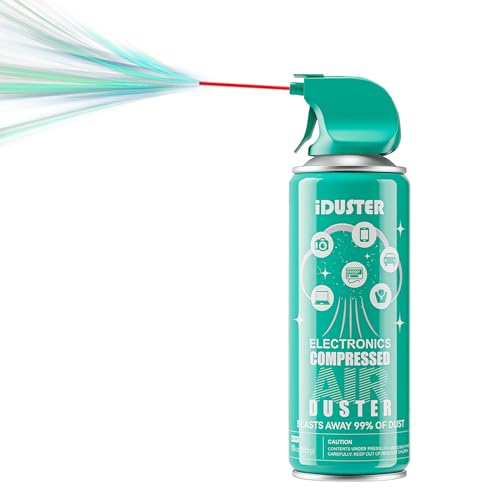
iDuster Computer Air Spray 10 oz is positioned for portable everyday cleaning, with examples including laptops, gaming consoles, car vents, and travel electronics. Its single-can format is distinct from the multipacks, so it may fit a person who wants one can for a compact kit. Avoid spraying toward a powered device or holding the can near heat, and use brief bursts rather than a continuous spray.
Bottom line: Choose this for a single portable can for mixed electronics and travel use.
How to choose an electronics duster
Choose an electronics duster by the feature you need first: a precision tube for narrow gaps, a formula property required for the work area, or enough cans for multiple stations. Aerosol dusters release pressurized propellant rather than ordinary room air, so short bursts are easier to control than a long spray. Power down and unplug equipment before cleaning, and never spray a hot component. A useful rule is to select a non-flammable formula when a task must be done near a potential ignition source, while still keeping aerosol cans away from flames and heat. A bitterant is an additive intended to discourage inhalant abuse; it is not a substitute for safe storage or careful use.
| Need | Feature to prioritize |
|---|---|
| Reach into crevices | Extension tube |
| Fire-sensitive work area | Explicit non-flammable formula claim |
| Several cleaning stations | Higher can count |
| Controlled short bursts | Trigger mechanism |
Using canned air safely around electronics
Use canned duster on cool, powered-down equipment and keep the nozzle several inches from delicate parts; close-range spraying can chill components or push debris deeper. Keep the can upright because tilting or inverting many aerosol dusters can release liquid propellant instead of gas. Use brief bursts, allow the propellant to dissipate between sprays, and do not shake or puncture the container. Compressed gas is not a substitute for a vacuum or physical cleaning when dust is packed into a fan or heatsink. For internal computer cleaning, prevent fans from free-spinning under the air stream, since overspin can damage a fan or its bearing.
What a safety tab means for duster cans
A safety tab is a physical closure or lock feature, not a formula property such as ozone-safe, bitterant-treated, or non-flammable. Aerosol cans are pressurized containers, so store them in a cool, dry place away from direct sunlight, heaters, and open flames. Do not leave a can in a hot vehicle: elevated temperatures can raise internal pressure. Keep dusters out of children’s reach, and follow any age or handling restrictions printed on the container.
Frequently Asked Questions
Can I use an electronics duster while a computer is on?
No; power down and unplug the computer before dusting so airflow does not move debris into energized parts. Let hot components cool first, since aerosol propellant can chill surfaces sharply.
Why should an air duster can stay upright?
Keeping the can upright helps release propellant as gas rather than liquid. Liquid propellant can leave a cold spray on components, so use short bursts and reposition the can instead of tilting it.
How close should I hold a duster nozzle?
Start several inches from the component and use brief bursts, moving closer only if needed. Close-range spray can chill delicate parts or drive dust farther into a connector or fan.
Is ozone-safe the same as non-flammable?
No; ozone-safe describes ozone impact, while non-flammable refers to ignition behavior. Neither claim means a pressurized aerosol can should be used near a flame or heat source.
What should I do before cleaning a computer fan?
Power down and unplug the computer, then keep the fan from spinning freely as air hits it. A fast-spinning fan can damage its bearing or generate unwanted voltage.