
AV Input HDMI Output: 3 Converters Compared

For converting a yellow, red, and white composite AV source to HDMI, the BD&M RCA-to-HDMI converter is a straightforward fit because it accepts composite input and offers 720p or 1080p HDMI output. Choose a multi-input switcher instead if you also need to connect HDMI sources; confirm that its switching behavior suits your setup.
Composite-to-HDMI converters change an older analog video signal into a digital HDMI signal for a modern display. They work in one direction, so check which device is the source and which is the display before choosing.
We earn a commission if you buy through links on this page. As an Amazon Associate I earn from qualifying purchases. Products are compared on manufacturer specifications, not hands-on testing.
- Best overall: BD&M RCA-to-HDMI Converter – Accepts composite AV input and provides 720p or 1080p HDMI output.
- Best for multiple video formats: RCA-to-HDMI Mini Converter – Supports PAL, NTSC variants, SECAM, PAL/M, and PAL/N.
- Best for source switching: RuiPuo 8-Input HDMI Switcher – Combines four RCA inputs and four HDMI inputs with one HDMI output.
| Product | Best for | Signal direction | Inputs | HDMI output | Shop |
|---|---|---|---|---|---|
| BD&M RCA-to-HDMI Converter | Composite sources | RCA to HDMI | Composite RCA | 720p/1080p | Check Price on Amazon |
| RCA-to-HDMI Mini Converter | Format flexibility | RCA to HDMI | Composite RCA | 720p/1080p | Check Price on Amazon |
| RuiPuo 8-Input HDMI Switcher | Multiple sources | AV/HDMI to HDMI | 4 RCA + 4 HDMI | HDMI 2.0 | Check Price on Amazon |
AV Input HDMI Output Converters
Compare the signal direction and input setup first, then match the converter to your source and display.
BD&M RCA-to-HDMI Converter
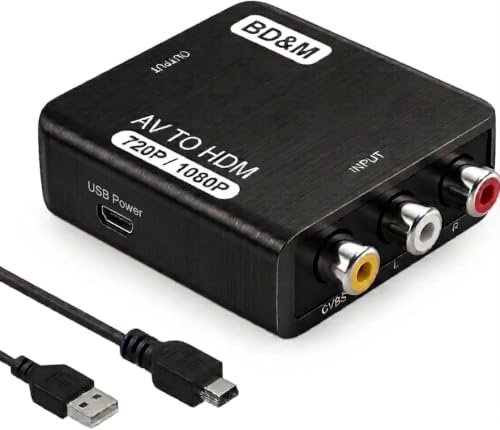
The BD&M converter is a direct match for composite sources such as a VCR, DVD player, or retro console, with RCA input and HDMI output. The maker says it supports 720p and 1080p HDMI resolution and PAL/NTSC video standards. Setup requires an HDMI cable and the included USB power cable, with no drivers required. This is a one-way converter, so it will not connect an HDMI source to an RCA-only display. Choose it when the source has yellow, white, and red RCA outputs and the display has HDMI input.
Bottom line: Pick this for a composite AV source that needs an HDMI connection to a display.
RCA-to-HDMI Mini Converter

This mini RCA-to-HDMI converter stands out for its broad analog video format support: the maker lists PAL, NTSC 3.58, NTSC 4.43, SECAM, PAL/M, and PAL/N. It converts yellow, white, and red composite input to 720p or 1080p HDMI output, and requires USB power from a 5V adapter during use. The extra format coverage may help with sources from different video systems, but this remains a one-way converter, not an HDMI-to-RCA adapter. It suits buyers who need the format options as well as HDMI output.
Bottom line: Choose this when the source format may be PAL, SECAM, or an NTSC variant.
RuiPuo 8-Input HDMI Switcher

The RuiPuo is a source switcher rather than a dedicated composite converter: it has four RCA inputs, four HDMI inputs, and one HDMI output. That combination suits a setup where several older AV devices and HDMI sources share one display connection. Its HDMI output is HDMI 2.0, and the maker lists support for 4K at 60 Hz along with several HDMI and audio formats. The features describe switching between sources, not a specific upscaling output for RCA video. Choose it for input consolidation, not when you only need a simple AV-to-HDMI conversion.
Bottom line: Pick this for switching among several RCA and HDMI sources on one HDMI display.
How to Choose an AV-to-HDMI Converter
Choose a converter that accepts the exact output your source provides: composite AV uses yellow video plus red and white audio plugs, while HDMI carries digital audio and video on one cable. Composite video is standard-definition; NTSC is typically 480i and PAL is typically 576i. A converter may scale that signal to an HDMI output mode, but scaling does not restore picture detail that the original source never captured. For a VCR or older console with composite outputs, look for RCA-to-HDMI direction and USB power requirements. If you have several source devices, a switcher with multiple inputs may be more useful than a single-purpose converter. With one source and one display, prefer a simple converter rather than paying complexity in setup and switching.
Signal Direction and Connection Fit
Match the direction printed in the product name or specifications: AV-to-HDMI sends an analog source toward an HDMI display, while HDMI-to-AV sends an HDMI source toward a composite input. These directions are not interchangeable; the two formats use different signal types and need different conversion electronics. Before ordering, check the source device for yellow, white, and red RCA outputs and the display for an available HDMI input. A converter does not replace the correct cable on either side. Composite RCA carries video on yellow and stereo audio on red and white, so connect all three for picture and sound. A black-and-white image can indicate a PAL/NTSC format mismatch; where a format switch is available, match it to the display system.
Converter Versus Multi-Input Switcher
A dedicated converter is the simpler choice when one composite source needs an HDMI connection; a multi-input switcher is for routing among multiple sources. The distinction matters because a switcher’s HDMI output or resolution support does not establish what resolution it produces from an RCA input. Use this table to narrow the type by the setup you need.
| Setup | Type to choose | Check before connecting |
|---|---|---|
| One composite source, HDMI display | RCA-to-HDMI converter | RCA input and HDMI output direction |
| Several composite and HDMI sources, one HDMI display | Multi-input switcher | Input count and RCA signal handling |
| HDMI source, composite display | HDMI-to-AV converter | Reverse direction and PAL/NTSC output |
For under four sources, count the ports you actually need and leave room for the display connection; a switcher with more inputs can reduce unplugging, but adds selection steps.
Frequently Asked Questions
Can an RCA-to-HDMI converter improve old video quality?
An RCA-to-HDMI converter can scale a composite signal to an HDMI output mode, but it cannot recreate detail absent from the original video. Composite sources are standard-definition, typically 480i for NTSC or 576i for PAL.
Do RCA-to-HDMI converters need USB power?
Many active converters require USB power because they convert analog signals into digital HDMI. Connect the power lead to a suitable USB power source, and make sure it is powered before troubleshooting a blank screen.
Why does composite video appear black and white?
A PAL/NTSC mismatch can produce a black-and-white image or unstable color. NTSC is the usual U.S. format, and a converter with a format selector should match the source or display system.
Which RCA plug carries the video signal?
The yellow RCA plug carries composite video, while red and white usually carry right and left audio. Connect all three for both picture and stereo sound; a video-only connection will not carry audio.
Can an AV-to-HDMI adapter work in reverse?
No, a one-way AV-to-HDMI converter does not convert HDMI into RCA. For an HDMI source and a composite display, use a converter designed for HDMI-to-AV direction.