
Beats Studio Pro Replacement Pads: 3 Options Compared

G GVOEARS Studio Pro Pads is the best starting point for most Beats Studio Pro owners because it is designed for that model and pairs memory foam with protein leather. Choose Wicked Cushions WC PadZ Studio Pro for extra-thick cushions or SOULWIT Studio Pro Earpads for a black foam-and-protein-leather option; Studio 2 and Studio 3 pads are a different fit.
Replacement pads are adhesive-backed cushions that restore the padded seal around the earcups. Match the headset model before installation, since similarly named Beats Studio versions are not interchangeable.
We earn a commission if you buy through links on this page. As an Amazon Associate I earn from qualifying purchases. Products are compared on manufacturer specifications, not hands-on testing.
- Best overall: G GVOEARS Studio Pro Pads – Studio Pro fit with memory foam and sandstone protein leather.
- Best for extra thickness: Wicked Cushions WC PadZ Studio Pro – The extra-thick design pairs dense memory foam with a larger ear opening.
- Best for black cushions: SOULWIT Studio Pro Earpads – A Studio Pro-specific option with high-density foam and protein leather.
| Product | Best for | Material | Design | Color | Shop |
|---|---|---|---|---|---|
| G GVOEARS Studio Pro Pads | Sandstone finish | Memory foam, protein leather | Standard profile | Sandstone | Check Price on Amazon |
| Wicked Cushions WC PadZ Studio Pro | Thicker cushions | Dense memory foam, PU leather | Extra thick; larger opening | Black | Check Price on Amazon |
| SOULWIT Studio Pro Earpads | Black replacement | High-density foam, protein leather | Standard profile | Black | Check Price on Amazon |
Beats Studio Pro replacement pads
These cushions are made for Studio Pro headphones, but differ in material, thickness, and available color.
G GVOEARS Studio Pro Pads

G GVOEARS Studio Pro Pads stands out for its sandstone finish and memory-foam construction, while its protein-leather surface is designed to be easy to clean. The pads are made for Beats Studio Pro headphones, so they suit owners seeking a model-specific replacement in a lighter color. Their dimensions are 3.78 inches long, 3.35 inches wide, and 1.18 inches high. The tradeoff is that this is not the extra-thick design offered by Wicked Cushions WC PadZ Studio Pro; choose another option if a larger ear opening or added thickness is your priority.
Bottom line: Pick these if you want sandstone-colored memory-foam cushions for Studio Pro.
Wicked Cushions WC PadZ Studio Pro

Wicked Cushions WC PadZ Studio Pro is the option here built around extra thickness and a larger ear opening, with dense memory foam and upgraded PU leather. It is made specifically for Beats Studio Pro, not other Beats Studio or Solo models. The manufacturer describes installation as tool-free and includes adhesive on each pad, plus an instruction manual and video guide. Choose it if more cushion thickness and opening space matter more than a standard-profile replacement. Its limitation is the narrow compatibility: it will not fit Studio 2, Studio 3, or Solo Pro headphones.
Bottom line: Choose these if you want extra-thick cushions and a larger ear opening.
SOULWIT Studio Pro Earpads
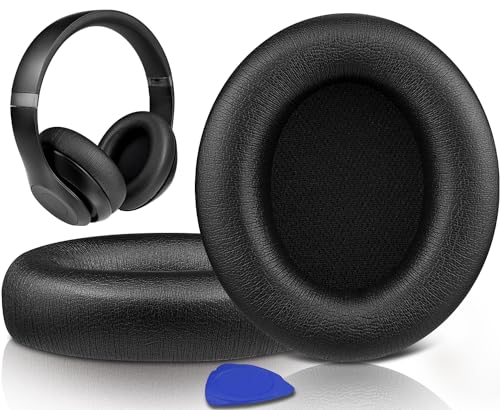
SOULWIT Studio Pro Earpads combines high-density foam with protein leather in a black Studio Pro-specific replacement. Its focus is preserving the headphones’ sound performance while replacing worn cushions, making it a straightforward choice for owners who want black pads rather than the sandstone finish of G GVOEARS Studio Pro Pads or the extra-thick shape of Wicked Cushions WC PadZ Studio Pro. The manufacturer says replacement usually takes about 5 minutes. This option does not call out extra thickness or a larger opening, so buyers seeking those particular design changes should consider a different cushion style.
Bottom line: Pick these for black, Studio Pro-specific pads with a quick replacement process.
How to choose Beats Studio Pro replacement pads
Start with the exact headphone model, then choose cushion shape and covering. Compare profile and ear opening next: extra thickness and a larger opening are explicit design choices on some replacement pads, not universal features. If the current cushions are comfortable and you only need a worn covering replaced, a standard-profile option may be the closer match. Check the headset model printed on the headphones before ordering.
How replacement pad fit affects sound and comfort
A consistent cushion seal around the earcup helps maintain the headphone’s intended acoustic fit, while a gap can change how sound reaches the ear. Foam density, cushion depth, and opening size also change how the pad sits around your ear, so the thickest option is not automatically the best fit for everyone. Remove the old pad carefully and clear away adhesive before placing a replacement; uneven residue can keep the new cushion from adhering evenly. Align the replacement to the earcup perimeter before pressing it down, then check the full edge for lifting. Do not stretch the leather covering to compensate for a mismatch: confirm the model and pad shape instead.
Beats Studio Pro pad styles compared
Choose by the physical change you want rather than color alone. The table separates the options by the design feature each one emphasizes, so it can be used to narrow the choice before checking the exact headset model.
| Priority | Option | What stands out |
|---|---|---|
| Sandstone finish | G GVOEARS Studio Pro Pads | Memory foam and protein leather |
| Extra thickness | Wicked Cushions WC PadZ Studio Pro | Larger ear opening and dense foam |
| Black replacement | SOULWIT Studio Pro Earpads | High-density foam and protein leather |
All three options target Studio Pro headphones, but their materials and shapes differ. Color does not establish compatibility; verify the model first, particularly if the headphones are an older Studio version.
Replacing headphone ear pads without damaging the fit
Most replacement pads attach with adhesive, so careful surface preparation matters more than force. Peel the old cushion away gradually rather than pulling sharply on the earcup; then remove loose adhesive so the new pad can contact a clean, even rim. Position the replacement around the full perimeter before pressing the adhesive into place. After installation, inspect the seam all the way around and make sure no edge is folded or lifted. Keep adhesive and small scraps away from children and pets, and avoid getting cleaning liquid into the earcup. Installation methods vary by pad, so use the included instructions when provided.
Frequently Asked Questions
Will Studio 3 pads fit Beats Studio Pro headphones?
No; Studio 3 and Studio Pro are different fits. Check the model name on the headphones before buying pads, because similar product names do not mean the cushions are interchangeable.
How long does it take to replace headphone ear pads?
A replacement can take about 5 minutes when the pad is designed for the headset and the old adhesive comes away cleanly. Allow extra time to remove residue and align the new cushion evenly.
Can replacement ear pads change headphone sound?
Yes, a poor seal can affect the sound reaching your ears. Make sure the cushion sits evenly around the earcup without gaps or lifted edges.
How do I remove old headphone pad adhesive?
Peel the cushion away gradually and clear loose adhesive from the rim before fitting the replacement. Keep liquid cleaners out of the earcup, and avoid scraping the surface aggressively.
What is the difference between PU leather and protein leather pads?
PU leather and protein leather are covering materials used on replacement cushions, but the names alone do not establish which will feel better or last longer. Compare the foam and cushion shape as well as the covering.