
Roku With RCA Output: Adapter and Players Compared

HDMI-to-RCA Composite Converter is the direct choice for connecting an HDMI Roku player to a TV with RCA inputs: it converts HDMI to composite video and supports NTSC or PAL. The Roku players here use HDMI rather than RCA, so choose one only if you are also using a converter.
For a 4K television, pick a 4K Roku player instead; composite video is standard-definition, not 4K.
We earn a commission if you buy through links on this page. As an Amazon Associate I earn from qualifying purchases. Products are compared on manufacturer specifications, not hands-on testing.
- Best overall: HDMI-to-RCA Composite Converter – Converts HDMI to composite RCA and has a switch for NTSC or PAL output.
- Best for HD streaming: Roku Streaming Stick HD – The compact HD Roku stick plugs into HDMI and can be paired with an RCA converter.
- Best for 4K streaming: Roku Streaming Stick Plus – This Roku stick supports 4K and HDR10+, but needs an HDMI-to-RCA converter for an RCA TV.
| Product | Best for | Connection | Video format | Power | Shop |
|---|---|---|---|---|---|
| HDMI-to-RCA Composite Converter | RCA television | HDMI input; RCA output | 480i–1080p input; NTSC/PAL output | 5V USB power required | Check Price on Amazon |
| Roku Streaming Stick HD | HD stick | HDMI | HD | TV-powered | Check Price on Amazon |
| Roku Streaming Stick Plus | 4K stick | HDMI | 4K, HDR10+ | TV-powered | Check Price on Amazon |
| Roku Ultra | Feature-rich player | HDMI | 4K, Dolby Vision | Wi-Fi 6 | Check Price on Amazon |
| Roku Express HD (Renewed) | Secondary TV | HDMI | HD | — | Check Price on Amazon |
Roku With RCA Output Options
Only the converter outputs composite video; the Roku players connect over HDMI and need an adapter for an RCA television.
HDMI-to-RCA Composite Converter
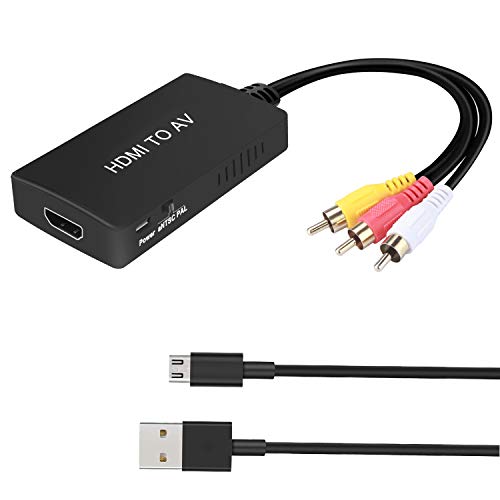
Unlike the Roku players, this adapter converts an HDMI source to composite RCA, making it the direct match for an older television with yellow, red, and white inputs. The converter accepts HDMI input from 480i through 1080p and offers selectable NTSC or PAL output. For a US television, start with NTSC; switch formats if the picture appears black and white. The USB power cable needs a separate 5V power source during use. This adapter does not pass through 3D or 4K, so it is not suitable when full 4K output matters.
Bottom line: Choose this when your Roku has HDMI and the television has RCA inputs.
Roku Streaming Stick HD

This is the HD Roku stick option, rather than an RCA-output device. It plugs into an HDMI port and is described as able to draw power from the TV, which keeps the stick compact behind the set. Its voice remote can control TV power and volume as well as Roku functions. To use it with an RCA-only television, add an HDMI-to-composite converter such as HDMI-to-RCA Composite Converter and provide that converter with 5V USB power. This setup adds another device and cannot make composite video look like native HD.
Bottom line: Pick this for HD streaming when an HDMI-to-RCA converter is part of the setup.
Roku Streaming Stick Plus

For a 4K-capable stick, Roku Streaming Stick Plus adds 4K and HDR10+ support over the HD-only option. The stick connects through HDMI and can draw power from the TV, while its voice remote handles TV power and volume. An RCA television still requires an HDMI-to-composite converter, and the resulting composite connection is standard-definition rather than 4K. Choose this model if you may later connect to a 4K display; for an RCA-only television with no upgrade planned, its higher-resolution capability will not carry through the converter.
Bottom line: Choose this if you want a 4K stick for an HDMI TV as well as an RCA setup.
Roku Ultra

Unlike the compact sticks, Roku Ultra is a separate Roku player with Wi-Fi 6, 4K, HDR10+, Dolby Vision, and Dolby Atmos support. Its rechargeable Voice Remote Pro has backlit buttons, hands-free voice control, and a lost-remote finder. Connecting it to an RCA television requires an HDMI-to-composite converter; the RCA output will not retain 4K or advanced audio formats. The extra picture and remote capabilities make more sense for a compatible HDMI television than for an RCA-only set.
Bottom line: Pick this for its player and remote features when you have a compatible HDMI display.
Roku Express HD (Renewed)

Roku Express HD (Renewed) is an HDMI Roku player aimed at secondary televisions and straightforward streaming, not a device with built-in RCA output. It includes a High Speed HDMI cable for connection to an HDMI television. For an RCA-only set, use an HDMI-to-composite converter between the player and television; the converter needs separate 5V USB power. Because this model is renewed and its features here do not identify a particular remote or power arrangement, confirm the included items meet your setup before choosing it.
Bottom line: Choose this for a secondary HDMI television, or add a converter for RCA input.
How to connect Roku to RCA inputs
An HDMI-to-composite converter bridges a Roku HDMI output to the yellow video and red/white audio RCA inputs on an older TV. Connect the Roku to the converter’s HDMI input, then connect the converter’s RCA outputs to matching TV inputs; the converter requires 5V USB power while operating. Set its output to NTSC for a typical US television, since PAL is used in other regions. This conversion reduces the signal to standard-definition composite video, so a Roku’s 4K capability will not appear as 4K on the RCA-connected set. If the image is black and white, switch between NTSC and PAL before troubleshooting the Roku.
What resolution to expect over RCA
Composite RCA is a standard-definition connection, and the converter here outputs NTSC or PAL rather than HDMI’s digital 4K picture. Its HDMI input range is 480i through 1080p, but converting a higher-resolution input does not make the television display that resolution. Choose an HD Roku stick for a basic older set; a 4K stick or player only makes sense if you will also use a compatible HDMI display. The converter does not support 3D or 4K output. For best results, match the RCA plugs to the TV’s color-coded inputs and select the right input source on the television.
Roku and RCA connection choices
The key choice is whether the TV has HDMI or only composite RCA: Roku sticks and players in this selection connect through HDMI, while the adapter converts HDMI to RCA. Use the table to match the device to the display and the signal you want.
| Setup | TV connection | What to expect |
|---|---|---|
| HD Roku stick with converter | HDMI to RCA | Composite standard definition |
| 4K stick with converter | HDMI to RCA | Composite standard definition |
| 4K Roku on compatible TV | HDMI | 4K-capable connection |
For an RCA-only television, pick the converter first and then the Roku player that fits your streaming needs. For a 4K television, connect the Roku directly by HDMI rather than routing it through composite conversion.
Common Roku-to-RCA setup mistakes
A frequent setup mistake is treating an HDMI-to-RCA adapter as a cable: conversion requires active electronics, and this converter needs a powered 5V USB connection. Another common problem is selecting PAL when the US television expects NTSC; the converter includes a format switch, and a black-and-white picture is a reason to try the other setting. RCA colors matter too: yellow carries composite video, while red and white carry audio. Make sure the television is set to the input those plugs use. Composite cannot carry the 4K, HDR, Dolby Vision, or Dolby Atmos experience associated with some Roku models, so do not choose those features for an RCA-only connection.
Frequently Asked Questions
Can a Roku stick plug directly into RCA ports?
No, the Roku sticks in this selection connect over HDMI, not RCA. Use an active HDMI-to-composite converter for a TV with yellow, red, and white inputs; the converter needs 5V USB power.
Why does my Roku picture look black and white?
A PAL/NTSC mismatch can cause a black-and-white image with this converter. Switch its format selector between NTSC and PAL, with NTSC the usual choice for US televisions.
Will a Roku 4K player show 4K through RCA?
No, RCA composite is standard definition, so an HDMI-to-RCA conversion cannot preserve a 4K picture. Connect a 4K Roku directly to a compatible HDMI television to use 4K.
Does the HDMI-to-RCA converter need its own power?
Yes, the converter requires a 5V USB power source during use, and its USB cable does not include that power source. Connect the cable to a suitable 5V source before troubleshooting video.
Can an HDMI-to-RCA converter work with PAL televisions?
Yes, this converter supports selectable PAL and NTSC output. Choose the format your television expects; the wrong setting can produce an abnormal picture.