
OBD2 to USB Tuning Cables: 4 Options Compared

For Ford, Lincoln, Mazda, or Mercury owners using FORScan, OBDLink EX FORScan Adapter is the best match because it is designed for FORScan and has an electronic switch for accessing CAN buses. Choose K+DCAN USB BMW E-Series Cable instead for BMW E-series coding with compatible Windows software; a cable alone does not perform tuning without software that supports the vehicle and the intended function.
We earn a commission if you buy through links on this page. As an Amazon Associate I earn from qualifying purchases. Products are compared on manufacturer specifications, not hands-on testing.
- Best overall: OBDLink EX FORScan Adapter – Designed for FORScan and uses an electronic switch for simultaneous CAN-bus access.
- Best for app flexibility: Vgate vLinker FS USB – The maker lists FORScan and other ELM327-compatible apps, including AlfaOBD and VCTool.
- Best for BMW E-series: K+DCAN USB BMW E-Series Cable – A 60-inch K+DCAN cable with K-Line/DCAN switching, listed for BMW E-series coding.
| Product | Best for | Primary software | Vehicle fit | Shop |
|---|---|---|---|---|
| OBDLink EX FORScan Adapter | FORScan users | FORScan | FORScan-compatible vehicles | Check Price on Amazon |
| Vgate vLinker FS USB | Multi-app diagnostics | FORScan, ELM327 apps | 12V/24V OBD2 vehicles | Check Price on Amazon |
| Vgate vLinker FS USB Grey | FORScan programming | FORScan | Ford, Lincoln, Mazda, Mercury | Check Price on Amazon |
| K+DCAN USB BMW E-Series Cable | BMW E-series coding | BimmerCode, INPA | BMW E-series, 1998–2016 | Check Price on Amazon |
OBD2 to USB tuning cables
Match the adapter to the vehicle, software, and specific diagnostic or coding task before choosing.
OBDLink EX FORScan Adapter
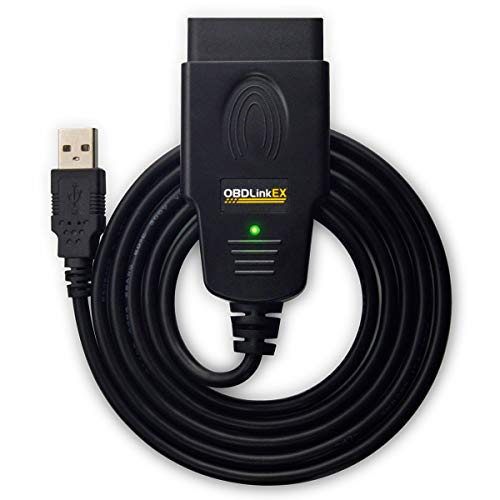
For FORScan work, this adapter stands apart with an electronic switch that lets the software access CAN buses simultaneously. OBDLink says it supports Ford protocols, modules, and advanced FORScan functions, and reports throughput up to 20 times faster than toggle-switch adapters. Its compact body measures 3.5 inches long, 1.8 inches high, and 1 inch wide. It suits owners prioritizing FORScan-specific access; it is a less direct fit for BMW coding or other software ecosystems. Confirm that the vehicle and intended operation are supported by FORScan before connecting.
Bottom line: Choose it for FORScan-focused work on a compatible vehicle.
Vgate vLinker FS USB

Among the FORScan-oriented choices, this adapter explicitly names additional ELM327-based apps, including AlfaOBD and VCTool. Vgate says it works with standard OBD2-port vehicles using 12V or 24V systems and supports USB 2.0 and 3.0; its data transfer rate is 3 Mbps. The adapter measures 4.33 inches long, 1.77 inches wide, and 0.79 inches high. It may suit buyers who want app flexibility beyond FORScan, but compatibility depends on both the app and vehicle, and diagnostic software is separate. Verify app support for the vehicle before relying on an advanced function.
Bottom line: Choose it if you need an ELM327-compatible app beyond FORScan.
Vgate vLinker FS USB Grey

This vLinker FS entry emphasizes Ford-family compatibility and programming specifications, including FEPS 18V output support in FORScan. The maker also gives a 3 Mbps transmission rate, a 3 MHz baud rate, an 8,192-byte serial buffer, and requests up to 4,128 bytes. It is suited to buyers seeking those specific FORScan functions and stated data-handling capabilities; the maker does not establish the same app range as the other vLinker entry, so do not assume every ELM327 app will work. Match the adapter and software to the exact vehicle and task before programming.
Bottom line: Choose it for its FORScan programming and transfer specifications.
K+DCAN USB BMW E-Series Cable

Unlike the FORScan-focused adapters, this is a K+DCAN cable for BMW E-series coding and diagnosis. The maker lists BimmerCode, INPA, and other Windows programs, plus a rocker switch to select K-Line or DCAN. It is aimed at BMW owners using supported Windows tools, not general FORScan use. The operating-system support includes Windows XP through Windows 10, while the title also names Windows 11.
Bottom line: Choose it for BMW E-series work requiring a K-Line/DCAN cable.
How to choose an OBD2 to USB tuning cable
Start with the vehicle and software pairing, not the USB plug: an OBD2 connector does not guarantee that an adapter supports every module or programming function. US light-duty vehicles generally adopted OBD-II from model year 1996, but that does not ensure compatibility with a particular app or advanced coding task. FORScan-oriented adapters and BMW K+DCAN cables serve different ecosystems. Use a vehicle-specific compatibility list from the software maker, then confirm the adapter protocol and operating system are supported. If you want engine calibration changes, verify that the chosen software supports writing that calibration for the exact vehicle; a diagnostic interface by itself is not a tuner.
OBD2 port and vehicle fit
Most passenger vehicles with OBD-II use a 16-pin trapezoidal diagnostic connector, but connector shape alone cannot confirm support for enhanced modules or coding. Start by checking the vehicle’s year, make, model, engine, and the software’s supported-vehicle list. A USB adapter also needs a compatible computer and driver/software setup; mobile app support does not automatically follow from USB compatibility. For a decision rule, if the job is BMW E-series coding, select a cable explicitly built for its K-Line/DCAN setup rather than a FORScan adapter. If the job is Ford-family module access through FORScan, choose a FORScan-oriented interface and confirm the exact feature in the software.
Diagnostic adapters versus tuning interfaces
An OBD2 adapter provides a communication path between a vehicle and software; the software determines which data or commands are available. Basic emissions diagnostics commonly retrieve standardized powertrain trouble codes, while enhanced diagnostics and coding depend on the make, model, module, and application. The term “tuning cable” can be misleading: reading codes, changing configuration, and writing an engine calibration are distinct tasks. A product that supports advanced diagnostics does not necessarily support calibration flashing. Match the interface to the specific operation, and never start a write procedure unless the software explicitly supports that vehicle and module and the vehicle has stable electrical power. An interrupted programming session can leave a module inoperable.
USB adapter selection by task
Use the intended software as the first filter, then narrow by vehicle and operation. FORScan-specific features such as simultaneous CAN-bus access matter only when the application and vehicle use them; BMW K-Line/DCAN switching is relevant to the BMW cable, not a universal advantage. This table separates the main use cases.
| Task | Interface direction | Check before connecting |
|---|---|---|
| Ford-family enhanced diagnostics | FORScan-oriented adapter | Vehicle and module support in FORScan |
| BMW E-series coding | K+DCAN cable | Chassis, K-Line/DCAN mode, software support |
| ELM327-compatible app use | ELM327 USB adapter | App, operating system, and vehicle compatibility |
Safe setup for coding and programming
Before coding, save or record the original configuration when the software permits it, and avoid disconnecting the adapter or computer during a write operation. Programming can keep vehicle modules awake and draw power; a properly sized, regulated battery maintainer is commonly used during longer coding or flashing sessions, but follow the vehicle and software requirements for the specific procedure. Do not assume a cable’s voltage output rating means it powers the vehicle or replaces a maintainer. Stop if the software reports a communication error, wrong module, or unsupported function rather than retrying a write blindly. Keep the vehicle stationary and follow the tool’s prompts so a cable cannot snag or be pulled loose.
Frequently Asked Questions
Will an OBD2 USB cable tune any car?
No; the interface only connects software to the vehicle, and supported functions vary by vehicle and application. Confirm that the software supports the exact model and calibration-writing task before attempting a tune.
What does a K-Line and DCAN switch do?
The switch selects between two communication interfaces used by different BMW generations and modules. The BMW cable here describes K-Line use for older models and DCAN for newer ones, so select the mode specified for the exact chassis and software.
Can I use a USB OBD2 adapter with a phone?
A USB adapter requires a phone and app that support its connection type, drivers, and protocol; many USB tools are intended for computers. Check the app’s supported hardware and device requirements before purchase, since an OBD2 port does not establish phone compatibility.
Does an OBD2 tuning cable read trouble codes?
Many OBD2-compatible interfaces can read standardized emissions-related powertrain codes when used with suitable software. Enhanced manufacturer modules and coding require an adapter and app that specifically support the vehicle.
Should the engine run during ECU programming?
Programming instructions are operation-specific, and some procedures require ignition on with the engine off. Keep vehicle voltage stable with the power setup specified by the vehicle or software procedure; do not interrupt a module write.