
Paper to Print Stickers: 5 Printable Sheets Compared

For most home sticker projects, Full Sheet Matte Labels, 100 Sheets is the most versatile choice because its 100 matte letter-size sheets have edge slits for peeling and a liner without slits for machine cutting. Choose a glossy or printable vinyl option instead when the surface or water resistance matters more than a matte finish.
We earn a commission if you buy through links on this page. As an Amazon Associate I earn from qualifying purchases. Products are compared on manufacturer specifications, not hands-on testing.
- Best overall: Full Sheet Matte Labels, 100 Sheets – Its 100 matte letter-size sheets have peel-friendly edge slits and a slit-free liner for cutting machines.
- Best for glossy vinyl: RowinsyDD Glossy Vinyl, 20 Sheets – The glossy vinyl sheets are described as waterproof and scratch resistant.
- Best for water resistance: JOYEZA Matte Printable Vinyl, 25 Sheets – The matte printable vinyl is described as water-resistant and tear-resistant.
| Product | Best for | Finish and material | Sheets | Printer compatibility | Shop |
|---|---|---|---|---|---|
| Full Sheet Matte Labels, 100 Sheets | Frequent label making | Matte paper | 100 | Laser and inkjet | Check Price on Amazon |
| Matte Sticker Paper, 40 Sheets | Custom matte cuts | Matte paper | 40 | Laser and inkjet | Check Price on Amazon |
| RowinsyDD Glossy Vinyl, 20 Sheets | Glossy vinyl designs | Glossy vinyl | 20 | Laser and inkjet | Check Price on Amazon |
| Glossy Sticker Paper, 40 Sheets | Glossy paper prints | Glossy paper | 40 | Laser and inkjet | Check Price on Amazon |
| JOYEZA Matte Printable Vinyl, 25 Sheets | Water-resistant matte | Matte vinyl | 25 | Inkjet and laser | Check Price on Amazon |
Paper to Print Stickers
Compare finish, material, sheet count and printer compatibility before choosing paper for your sticker project.
Full Sheet Matte Labels, 100 Sheets

Full Sheet Matte Labels, 100 Sheets stands out for its 100-sheet pack and edge slits that help peel labels while keeping the backing intact for electronic cutting machines. Each white, full sheet label measures 8.5 by 11 inches and has a matte finish. The manufacturer says it is designed for most laser and inkjet printers and provides templates in PDF, Word and Illustrator formats. It suits people making repeated labels or planning to cut custom shapes. The limitation is its matte paper surface, so choose a glossy or vinyl option if that finish is central to the project.
Bottom line: Pick this for a large supply of matte labels and a liner suited to electronic cutting.
Matte Sticker Paper, 40 Sheets

Matte Sticker Paper, 40 Sheets pairs a 40-sheet pack with a backing marked to distinguish the printable surface from the liner, plus an orange reminder label intended to aid peeling. The white, 8.5-by-11-inch sheets are made from 100-gsm writing paper and can be cut with an electronic cutter or other cutting tools. The manufacturer says the paper is compatible with most laser and inkjet printers. This option suits small custom-cut projects where the backing cues are useful. It is matte writing paper rather than vinyl, so it is not the fit for buyers seeking a glossy or water-resistant material.
Bottom line: Choose this for custom matte stickers when clear backing cues matter.
RowinsyDD Glossy Vinyl, 20 Sheets

RowinsyDD Glossy Vinyl, 20 Sheets is the glossy vinyl choice, with 20 white, 8.5-by-11-inch sheets and a backing layer designed for easier peeling. The manufacturer describes the material as waterproof and scratch resistant, and says it works with most laser and inkjet printers. The glossy finish suits designs where shine is preferred over a matte paper look, while the vinyl format is intended for indoor and outdoor label use. The pack has fewer sheets than the paper options, so it may be less suitable for high-volume printing. Confirm your printer’s media guidance before feeding vinyl sheets.
Bottom line: Pick this for glossy vinyl designs where the maker’s water-resistance claim fits the project.
Glossy Sticker Paper, 40 Sheets
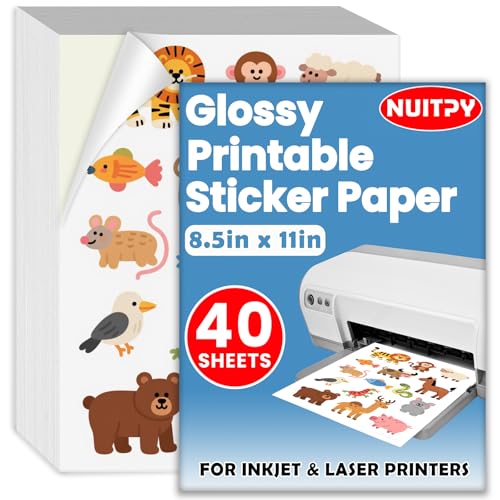
Glossy Sticker Paper, 40 Sheets offers a glossy printable surface in a 40-sheet pack, giving it a paper-based alternative to glossy vinyl. Each white sheet measures 8.5 by 11 inches, has adhesive backing, and can be cut with scissors or a cutting machine. The manufacturer says it is compatible with inkjet and laser printers and describes its coating as helping reflect light for vivid-looking colors. It suits smooth, flat-surface projects that call for a glossy finish. Unlike the vinyl options, the material is described as sticker paper, so choose another format if water resistance is a deciding requirement.
Bottom line: Choose this for glossy paper stickers intended for smooth, flat surfaces.
JOYEZA Matte Printable Vinyl, 25 Sheets

JOYEZA Matte Printable Vinyl, 25 Sheets differs from the paper sheets by using matte printable vinyl, with 25 white sheets measuring about 8.5 by 11 inches. The manufacturer describes the sheets as water-resistant and tear-resistant, and says they dry quickly; it recommends UV-resistant sealer spray to boost waterproofness and durability. This is a match for projects that favor a matte vinyl surface over glossy paper. The water resistance is not the same as waterproofing, so it is not the choice for buyers who need an unsealed print to withstand water exposure.
Bottom line: Pick this for matte vinyl projects where water resistance is useful but not a waterproof guarantee.
How to choose sticker printing paper
Start with the finish and material: matte paper, glossy paper, glossy vinyl and matte vinyl serve different visual and durability priorities. Letter-size sheets measure 8.5 by 11 inches, the format used by all five choices here. For repeated labels, a 100-sheet pack offers more sheets than packs of 20, 25 or 40; for a first design run, a smaller pack limits unused stock. Check that the printer supports the sheet material, not just its dimensions. When an exact printer-media match is uncertain, test one sheet before committing a full pack, and use the manufacturer’s media guidance for feed settings.
| Need | Choose |
|---|---|
| Matte paper, larger batch | 100-sheet full sheet labels |
| Glossy paper finish | 40-sheet glossy sticker paper |
| Glossy vinyl finish | 20-sheet glossy vinyl |
| Matte vinyl finish | 25-sheet matte vinyl |
Printer compatibility and feeding
Printer compatibility depends on both the printing process and the sheet coating: inkjet and laser printers use different printing mechanisms, so a package claiming both should still be checked against the printer manual. Use the printer’s label or specialty-media setting when available, because thicker or coated stock may feed differently from plain paper. Load a single sheet first and confirm the printable side faces the correct direction; printer trays vary. Avoid sending a sheet through again if ink or toner has not set, since a second pass can mark the surface. The key decision rule is simple: if the printer manufacturer excludes the material, do not feed it through that printer.
Paper, vinyl, and water resistance
Paper and vinyl are not interchangeable: paper is the straightforward choice for ordinary indoor labels, while printable vinyl is the material to consider when flexibility or water resistance is important. A glossy coating changes appearance but does not, by itself, establish that a print is waterproof. The vinyl makers describe different claims: one says waterproof and scratch resistant, while the other says water-resistant and advises sealer spray to boost waterproofness. Treat those claims as distinct, and choose by the exposure the finished sticker must handle. For outdoor or wet use, confirm both the printer’s compatibility and whether the finished print needs a compatible protective layer.
Cutting and peeling full sheet stickers
Full sheet stock starts as one large adhesive sheet, so the design must be cut into individual shapes after printing. Scissors work for simple outlines; electronic cutters can follow more detailed designs when the liner and machine setup are compatible. A slit-free liner can be helpful for cutting mats, while slits near the edges may make peeling easier, as on the 100-sheet label option. Keep cut lines within the printed area and test alignment on a single sheet before making a batch. Peel slowly from an edge to reduce curling, and apply stickers to clean, smooth, dry surfaces for more even contact.
Frequently Asked Questions
Can sticker paper go through a laser printer?
Some printable sticker sheets are marketed for both laser and inkjet printers, but compatibility is material-specific. Verify that the printer supports the sheet’s coating or vinyl before feeding it.
What size is standard letter sticker paper?
Standard US letter sheets measure 8.5 by 11 inches. Confirm the document page size and printer paper setting match those dimensions before printing.
Does glossy sticker paper make prints waterproof?
A glossy finish alone does not establish waterproofing. Check whether the material is paper or vinyl and rely only on the maker’s specific water-resistance claim for that sheet.
How should sticker paper be cut after printing?
Simple shapes can be trimmed with scissors, while electronic cutters can handle custom outlines when the backing works with the cutting setup. Test alignment and cut settings on one sheet before a batch.
How do you prevent sticker sheets from jamming?
Load one sheet first and use a media setting intended for labels or specialty stock if available. Avoid stock that the printer manufacturer excludes, especially when the material is vinyl or coated.