
Best Apple Pencil Grip: 5 Options Compared for Fit

The Paperlike grip suits most Apple Pencil users because it fits several Pencil generations and is designed to preserve their functions while attached. Choose a different grip if you want a multi-pack, a split-back design for easier removal, or a specific shape.
Apple Pencil grips are sleeves or cushions that change how the stylus feels in your hand; compatibility and charging access are key deciding factors.
We earn a commission if you buy through links on this page. As an Amazon Associate I earn from qualifying purchases. Products are compared on manufacturer specifications, not hands-on testing.
- Best overall: Paperlike Pencil Grips – Designed for four Apple Pencil models and says it supports magnetic charging and Pencil functions while attached.
- Best for a multi-pack: Omni Grip 6-Pack – Includes six translucent grips and offers two grip experiences by orientation.
- Best for removal: Pro-Draw The Grip – Its split-back design is intended to make attaching and removing the grip easier.
| Product | Best for | Pencil compatibility | Pack count | Charging or function access | Shop |
|---|---|---|---|---|---|
| Paperlike Pencil Grips | Broad compatibility | 1st, 2nd, USB-C, Pro | 2 | Magnetic charging; Pencil functions | Check Price on Amazon |
| Omni Grip 6-Pack | Extra grip spares | Apple Pencil, 2nd; styluses | 6 | — | Check Price on Amazon |
| Pro-Draw The Grip | Easy removal | Pro, 1st, 2nd, USB-C | 1 | Split-back design | Check Price on Amazon |
| SIXFU Grip 2-Pack | Mixed grip shapes | Pro, 2nd, USB-C | 2 | Wireless charging; double-tap | Check Price on Amazon |
| elago Pencil Grip 2-Pack | Two-color set | Pro, 1st, 2nd, USB-C | 2 | — | Check Price on Amazon |
Apple Pencil Grips Compared
Compare Pencil compatibility, pack size and the design features that affect charging and daily handling.
Paperlike Pencil Grips

Paperlike stands out for compatibility across Apple Pencil 1st and 2nd generation, USB-C and Pro models. The set includes two grips, with a charcoal and Paperlike Blue color combination. Paperlike says the shape is designed for comfort and control, and that its thin silicone zones preserve Pencil functions including magnetic charging, double-tap, squeeze, barrel roll and haptic feedback. Angled sidewalls are designed to work with most iPad cases. This suits someone who wants a broad model match without removing the grip for charging. Its two-piece set may be less useful if you specifically want a larger multi-pack.
Bottom line: Choose this if your Pencil model and charging routine call for broad compatibility.
Omni Grip 6-Pack
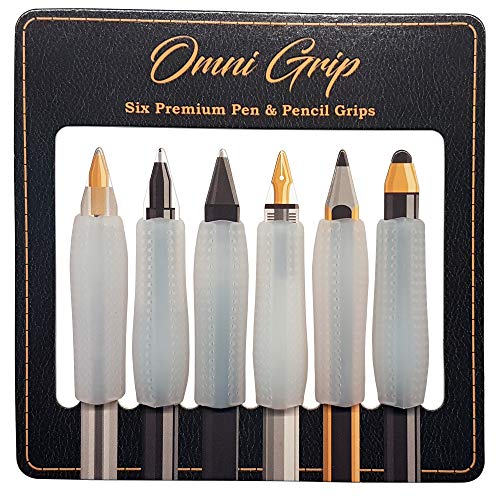
Omni Grip is the only option here supplied as a six-pack, making it a practical match for someone who wants several grips for different writing tools or spares. The clear silicone cushions are described as slim and discreet, and the reversible design offers two grip experiences depending on orientation. It is intended for adults and also fits pens, pencils and styluses, rather than only Apple Pencil. The tradeoff is that the compatibility wording does not cover every Apple Pencil generation, and the specifications do not establish how the grip affects charging or Pencil gestures. Confirm compatibility and charging access for your model before choosing it.
Bottom line: Pick this if you want six clear grips and can verify fit for your Pencil.
Pro-Draw The Grip

Pro-Draw differentiates itself with a split-back design intended to make the grip easier to attach and remove, especially when charging a 2nd-generation Pencil. It is a single black grip compatible with Apple Pencil Pro, 1st and 2nd generation, and USB-C models. The maker also describes it as providing comfort and drawing control. This is a good fit for someone who prioritizes removing the sleeve for charging or wants a removable design rather than a fixed-feeling sleeve. The specifications do not establish its material or whether charging and gestures work with it attached, so those functions may matter to verify before purchase.
Bottom line: Choose this if a removable split-back design is your main priority.
SIXFU Grip 2-Pack

SIXFU uses a combined square-and-circle shape, giving users more than one surface to hold. The pack contains two grips, one black and one white, and its fit includes Apple Pencil Pro, 2nd generation and USB-C models, plus styluses around 0.35 inches in diameter. The maker says the thin cross-section supports wireless charging and double-tap without removal, and describes the grips as nonslip and sweat-resistant. This suits someone who wants shape variety and those supported Pencil models. Its compatibility range is narrower than options that include 1st generation, so check your Pencil generation before choosing.
Bottom line: Pick this if you want two grip shapes and use a Pencil model.
elago Pencil Grip 2-Pack

elago’s distinguishing feature is its two-color set: one dark gray grip and one mint grip. It is compatible with Apple Pencil Pro, 1st and 2nd generation, and USB-C models. The maker says the silicone ergonomic shape is intended to improve grip and reduce fatigue during continued use. This is a straightforward choice for someone who wants color variety across a broad range of Pencil models. The specifications do not establish charging or gesture access while the grip is attached, so users who rely on magnetic charging or Pencil gestures should verify those functions before choosing it.
Bottom line: Choose this if two colors and broad model compatibility matter most.
How to Choose an Apple Pencil Grip
Start with Pencil compatibility and whether the grip needs to stay on during charging. Apple Pencil 2nd generation and Pro charge magnetically along the iPad’s side, so a sleeve must leave the charging area clear or be removable. Apple Pencil 1st generation charges through its Lightning connector, while the USB-C model charges through its sliding cap and USB-C port. A grip that supports one charging method may not suit another. If you charge magnetically and do not want to remove the grip, prioritize a design that explicitly supports that function; if removal is acceptable, a split-back design can be more convenient. Compare shape and quantity only after confirming the model match.
Apple Pencil Grip Fit and Charging
Apple Pencil bodies are about 0.35 inches across, so a grip sized for that diameter is a useful starting point, but the sleeve’s opening and shape also affect fit. A snug grip should stay in place without covering a charging connector, magnetic charging area or controls needed for pairing. The 1st-generation Pencil’s Lightning connector and the USB-C model’s sliding cap make charging access different from side-charging models. If your charging routine depends on the iPad’s magnetic edge, choose a grip that specifically preserves magnetic charging or is easy to remove. For a Pencil outside a grip’s model range, confirm the fit before ordering rather than assuming similar dimensions guarantee compatibility.
Grip Shapes and Materials Compared
Silicone sleeves add a softer contact surface, while molded shapes can offer more than one finger position; neither shape is automatically better for every hand. A round sleeve keeps a familiar pencil-like profile, while square or contoured surfaces can help some users orient the Pencil consistently. Pack count is useful when grips will be shared across tools, but it does not establish compatibility with every Pencil generation. Use this comparison to weigh the designs against your routine.
| Design need | What to prioritize | Tradeoff |
|---|---|---|
| Keep grip on while charging | Explicit support for your charging method | Model compatibility can be narrower |
| Remove for charging | Split-back or easy-removal design | Requires taking the grip off |
| Vary hand position | Contoured or multi-shape surface | May feel less like a bare Pencil |
| Cover several tools | Multi-pack with broad tool fit | Check Pencil-specific compatibility |
Common Apple Pencil Grip Mistakes
The most common mistake is choosing by generation name alone and overlooking how the Pencil charges. Apple Pencil 1st generation uses a Lightning connection, USB-C uses a port under its sliding cap, and 2nd generation and Pro support magnetic charging on compatible iPads. A sleeve that blocks the connector or charging area can interrupt a routine even if it fits the barrel. Another mistake is assuming every grip supports every Pencil gesture: double-tap, squeeze, barrel roll and haptic feedback apply only to compatible Pencil models. Match the grip to both your Pencil generation and the features you use. Avoid forcing a tight sleeve over controls or connectors; remove it if it obstructs charging or operation.
Frequently Asked Questions
Do Apple Pencil grips affect magnetic charging?
Some grips are designed to preserve magnetic charging, while others may need to be removed. Check for explicit support for your Pencil generation and compatible iPad before relying on side charging.
Can one grip fit every Apple Pencil generation?
No; compatibility differs by grip. Apple Pencil models also use different charging designs, so match the model range rather than relying on a similar barrel size.
How wide is an Apple Pencil for grip sizing?
Apple Pencil barrels are about 0.35 inches across. A grip’s opening and shape still affect fit, so that measurement alone does not guarantee compatibility.
Can a grip block Apple Pencil gestures?
A grip can affect access to model-specific controls unless its design preserves them. Double-tap is available on supported Pencil models, while squeeze, barrel roll and haptic feedback depend on Apple Pencil Pro.