
Best Multifunctional Wireless Charging Stations Compared

The IHAO 5-in-1 station suits most people because it combines a Qi phone charger with a clock, environment display, night light, and USB ports. Choose a simpler 3-in-1 stand if you want a magnetic-style charging setup without clock and room-monitoring functions.
We earn a commission if you buy through links on this page. As an Amazon Associate I earn from qualifying purchases. Products are compared on manufacturer specifications, not hands-on testing.
- Best overall: IHAO 5-in-1 DH15 – Combines 15W phone charging with a clock, temperature and humidity display, three light colors, and USB ports.
- Best for room monitoring: AYI 5-in-1 Station – Pairs 15W phone charging with temperature and humidity readings and a three-level night light.
- Best for a magnetic-style setup: 3-in-1 Magnetic Charger Stand – A 3-in-1 stand with a tap-controlled blue ambient light.
| Product | Best for | Phone charging | Devices charged | Added features | Shop |
|---|---|---|---|---|---|
| IHAO 5-in-1 DH15 | Bedside features | Up to 15W | Phone, watch, earbuds | Clock, temperature, humidity, 3-color light | Check Price on Amazon |
| AYI 5-in-1 Station | Sleep environment | Up to 15W | Phone, Apple Watch, earbuds | Clock, temperature, humidity, 3-level light | Check Price on Amazon |
| 3-in-1 Magnetic Charger Stand | Magnetic-style charging | Up to 15W | iPhone, Apple Watch, AirPods | Blue ambient light | Check Price on Amazon |
| GETPALS 3-in-1 Charger Stand | Apple device set | Up to 7.5W | iPhone, Apple Watch, AirPods | 3 charging positions | Check Price on Amazon |
Multifunctional wireless charging stations
Compare the charging layout and bedside functions before choosing a station for your devices.
IHAO 5-in-1 DH15

The IHAO DH15 stands out for combining charging with a clock and room readings. It wirelessly charges a Qi phone and can charge a smartwatch and earbuds at the same time; the watch charger works only with Apple Watch. The display shows temperature and humidity, and the night light offers warm, white, and cool settings. A foldable design can suit a nightstand, desk, or travel bag.
Choose this station if you want bedside functions alongside charging. The product’s 15W maximum is a peak phone output, not a guarantee that every phone will charge at that rate.
Bottom line: Pick this if you want a clock and room readings built into your charging setup.
AYI 5-in-1 Station

The AYI station adds an alarm to the bedside combination of phone, watch, and earbud charging, a clock, and temperature and humidity readings. Its phone charger supports up to 15W, while the three-level night light gives a choice of brightness. The product also describes auto-shutoff at full charge and over-charge, over-current, and short-circuit protection.
This model suits someone who wants an alarm and room-monitoring display as part of a nightstand hub. Confirm that your phone and earbuds support the station’s wireless charging before choosing it; the 15W maximum alone does not establish compatibility or actual charging speed.
Bottom line: Choose this for an alarm and adjustable bedside light with room readings.
3-in-1 Magnetic Charger Stand

The 3-in-1 magnetic-style stand trades the clock and room-monitoring features of the 5-in-1 stations for an adjustable blue ambient light with tap control. It is designed for an iPhone, Apple Watch, and AirPods, so it is a closer fit for a person who wants to charge an Apple device set rather than use a general Qi-phone bedside hub.
The product specifies 15W phone charging, but the maker does not establish which accessories or adapters are needed to reach that output. Check the phone’s magnetic charging compatibility and required power adapter before ordering, especially if you do not use the device types.
Bottom line: Pick this if your priority is a magnetic-style Apple-device charging layout.
GETPALS 3-in-1 Charger Stand
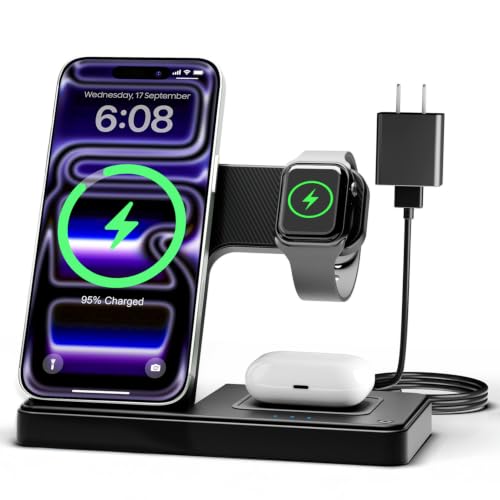
The GETPALS stand differs from the 5-in-1 hubs by focusing on three Apple-device charging positions rather than a clock, room display, or night light. Its outputs are up to 7.5W for phones, 3W for earbuds, and 2.5W for watches, making it a useful comparison if you value a defined output for each device over a higher phone maximum.
The device compatibility list spans multiple iPhone and watch generations, and AirPods 2, 3, and 4 require a MagSafe charging case. This is a partial fit for a multifunctional station search because its described functions center on charging rather than room or clock features.
Bottom line: Choose this for a defined three-device Apple charging layout.
How to choose a multifunctional wireless charging station
Start with the devices and functions you need at the same time: phone, watch, and earbuds are a common three-device combination, while the 5-in-1 hubs add a clock, room readings, and a light. Wireless charging requires compatible receiving hardware; Qi is a wireless power standard, but a device’s support and the charger’s output determine whether the pairing works. A phone’s maximum advertised charging rate is not a promise of that rate in every setup.
For an Apple Watch, verify that the station explicitly supports Apple Watch rather than assuming any watch can use its watch position. For earbuds, the case must support wireless charging; the GETPALS model specifically requires a MagSafe charging case for AirPods 2, 3, and 4. Choose a 5-in-1 hub when bedside functions matter, and a simpler stand when device charging is the priority.
What the charging wattage means
Wattage is the maximum power a charger can provide under compatible conditions, not a fixed rate for every phone. These options range from up to 7.5W phone output on the GETPALS stand to up to 15W on the other three products. Actual charging can be lower when a phone, case, adapter, or charging alignment limits power.
Keep the phone centered on the charging area; poor coil alignment can interrupt or slow wireless charging. If fast charging is your deciding factor, confirm both the phone’s supported wireless charging rate and the station’s compatibility with that charging mode.
5-in-1 hubs versus 3-in-1 stands
A 5-in-1 hub combines charging with bedside utilities, while a 3-in-1 stand concentrates on charging a phone, watch, and earbuds. The right choice depends on whether a clock, environmental display, or night light is useful where the station will sit. “Multifunctional” can mean added room and clock features, not simply more charging pads.
The comparison below separates those two roles and shows the concrete trade-off: extra bedside functions versus a simpler charging arrangement.
| Need | Station type | Trade-off |
|---|---|---|
| Clock and room readings | 5-in-1 hub | More bedside functions |
| Phone, watch, and earbuds charging | 3-in-1 stand | Fewer non-charging features |
| Lower phone maximum among these choices | GETPALS stand | Up to 7.5W for phones |
Placement and safe charging habits
Place a wireless charging station on a stable, dry surface with room around its charging areas. Wireless power can create heat, and charging may slow if a phone becomes warm; avoid covering the phone or charger with bedding and keep the station away from liquids. Remove metal objects between the phone and pad, since they can interfere with charging and heat up.
For a bedside light, confirm that its controls suit your sleep routine: the IHAO has three color choices, the AYI describes three brightness levels, and the magnetic-style stand uses tap control for its blue light. Keep cables routed where they will not be pulled from a nightstand. If a phone repeatedly heats or stops charging, stop charging and check its placement and compatibility.
Frequently Asked Questions
Will a Qi phone work with every station here?
Not necessarily: Qi support is required for a Qi charging pad, but charging speed and compatibility still depend on the phone and charger pairing. Confirm the phone model supports the station’s wireless charging mode before choosing.
Can these stations charge a watch and earbuds together?
The first two products describe simultaneous phone, watch, and earbud charging, and the other two are described as 3-in-1 phone, watch, and earbud stands. Watch and earbud compatibility is model-specific; for the GETPALS stand, AirPods 2, 3, and 4 need a MagSafe charging case.
Does 15W mean a phone always charges at 15W?
No; 15W is a maximum phone output for three options here, not a guaranteed rate. A phone that supports a lower wireless rate, or a setup with alignment or adapter limits, can charge more slowly.
Can I leave a wireless charger on overnight?
A compatible setup may remain connected, but keep the charger uncovered and on a dry, stable surface because wireless charging can produce heat. Stop using it if the phone or charger becomes unusually hot.
What does a humidity display measure?
A humidity display reports relative humidity, expressed as a percentage of moisture in the air compared with the maximum air can hold at that temperature. Room readings can differ from another location, so place the station away from vents, direct sun, and humidifiers for a more representative reading.