
Advanced Portable Car Camcorder Options Compared

For a front-facing portable car camcorder, iZEEKER 2.5K Front Dash Cam is the closest match because its 1440p resolution and 170° view cover more road detail and width than the 1080p options. Choose Minolta MNCD350X 2-Channel Camcorder instead if recording inside the vehicle matters; it is a two-channel camera rather than a front-only setup.
We earn a commission if you buy through links on this page. As an Amazon Associate I earn from qualifying purchases. Products are compared on manufacturer specifications, not hands-on testing.
- Best overall: iZEEKER 2.5K Front Dash Cam – Records at 1440p with a 170° viewing angle.
- Best for cabin recording: Minolta MNCD350X 2-Channel Camcorder – Adds an integrated inside camera alongside the road-facing camera.
- Best for motion monitoring: Minolta 1080p HD Dash Camera – Includes motion detection and a parking monitor.
| Product | Best for | Video resolution | Viewing angle | Screen size | Shop |
|---|---|---|---|---|---|
| iZEEKER 2.5K Front Dash Cam | Wide front view | 1440p QHD | 170° | 3 in. IPS | Check Price on Amazon |
| Minolta MNCD350X 2-Channel Camcorder | Cabin recording | 1080p | 120° | 2.7 in. | Check Price on Amazon |
| Minolta 1080p HD Dash Camera | Parking monitoring | 1080p | Wide angle; degree unspecified | 3 in. | Check Price on Amazon |
| Aryelent 1080p 2.4-Inch Dash Cam | Simple front recording | 1080p | 140° | 2.4 in. | Check Price on Amazon |
Advanced Portable Car Camcorders
Compare resolution, viewing coverage, and recording configuration to find the right fit for your vehicle.
iZEEKER 2.5K Front Dash Cam
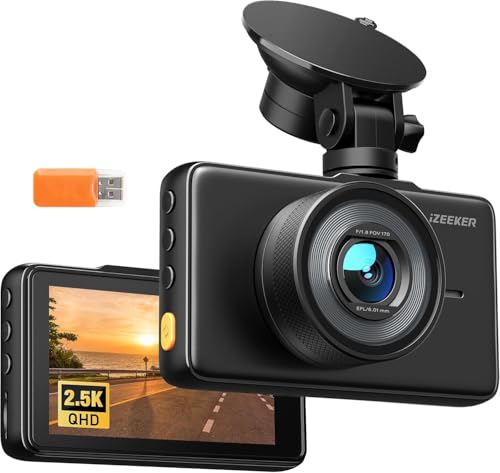
Among these front-facing models, iZEEKER 2.5K Front Dash Cam pairs the highest resolution, 1440p QHD, with a 170° lens. The 3-inch IPS display and physical buttons support direct playback and operation, while the suction-cup mount is suited to portable installation. It also includes night vision, WDR, loop recording, a G-sensor, and 24-hour parking mode. This camera is a fit when broad forward coverage and a screen matter more than cabin footage. The package does not include an SD card, so plan for separate compatible storage before relying on recording.
Bottom line: Choose this for a high-resolution front view and onboard screen.
Minolta MNCD350X 2-Channel Camcorder

Unlike the front-only options, Minolta MNCD350X 2-Channel Camcorder includes an integrated camera aimed inside the vehicle, making it the choice here for recording both the road and cabin. Its front camera records 1080p video through a 120° lens, and a 2.7-inch LCD supports local viewing. The built-in G-sensor detects abrupt collisions. This two-channel arrangement may suit rideshare or family driving where interior context is useful. Its 120° viewing angle is narrower than the 140° and 170° options, so choose another model if maximizing forward road coverage is the priority.
Bottom line: Choose this when interior recording is a priority.
Minolta 1080p HD Dash Camera

Minolta 1080p HD Dash Camera stands out for its combination of motion detection and a parking monitor, alongside loop recording and a G-sensor with file locking. The camera records 1080p video and has a wide-angle view, with a 3-inch LCD in a compact dashboard-mount design. Those features suit drivers who want a straightforward daily-use recorder with parked-vehicle monitoring functions. The viewing angle is not quantified here, unlike the 140° and 170° alternatives, so this model is less suitable when comparing exact road coverage is central to the choice.
Bottom line: Choose this for motion detection and parking-monitor functions.
Aryelent 1080p 2.4-Inch Dash Cam

Aryelent 1080p 2.4-Inch Dash Cam provides a defined 140° front view, which places its coverage between the 120° cabin-recording model and the 170° wide-view camera. Its 1080p recording, 2.4-inch LCD, night vision, and G-sensor with file locking cover basic road-event capture. This is a fit for a driver who wants a specified viewing angle without needing the highest resolution or a large display. The smaller 2.4-inch screen may be less comfortable for reviewing clips in the vehicle than the 2.7- and 3-inch displays on the other options.
Bottom line: Choose this for a defined 140° view and basic recording.
How to choose an advanced portable car camcorder
Choose resolution and viewing angle based on what you need to see in a clip. A 170° lens covers a wider scene than a 120° lens, while a higher resolution such as 1440p can preserve finer image detail than 1080p. Wider views can also make distant objects appear smaller, so angle alone does not guarantee readable details. For cabin events, choose a two-channel model with an interior camera rather than a front-only recorder.
Loop recording typically overwrites the oldest unlocked clips when storage fills; a G-sensor can lock footage after a detected jolt, but locked files can accumulate and consume card space. Parking modes may need a compatible power arrangement and can drain a vehicle battery if left active. Confirm that the camera’s mounting position does not obstruct the driver’s forward view.
Dash cam viewing angle and resolution
Compare the horizontal scene width and resolution together: these options range from 120° to 170° and from 1080p to 1440p. A wider lens captures more adjacent roadway, while a narrower one gives more of the frame to the forward scene. The 140° model sits between those angles, and the 170° model offers the broadest coverage.
Dash cam resolution is often described by vertical pixel count: 1080p is 1920×1080, while 1440p QHD is 2560×1440. Higher pixel count provides more image data, but actual license-plate readability also depends on distance, motion, lighting, windshield glare, and camera placement. Keep the lens clear and mount the camera securely near the center of the windshield without blocking the driver’s line of sight.
Parking mode, loop recording, and power
Parking mode records while a vehicle is unattended, but the triggering method matters: motion detection reacts to movement, while impact detection responds to a jolt. A G-sensor is an accelerometer that flags sudden movement; sensitivity settings can affect whether rough roads cause unwanted file locks. Loop recording keeps a card usable by replacing older unlocked footage once capacity is reached.
Continuous parking monitoring can draw power after the engine is off. Many dash cams require a hardwire kit or an external battery for sustained parked recording, and low-voltage protection helps reduce the risk of draining the car battery. Since parking-mode power arrangements vary, confirm the required power setup before relying on unattended recording. Periodically check that protected clips have not filled the card and stopped normal loop recording.
Mounting and safe placement
Place a dash cam high enough to capture the road but outside the driver’s clear field of view. A central position behind or near the rearview mirror is a common choice because it limits obstruction and keeps the lens aligned with the vehicle. Suction-cup mounts are removable and useful for portable setups; clean, dry glass helps a suction mount hold more reliably.
Route the power cable along the windshield edge and away from airbags, pedals, and controls. A cable hanging near the driver’s legs can interfere with safe operation, and trim or airbag deployment paths should not be disturbed during installation. After mounting, check the live view while parked: the horizon should be level, the road should dominate the frame, and the camera should not point mainly at the dashboard.
Car camcorder comparison by need
Match the setup to what the recording must show: road detail, broad forward coverage, parked activity, or the cabin. A dash cam’s channel count tells you whether it records one outward view or an additional interior view. Use this guide to prioritize the feature that changes the captured scene.
| Need | Useful specification | Tradeoff to consider |
|---|---|---|
| Road detail | 1440p QHD | Lighting and motion still affect readability |
| Wide forward scene | 170° viewing angle | Objects may appear smaller at the edges |
| Cabin context | Two-channel camera | Interior view is a different setup from front-only recording |
| Parked movement | Motion or impact-triggered parking mode | Power arrangement and card capacity matter |
Frequently Asked Questions
Does a wider dash cam angle show more road?
Yes, a wider viewing angle captures more of the scene beside the vehicle. The options here span 120° to 170°, but objects near the edges can appear smaller than in a narrower view.
Is 1440p better than 1080p for a dash cam?
1440p QHD uses 2560×1440 pixels, compared with 1920×1080 for 1080p. More pixels can preserve finer detail, though distance, lighting, movement, and windshield glare also affect what a clip shows.
How does a dash cam G-sensor work?
A G-sensor detects sudden movement or impact and can protect the current clip from loop-recording overwrite. Rough roads or overly sensitive settings can also trigger file locks, so check protected footage periodically.
Can a dash cam record while the car is parked?
A dash cam with parking mode can monitor a parked vehicle, but extended operation may require hardwiring or an external battery. Low-voltage protection helps limit the risk of draining the vehicle battery.
How often should I check dash cam storage?
Check storage regularly, especially after impact-triggered clips are locked. Loop recording replaces older unlocked files, but a card filled with protected footage can prevent normal recording.