
2011 F-150 Radio Replacement: Fit and Features Compared

9-Inch Wireless CarPlay Stereo is the broadest match for a 2011 F-150 because it names the full 2009–2014 range, but it excludes trucks with factory 4.2-inch or 8-inch displays. Choose a trim-specific unit instead if your truck has manual AC controls, a particular trim, or factory SYNC.
These replacement head units replace the factory radio with a touchscreen and may add smartphone integration. Confirm your factory screen, AC controls and SYNC setup before choosing.
We earn a commission if you buy through links on this page. As an Amazon Associate I earn from qualifying purchases. Products are compared on manufacturer specifications, not hands-on testing.
- Best overall: 9-Inch Wireless CarPlay Stereo – Fits the 2009–2014 F-150 range, with a clear exclusion for factory 4.2-inch and 8-inch display systems.
- Best for octa-core hardware: Avorienelle Octa-Core 9-Inch Stereo – Pairs an octa-core processor and 4GB RAM with a 9-inch touchscreen.
- Best for STX and XL: Linux Stereo for STX and XL – Specifically fits 2009–2014 STX and XL models and includes a CAN-Bus decoder.
| Product | Best for | Fit range | Screen | Platform or key note | Shop |
|---|---|---|---|---|---|
| 9-Inch Wireless CarPlay Stereo | Broad year fit | 2009–2014 F-150 | 9-inch IPS touchscreen | Wired and wireless CarPlay/Android Auto | Check Price on Amazon |
| Avorienelle Octa-Core 9-Inch Stereo | Multitasking hardware | 2009–2014 F-150 | 9-inch touchscreen | Octa-core, 4GB RAM | Check Price on Amazon |
| Linux Stereo for STX and XL | STX and XL trims | 2009–2014 STX and XL | Touchscreen; size — | Linux; not compatible with factory SYNC | Check Price on Amazon |
| 9-Inch Android 13 Stereo, 4-Core | Manual-AC trims | 2009–2014 STX, XLT, XL | 9-inch touchscreen | Android 13; manual AC only | Check Price on Amazon |
| 9-Inch Android 13 QLED Stereo | 2009–2012 trucks | 2009–2012 XL, STX, XLT | 9-inch QLED touchscreen | Android 13; manual AC only | Check Price on Amazon |
2011 F-150 Radio Replacements
Compare the fit ranges and factory-system restrictions before selecting a touchscreen head unit.
9-Inch Wireless CarPlay Stereo

9-Inch Wireless CarPlay Stereo stands out for its 2009–2014 F-150 fit and support for both wired and wireless CarPlay and Android Auto. It has a 9-inch IPS touchscreen, 64GB storage, GPS, Bluetooth, AM/FM radio and steering-wheel-control support. The key limitation is factory-system compatibility: the maker excludes trucks with a factory 4.2-inch color LCD or 8-inch touchscreen. That restriction matters because a matching model year alone does not establish fit. Check the truck’s original display before choosing this unit.
Bottom line: Choose this if your truck falls within the years and does not have either excluded factory display.
Avorienelle Octa-Core 9-Inch Stereo
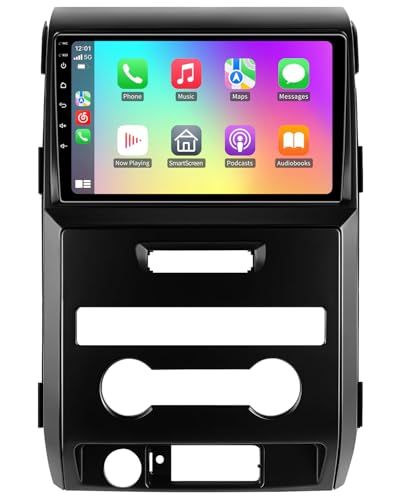
Avorienelle Octa-Core 9-Inch Stereo is distinguished by its octa-core processor and 4GB of RAM, alongside a 9-inch touchscreen and 64GB storage. The maker says it supports wireless Apple CarPlay and Android Auto, GPS, Bluetooth, Wi-Fi, steering-wheel controls, FM RDS and mirror link. Its fit covers the 2009–2014 F-150, without naming trim or factory-radio exclusions in the specifications. Buyers whose trucks have less common factory screens or controls should verify compatibility before ordering; the broad year range alone does not resolve those fit questions.
Bottom line: Pick this for the specified octa-core and memory combination, after confirming your factory setup.
Linux Stereo for STX and XL

Linux Stereo for STX and XL is a narrower choice for STX and XL trucks, and its Linux platform sets it apart from the Android units. The maker says the package includes a vehicle-specific bezel, wiring harness, CAN-Bus decoder and mounting accessories, and supports the factory odometer/trip-reset function and AC-control display. It is not compatible with Ford’s SYNC radio system, so this is not a general fit for every 2011 F-150. The fields do not give a screen size, which makes checking the exact fit and appearance especially important for buyers comparing screen dimensions.
Bottom line: Choose this only for a compatible STX or XL without the factory SYNC radio.
9-Inch Android 13 Stereo, 4-Core

9-Inch Android 13 Stereo, 4-Core targets STX, XLT and XL trims from 2009–2014, but its manual-AC requirement makes the fit more specific than the broad year range suggests. It has a 9-inch, 1280 × 800 touchscreen, 4-core processor and 64GB ROM; the maker also names wireless CarPlay and Android Auto support. The maker excludes Lariat, FX4, Platinum, SVT Raptor and Harley-Davidson trims. That makes this a poor candidate for those configurations even if the model year matches. Check both trim and AC control type before selecting it.
Bottom line: Choose this for a STX, XLT or XL with manual AC, not for the excluded trims.
9-Inch Android 13 QLED Stereo

9-Inch Android 13 QLED Stereo is the only option here limited to 2009–2012, and its fit is XL, STX and XLT with manual AC. Its 9-inch QLED touchscreen has a 1280 × 720 resolution, and the maker specifies Android 13, 4GB RAM, 64GB ROM and 5G Wi-Fi. The trim and control restrictions make it a partial match for a 2011 F-150 rather than a universal fit. Buyers with other trims or automatic climate controls should look at a different configuration; a shared model year does not override those restrictions.
Bottom line: Pick this for a 2009–2012 XL, STX or XLT equipped with manual AC.
How to Choose a 2011 F-150 Radio
Start with the factory radio and control layout, not the screen size you want. The options here identify important differences: factory 4.2-inch or 8-inch display exclusions, SYNC incompatibility, and manual-AC-only fit. Match the truck’s trim and original screen to those restrictions before comparing phone features. A 2009–2014 year range does not mean every trim or factory system is covered.
Smartphone integration also differs: some units name wired and wireless CarPlay and Android Auto, while others name only wireless support. If you rely on steering-wheel controls, retain-function claims or the factory AC display, check that the specific unit explicitly names the function. For installation, disconnect the negative battery terminal before working on vehicle wiring, and do not bypass a fuse or splice wires to force an incompatible fit.
F-150 Trim and Factory-System Fit
Factory configuration is the deciding fit check for a 2011 F-150 radio replacement. The products specify different boundaries: one excludes factory 4.2-inch and 8-inch display systems, another excludes factory SYNC, and two require manual AC. A truck’s trim name alone may not tell you which factory radio or climate controls it has, so inspect the dash and identify the original system before ordering. Treat a unit’s model-year span as a starting point, not a guarantee of fit.
The table separates the named restrictions so you can rule out mismatches early. If you cannot identify whether your radio is SYNC or what display system it uses, confirm that before buying; installing a radio with incompatible connectors or control interfaces can leave factory functions unavailable.
| Unit | Stated fit or restriction | Key exclusion |
|---|---|---|
| 9-Inch Android 13 Stereo, 4-Core | 2009–2014 STX, XLT, XL; manual AC | Lariat, FX4, Platinum, SVT Raptor, Harley-Davidson |
| 9-Inch Wireless CarPlay Stereo | 2009–2014 F-150 | Factory 4.2-inch LCD or 8-inch touchscreen |
| Avorienelle Octa-Core 9-Inch Stereo | 2009–2014 F-150 | Verify factory configuration |
| Linux Stereo for STX and XL | 2009–2014 STX, XL | Factory SYNC radio |
| 9-Inch Android 13 QLED Stereo | 2009–2012 XL, STX, XLT; manual AC | Other trims or AC controls |
Screen Size and Smartphone Features
A larger replacement screen does not establish dashboard fit by itself. The touchscreens are 9 inches, but resolutions differ: 1280 × 800 on 9-Inch Android 13 Stereo, 4-Core and 1280 × 720 on 9-Inch Android 13 QLED Stereo. Those numbers describe pixel dimensions, not the physical opening or bezel fit, so prioritize vehicle-specific compatibility over resolution. Compare the integration method too: wired support can be useful when you prefer a cable connection, while wireless support avoids plugging in for each drive.
Navigation and voice functions rely on the unit’s features, but phone projection is not the same thing as built-in vehicle compatibility. Preserve a clear view of the road: keep the display and phone controls secondary to driving, and set destinations before moving.
Installation and Common Fit Mistakes
The most common selection mistake is treating “2009–2014 F-150” as a universal fit statement. These products have exceptions tied to trim, AC controls, factory display size or SYNC, and those can outweigh shared model years. A second mistake is assuming that a plug-and-play claim means every factory feature will remain: Linux Stereo for STX and XL specifically names odometer/trip-reset and AC-display functions, while other specifications do not make the same claim.
Before installation, compare the original radio, bezel, connectors and control setup with the unit’s fit. Disconnect the negative battery terminal before handling wiring, use the harness rather than cutting factory wires, and stop if connectors do not match. Never defeat an electrical fuse or force a connector; a fit mismatch is a reason to confirm compatibility, not improvise wiring.
Frequently Asked Questions
How do I identify the factory screen in my 2011 F-150?
Look at the original radio display and measure its visible diagonal; the options distinguish factory 4.2-inch and 8-inch systems. If the display or radio branding is unclear, identify the factory system before choosing a replacement.
Will these radios fit an F-150 with factory SYNC?
Not all of them: Linux Stereo for STX and XL specifically says it is not compatible with Ford’s SYNC radio system. Check whether the truck has factory SYNC before selecting that unit.
Can I use a manual-AC radio with automatic climate controls?
Do not assume so; 9-Inch Android 13 Stereo, 4-Core and 9-Inch Android 13 QLED Stereo specify manual-AC-only compatibility. Match the truck’s actual AC control type before choosing either one.
Is a 9-inch screen always a better radio fit?
No; screen size does not establish bezel, connector or factory-system compatibility. Several options here use 9-inch screens but still impose trim, display or AC-control restrictions.
Should I disconnect the battery before replacing a car radio?
Yes, disconnect the negative battery terminal before working on the radio wiring to reduce the risk of an electrical short. Do not splice or force connectors when the harness does not match.