
Best Tripod for Content Creators: 4 Phone Setups Compared

For most content creators, Content Creator Essentials 71-inch Kit is the most complete starting point because it combines a 71-inch tripod with a wireless microphone, light, and remote. Choose a different setup if you need automatic face tracking, a magnetic phone mount, or a simpler phone stand instead.
A phone tripod holds a smartphone steady for hands-free recording, while included accessories can help with lighting or audio; check that the phone connection and included gear suit your device and recording setup.
We earn a commission if you buy through links on this page. As an Amazon Associate I earn from qualifying purchases. Products are compared on manufacturer specifications, not hands-on testing.
- Best overall: Content Creator Essentials 71-inch Kit – Combines a 71-inch stand with a wireless microphone, light, and remote.
- Best for face tracking: Acer Gadget Auto Face Tracking Tripod – Automatically follows a face or body and includes a ring light.
- Best for MagSafe phones: TONEOF 68-inch Magnetic Aluminum Tripod – Uses a magnetic mount and extends to 68 inches.
- Best for a simple phone setup: EUCOS 62-inch Phone Tripod – Extends to 62 inches and fits phones 2.2 to 3.6 inches wide.
| Product | Best for | Maximum height | Phone mount | Creator feature | Shop |
|---|---|---|---|---|---|
| Content Creator Essentials 71-inch Kit | All-in-one recording | 71 in | Phone holder | Wireless mics, light, remote | Check Price on Amazon |
| Acer Gadget Auto Face Tracking Tripod | Hands-free tracking | 64 in | Phone holder | Face tracking, ring light | Check Price on Amazon |
| TONEOF 68-inch Magnetic Aluminum Tripod | MagSafe phone users | 68 in | MagSafe magnetic mount | Rechargeable remote | Check Price on Amazon |
| EUCOS 62-inch Phone Tripod | Simple phone filming | 62 in | Clip, 2.2–3.6 in wide | Remote | Check Price on Amazon |
Phone Tripods for Content Creators
Compare these phone-focused setups by height, mount style, and the accessories that shape how you record.
Content Creator Essentials 71-inch Kit

The 71-inch Essentials kit stands apart by bundling audio and lighting gear with its phone tripod. It extends from 13 to 71 inches and can be used as a handheld selfie stick, desktop stand, floor tripod, or light stand. The kit includes two lavalier microphones, a receiver with USB-C, Lightning, and 3.5 mm connections, and a remote. The maker says the microphones pair without an app and offer a 79-foot range and 12-hour recording time. This setup suits creators who want several recording pieces together; check receiver compatibility with your phone before choosing it.
Bottom line: Choose this if you want a phone stand bundled with microphones and a light.
Acer Gadget Auto Face Tracking Tripod

The Acer Gadget setup differs from a fixed-angle phone stand by automatically tracking a face or body through a 360-degree rotation. It is 64 inches tall and includes a detachable mini ring light with three color modes, plus a remote. The maker says gesture controls can start recording with an OK sign and pause with an open palm, with an operating distance of 0.5 to 5 meters. That makes it a fit for solo creators who move within the frame. Its tracking features are the main draw; choose another option if you prefer a magnetic mount or need included microphones.
Bottom line: Pick this for solo videos where you move around in front of the camera.
TONEOF 68-inch Magnetic Aluminum Tripod
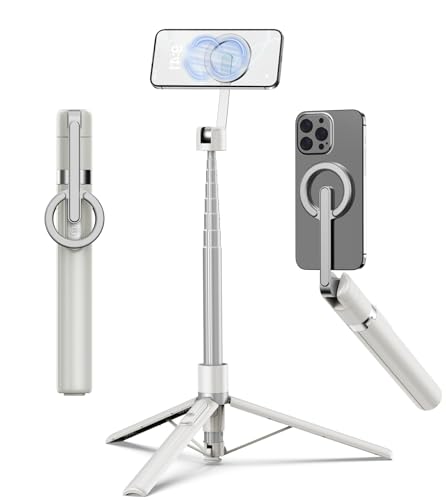
The TONEOF uses a magnetic phone mount rather than a spring-loaded clip, setting it apart for creators with MagSafe-compatible phones. Its eight-section aluminum-alloy pole extends from 11 to 68 inches, and the phone can be attached or removed quickly. A rechargeable remote is included for hands-free shooting. This design suits mobile creators who value a quick magnetic attachment and a tall travel stand. The mount depends on MagSafe compatibility, so it is not the safe default for every phone; verify your device and case work with the magnetic setup before recording.
Bottom line: Choose this if your phone supports MagSafe and quick magnetic mounting matters.
EUCOS 62-inch Phone Tripod

The EUCOS is a straightforward phone tripod and selfie stick, extending to 62 inches in one fluid motion rather than offering face tracking or a bundled microphone kit. Its holder fits phones 2.2 to 3.6 inches wide, and the unit weighs 0.8 pounds. The maker says its modified Nylon PA6/6 construction is engineered for crush and shear resistance and offers lifetime protection against defects or issues. This is a practical fit for creators who mainly need adjustable phone height and a remote. Its simpler setup lacks the separate lighting and audio gear found in the bundled kit.
Bottom line: Pick this for basic phone filming when a quick-extending stand is enough.
How to Choose a Tripod for Content Creation
Choose a tripod by matching its role to your recording setup: phone support, lighting, tracking, or sound. A phone tripod controls framing, but it does not automatically improve audio; creators recording speech often benefit from positioning a microphone close to the speaker. For solo videos, tracking can reduce the need to reframe when you move, while a fixed phone holder is simpler for a static shot. Maximum height also matters: compare the stand height with your seated or standing camera angle rather than assuming the tallest option fits every room. If you rely on accessories, check connector compatibility and whether the included pieces work with your phone before recording.
The table maps common recording needs to the feature that addresses them.
| Recording need | Useful tripod feature |
|---|---|
| Solo movement in frame | Automatic face or body tracking |
| Spoken audio | Compatible external microphone |
| Quick phone attachment | Magnetic mount compatible with the phone |
| Simple static framing | Adjustable height and a secure phone holder |
Phone Mount Fit and Setup
Phone fit is determined by the mount, not the tripod’s maximum height. A clip needs to span the phone’s width securely; the EUCOS holder fits phones from 2.2 to 3.6 inches wide. A magnetic mount instead relies on MagSafe compatibility, so confirm the phone and case combination attaches securely before filming. Set the tripod on a stable, level surface and keep its legs clear of foot traffic and cable runs. For shots above a desk or floor, avoid placing a phone where a bump could send it onto someone or fragile equipment. Recheck the mount after changing cases, orientation, or accessories, since added weight can change balance.
Why Audio and Lighting Matter in Creator Tripods
Audio and lighting are separate parts of a recording setup, even when a kit bundles them with a stand. A lavalier microphone clips near the speaker, while a ring light provides a nearby source of illumination; placement affects both. Keep a light near the camera direction to reduce harsh side shadows, and avoid pointing it directly into the lens. Wireless microphone range is a maker-rated limit, not a guarantee that every room will perform the same; walls and interference can affect a signal. A kit’s receiver connector must match the phone’s port or supported adapter. For cleaner speech, record a short test and listen for clothing rub, echo, or background noise before a longer take.
Safe Placement for a Phone Tripod
Set a phone tripod on a flat, firm surface and spread its legs fully before mounting the phone. Tall stands have a higher center of gravity and can tip if bumped, so keep them away from doorways, pets, and children, and avoid stretching a leg over a step or uneven floor. A simple decision rule is to use a lower setup whenever the full height is unnecessary, especially in a busy room. Keep charging and microphone cables routed away from walkways to prevent snags. Before recording, check that the phone is centered in its holder, the mount is locked, and the stand stays steady when lightly nudged.
Frequently Asked Questions
How tall should a phone tripod be for video?
Choose a height that puts the lens near the intended camera angle, such as eye level for a standing talking-head shot. These options extend from 62 to 71 inches, but room layout and whether you sit or stand determine the useful height.
Can a phone tripod work with a phone case?
A clip mount must still grip the cased phone within its supported width, while a magnetic mount needs a compatible MagSafe connection. Check the case-and-phone combination before relying on it, since a thick or noncompatible case can interfere with attachment.
Is a ring light enough for indoor video?
A ring light can provide close, front-facing fill, but it may not light a large room evenly. Place it near the camera direction and adjust distance to control shadows and glare; ambient room light and subject distance affect the result.
Where should a microphone sit for vlogging?
A lavalier microphone usually works best clipped near the speaker’s upper chest, clear of fabric rubbing against it. Make a short test recording first, since clothing noise and room echo can undermine speech even when the wireless connection works.
How do I keep a tall tripod from tipping?
Place the tripod on a firm, level surface, spread its legs fully, and keep it clear of foot traffic. Lower the stand when its maximum height is unnecessary, and route cables so they cannot snag a leg.