
Extract Audio From HDMI: 4 Extractors Compared

To extract audio from HDMI with the most video headroom, choose OREI 8K HDMI Audio Extractor, which supports pass-through up to 8K at 50/60Hz and provides optical and 3.5mm audio outputs. Choose a different extractor if your source is limited to 4K at 30Hz, you need RCA outputs, or your setup depends on ARC.
An HDMI audio extractor separates sound from an HDMI source so audio can go to a separate sound system; confirm the source, display, and sound system connections match before ordering.
We earn a commission if you buy through links on this page. As an Amazon Associate I earn from qualifying purchases. Products are compared on manufacturer specifications, not hands-on testing.
- Best overall: OREI 8K HDMI Audio Extractor – Supports video pass-through up to 8K at 50/60Hz and offers optical, stereo, and ARC outputs.
- Best for RCA systems: J-Tech Digital 4K ARC Extractor – Sends stereo audio over RCA and 5.1-channel audio over optical.
- Best for basic 4K setups: VPFET HDMI 1.4 Audio Extractor – Supports 4K at 30Hz and includes optical and 3.5mm outputs.
| Product | Best for | Maximum video pass-through | Audio outputs | ARC support | Shop |
|---|---|---|---|---|---|
| OREI 8K HDMI Audio Extractor | High-resolution setups | 8K at 50/60Hz | Optical, 3.5mm, HDMI ARC | Yes; no eARC | Check Price on Amazon |
| J-Tech Digital 4K ARC Extractor | RCA sound systems | 4K at 60Hz (4:2:0) | Optical, RCA | ARC; no eARC | Check Price on Amazon |
| OREI 4K 60Hz HDMI Audio Extractor | 4K optical audio | 4K at 50/60Hz (4:4:4) | Optical, 3.5mm | No | Check Price on Amazon |
| VPFET HDMI 1.4 Audio Extractor | 4K 30Hz sources | 4K at 30Hz | Optical, 3.5mm | No | Check Price on Amazon |
HDMI audio extractors
Match the extractor’s video ceiling and audio outputs to your source, display, and sound system.
OREI 8K HDMI Audio Extractor

For the highest video ceiling in this group, this OREI passes through up to 8K at 50/60Hz and supports 4K at 120Hz. It provides optical and stereo 3.5mm audio outputs, plus an HDMI ARC output; supported audio formats include LPCM up to 7.1 channels, Dolby Atmos, and DTS:X. The maker says it supports 48 Gbps FRL and 18 Gbps TMDS bandwidth. This is the most capable fit when the source and display need high-resolution pass-through, but it does not support eARC, so it is not a match for an eARC-only setup.
Bottom line: Choose this when you need high-resolution pass-through and your system does not require eARC.
J-Tech Digital 4K ARC Extractor
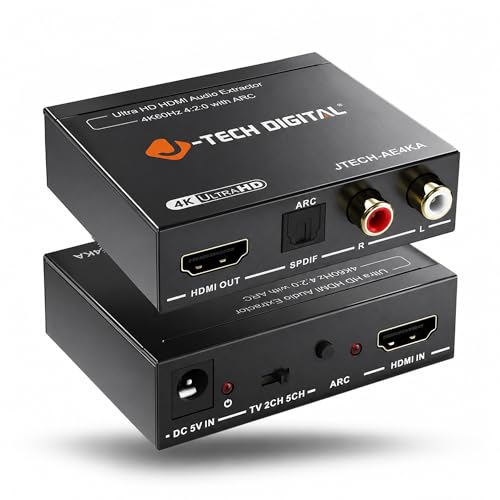
Unlike the models with 3.5mm output, this J-Tech sends stereo sound through RCA and 5.1-channel audio through optical. Its maker specifies 4K at 60Hz with 4:2:0 chroma or 4K at 30Hz with 4:4:4, and notes that a source unable to output the supported 4K 60Hz format may need to be set to 4K 30Hz or 1080p. The extractor does not downmix 5.1-channel audio, so a stereo-only sound system may not receive usable stereo from a 5.1 source. Choose it for an RCA connection, not for eARC.
Bottom line: Choose this if your sound system takes RCA stereo or optical surround sound.
OREI 4K 60Hz HDMI Audio Extractor

This OREI combines 4K at 50/60Hz pass-through with optical and 3.5mm audio outputs, making it a straightforward fit for a 4K display and an optical sound system. The maker says it supports LPCM 2/5.1/7.1-channel audio and formats including Dolby Digital, DTS 5.1, Dolby TrueHD, and Dolby Atmos; optical output supports Dolby Digital and DTS. It also supports HDCP 2.2 and CEC bypass. Unlike the ARC models, it has no ARC support, so it will not suit a setup that needs TV audio returned over ARC.
Bottom line: Pick this for 4K pass-through and optical or 3.5mm audio without ARC.
VPFET HDMI 1.4 Audio Extractor

This VPFET is the simplest match for a source and display operating at 4K 30Hz or below, with optical and 3.5mm outputs. Its maker specifies HDMI 1.4, 10.2 Gbps bandwidth, and HDCP 1.4, and provides 2.0-channel, 5.1-channel, and pass modes. Use 2.0-channel mode for the 3.5mm stereo output and 5.1-channel mode for optical; pass mode is the fallback if audio and video do not output in the other modes. This model does not support ARC or eARC and cannot take a TV as its HDMI input source.
Bottom line: Choose it for a non-ARC setup capped at 4K 30Hz with optical or 3.5mm audio.
How to choose an HDMI audio extractor
Start with the highest video format your source and display both need to pass through, then match the audio output to the sound system. A model rated for 4K at 30Hz is a limit for the full HDMI path; a 4K 60Hz or 8K source needs an extractor that explicitly supports that format. Check the audio connection too: optical is a digital output, while 3.5mm and RCA are analog stereo connections. For surround sound, verify that the sound system accepts the format being sent. Optical connections commonly carry stereo PCM or compressed 5.1 audio, not lossless multichannel formats such as Dolby TrueHD. If audio will come from the TV rather than a source device, confirm ARC compatibility before selecting an extractor.
HDMI extractor outputs and sound-system fit
Choose the output that physically and digitally matches the sound system: optical for a Toslink input, RCA for left/right analog inputs, or 3.5mm for an analog stereo input. Optical commonly supports stereo PCM and compressed Dolby Digital or DTS 5.1, while its bandwidth does not carry lossless multichannel audio. RCA and 3.5mm outputs are stereo, so a receiver’s multichannel input capabilities do not make those outputs surround sound. A simple decision rule is to select optical when the sound system has Toslink and supports the intended digital format; choose RCA or 3.5mm only when stereo is sufficient. Check whether a 5.1 source is downmixed if the receiving system only accepts stereo, since an extractor may pass rather than convert multichannel audio.
| Sound-system input | Typical extractor output | What to verify |
|---|---|---|
| Toslink | Optical | Supported audio format |
| Left/right analog | RCA or 3.5mm | Stereo compatibility |
| TV return channel | HDMI ARC | ARC support at both ends |
ARC, eARC, and source connections
ARC is the HDMI return-audio feature that carries sound from a compatible TV back toward an audio device over an HDMI connection; eARC is a newer return channel with greater audio bandwidth. An extractor that supports ARC does not necessarily support eARC, so match the exact feature required by the TV and sound system. For conventional source extraction, connect a player or console to the extractor’s HDMI input, then send video onward to the display and audio through the selected output. Do not connect a TV as the input source unless the extractor explicitly supports that use. A practical rule: if the source is the TV’s built-in apps, require the appropriate ARC or eARC path; if the source is a console or player, an extractor with suitable video pass-through may be enough.
Video formats, HDCP, and troubleshooting
Video pass-through depends on the format supported by every device in the chain, including source, extractor, display, and cable. A 4K 60Hz signal may require a specific chroma format: one model here supports 4K 60Hz at 4:2:0, while other models specify 4:4:4 at their supported rates. HDCP compatibility matters for protected video; the products here specify HDCP 1.4, 2.2, or 2.3, so check the connected devices when playback fails. If audio or video drops out, first lower the source to a mutually supported resolution and refresh rate, then check the extractor’s audio mode and output connection. Do not assume that a 4K label guarantees 4K at 60Hz.
Frequently Asked Questions
Can an HDMI extractor take audio from a TV?
Only an extractor with a supported TV return path can do that. ARC requires compatible ARC connections at the TV and audio device; eARC-only setups need eARC support, which is not the same feature.
Will optical carry Dolby Atmos sound?
Optical can carry some compressed surround formats, but it does not have the bandwidth for lossless Dolby TrueHD-based Atmos. Check whether the source and receiving system can use a supported compressed format or another connection.
Does an HDMI extractor convert 5.1 audio to stereo?
Not necessarily; some extractors pass 5.1 audio without downmixing it. If the sound system accepts only stereo, verify downmix support or set the source to stereo PCM.
What HDMI version do I need for 4K at 60Hz?
The required capability depends on the video format, including chroma subsampling and color depth, not only the resolution. Confirm that the source, extractor, display, and cables support the same 4K 60Hz format.
Why is there no sound from my HDMI extractor?
A mismatched audio mode or unsupported audio format can prevent sound output. Try stereo PCM for an analog output, or select a format the optical receiver supports; also verify the source is connected to the extractor input rather than a TV output.