
Fosi Audio K5 Pro: DAC Amp Models Compared

The Fosi Audio K5 Pro is the closest match for a desktop gaming DAC amp because it combines a mic input with USB-C, optical, and coaxial inputs. Choose a different model if you need a 4.4mm balanced headphone output, higher stated decoding limits, or a compact phone-connected dongle.
We earn a commission if you buy through links on this page. As an Amazon Associate I earn from qualifying purchases. Products are compared on manufacturer specifications, not hands-on testing.
- Best overall: Fosi Audio K5 Pro – Mic input plus USB-C, optical, and coaxial inputs suits a gaming desktop setup.
- Best for balanced headphones: Fosi Audio K7 – Adds a 4.4mm balanced output and lists up to 2100mW output.
- Best for digital output: Douk Audio K5 – Includes an optical output for sending computer audio to compatible digital-input gear.
| Product | Best for | Inputs | Headphone outputs | Maximum decoding | Shop |
|---|---|---|---|---|---|
| Fosi Audio K5 Pro | Gaming desktops | USB-C, optical, coaxial | 3.5mm | 24-bit/192kHz | Check Price on Amazon |
| Douk Audio K5 | Optical output | USB, optical | 3.5mm, 6.35mm | 32-bit/384kHz; DSD256 | Check Price on Amazon |
| Fosi Audio DS2 | Phone listening | USB-C | 3.5mm, 4.4mm | 32-bit/384kHz; DSD256 | Check Price on Amazon |
| Fosi Audio K7 | Balanced desktop audio | USB-C, optical, coaxial, Bluetooth | 4.4mm balanced | 32-bit/384kHz; DSD256 | Check Price on Amazon |
Fosi Audio K5 Pro and DAC Amp Alternatives
Compare the connection types and stated decoding support to match a DAC amp to your source and headphones.
Fosi Audio K5 Pro
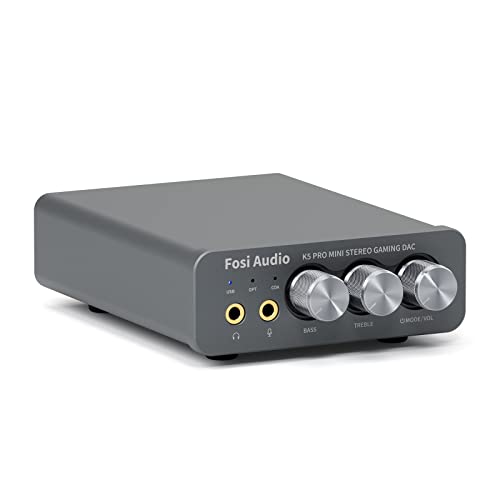
The Fosi Audio K5 Pro stands apart for combining a mic input with three digital source options: USB-C, optical, and coaxial. It converts those signals to 3.5mm AUX and RCA outputs, so it can feed headphones or compatible powered audio gear. The maker positions it for PS5, computers, Mac, and active speakers, and says it supports 24-bit/192kHz audio. Its compact case measures 4.4 by 3.7 by 1.2 inches. Buyers who need a 4.4mm balanced headphone connection should choose another model, because the K5 Pro’s headphone output is 3.5mm.
Bottom line: Choose it for desktop gaming when a mic input and multiple digital source connections matter most.
Douk Audio K5

The Douk Audio K5 is the option here with an optical output, in addition to optical, RCA, and headphone outputs. That extra digital path can suit a computer setup that needs to pass audio to equipment with an SPDIF input. Its headphone connections include both 3.5mm and 6.35mm, while the Fosi K5 Pro centers on a 3.5mm headphone output and adds a mic input. Douk states support for PCM up to 32-bit/384kHz and DSD256. Choose it for varied output routing; the maker does not identify a microphone input, so gaming chat should not be the deciding assumption.
Bottom line: Pick it when optical signal pass-through and a 6.35mm headphone jack are priorities.
Fosi Audio DS2

The Fosi Audio DS2 is a portable USB-C DAC dongle rather than a desktop control hub, and its 4.4mm balanced output is its key distinction. It also has a 3.5mm output, so it covers headphones with either connector type. The maker says it supports PCM up to 32-bit/384kHz and DSD256, and gives output power of up to 170mW per channel at 32 ohms. This model suits phone or tablet listening where small size matters more than a desktop mic input or multiple digital inputs. Buyers with only optical or coaxial sources should select a different unit.
Bottom line: Choose it for portable USB-C listening with a 4.4mm balanced headphone connection.
Fosi Audio K7

The Fosi Audio K7 builds on a desktop DAC amp format with a 4.4mm balanced output, Bluetooth, and a mic input. The K5 Pro also targets gaming and provides a mic input, but this model adds Bluetooth and a balanced headphone connection. Fosi says the K7 supports PCM up to 32-bit/384kHz and DSD256, with up to 2100mW output power. Its connections include USB-C, optical, and coaxial inputs. Choose it for a more connection-rich desktop setup; a buyer who only needs standard 3.5mm headphone listening may not need the balanced-output feature.
Bottom line: Pick it for a desktop setup needing balanced headphones, Bluetooth, and a mic input.
How to choose a gaming DAC amp
For console or PC gaming, start with the source connection and the headset connection, not the advertised decoding ceiling. USB carries digital audio from a computer, while optical and coaxial are S/PDIF connections commonly used by consoles and other digital sources; the source and DAC must share an input type. A 3.5mm mic input is separate from the headphone output, so check that both are present if you need voice chat. For standard single-ended headphones, 3.5mm is common; 6.35mm is the larger plug and can be adapted to 3.5mm with a suitable adapter. Choose a model with a 4.4mm output only when your headphones have a balanced cable and compatible wiring.
What decoding numbers mean
Sample rate and bit depth describe the digital audio format a DAC can accept, not a guarantee of audible improvement. CD audio is 16-bit/44.1kHz, while 24-bit/96kHz is a common high-resolution format; the source app, operating system, and DAC all need to support the format for that signal path. A 32-bit/384kHz maximum is useful chiefly as a compatibility ceiling, and does not make every source play at that rate. DSD is a different encoding family from PCM, so a DSD256 claim should not be compared as if it were a PCM sample rate. For gaming, prioritize matching inputs and mic routing before paying attention to a larger maximum number.
Desktop and portable DAC amp types
Desktop DAC amps use a separate enclosure and typically offer several source and line-output connections; portable dongles connect directly over USB-C and focus on headphone output. The distinction matters because a dongle with 3.5mm and 4.4mm jacks does not substitute for a desktop unit’s optical or coaxial input. Use this quick match-up to narrow the type by setup need.
| Setup need | Connection feature to prioritize |
|---|---|
| Console or PC plus voice chat | Compatible digital input and mic input |
| Headphones with balanced cable | 4.4mm balanced output |
| Computer feeding SPDIF equipment | Optical output |
| Phone or tablet use | USB-C portable DAC amp |
Before ordering, confirm that the console or computer can output through the connection you plan to use and that the headset’s mic plug matches the DAC amp’s mic input.
Headphone plugs and output power
Headphone plug size and electrical compatibility are separate checks: a physical adapter changes the plug shape, but it does not turn a single-ended output into a balanced one. A 4.4mm balanced cable must connect to a device designed for balanced output; do not use a wiring adapter that joins balanced contacts to a single-ended jack. Output power figures are also tied to headphone impedance, so a published rating at 32 ohms does not directly describe performance at every impedance. If you have hard-to-drive headphones, compare power at the headphone’s impedance and sensitivity rather than relying only on the largest headline figure.
Frequently Asked Questions
Can the K5 Pro connect to a PS5?
The K5 Pro is positioned for PS5 use and has USB-C, optical, and coaxial digital inputs. Confirm that the console’s selected audio output matches the input connection you intend to use.
What is the difference between optical and coaxial audio?
Both are S/PDIF digital-audio connections, but optical carries the signal over light while coaxial uses an electrical cable. A source and DAC need the same connection type; neither connection is interchangeable with USB-C.
Does a 4.4mm headphone jack fit regular headphones?
A 4.4mm plug requires a matching 4.4mm output or an appropriate cable termination. A plug adapter does not make ordinary single-ended headphones balanced, so match the cable and output design.
Is 384kHz better for gaming audio?
A 384kHz maximum is a format-compatibility limit, not a promise of better game sound. Most game audio is rendered in real time, so connection compatibility, mic routing, and headphone matching are more practical selection factors.
Can a USB-C DAC amp work with a phone?
A USB-C DAC amp can work when the phone supports USB audio output and the connection is compatible. Portable units draw from or connect through the phone, so check the device’s USB audio behavior and any required adapter before choosing.