
AV Cable for PlayStation 2: 4 Composite Options Compared

For a standard PlayStation 2 connection, PS2/PS3 RCA Composite AV Cable is a straightforward pick because its 6-foot cable connects the console to a TV with composite RCA inputs. Choose COMeap PS2 AV Cable with Converter if you also need its bundled RCA-to-HDMI converter, which requires USB power.
These AV cables carry analog composite video and stereo audio; they do not make the PS2 output native HD video.
We earn a commission if you buy through links on this page. As an Amazon Associate I earn from qualifying purchases. Products are compared on manufacturer specifications, not hands-on testing.
- Best overall: PS2/PS3 RCA Composite AV Cable – A 6-foot composite cord with yellow video and red/white stereo-audio plugs.
- Best for HDMI TVs: COMeap PS2 AV Cable with Converter – Includes an RCA-to-HDMI converter, with USB power required for the converter.
- Best for a simple replacement: PlayStation AV Multi Out to RCA Cable – A 5.9-foot PS1, PS2, and PS3-compatible cable with three RCA connectors.
| Product | Best for | Length | Console compatibility | TV connection | Shop |
|---|---|---|---|---|---|
| PS2/PS3 RCA Composite AV Cable | Standard RCA TVs | 6 ft | PS1, PS2, PS2 Slim, PS3 | Composite RCA | Check Price on Amazon |
| COMeap PS2 AV Cable with Converter | HDMI input displays | 6 ft | PS1, PS2, PS2 Slim, PS3 | RCA cable plus HDMI converter | Check Price on Amazon |
| PlayStation AV Multi Out to RCA Cable | Near-six-foot reach | 5.9 ft | PS1, PS2, PS2 Slim, PS3 | Composite RCA | Check Price on Amazon |
| 6Ft PS1/PS2/PS3 Composite AV Cable | Flexible cable handling | 6 ft | PS1, PS2, PS3 | Composite RCA | Check Price on Amazon |
AV Cables for PlayStation 2
Compare cable length, console compatibility, and whether the package includes conversion hardware.
PS2/PS3 RCA Composite AV Cable
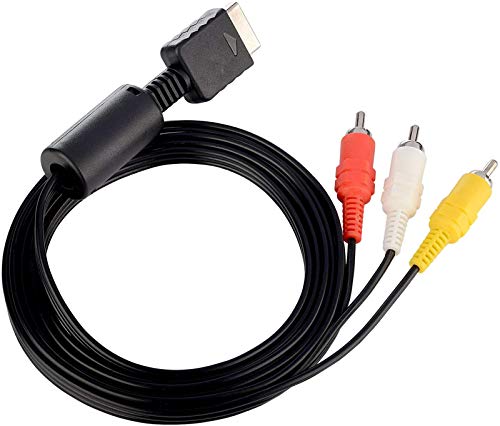
For a direct composite connection, this cable provides a 6-foot run from a compatible PlayStation console to a TV or monitor with RCA composite inputs. Its yellow plug carries video, while red and white carry the two stereo-audio channels. The compatibility includes PS1, PS2, PS2 Slim, and PS3. It suits a replacement setup where the display already has those three RCA jacks. The limitation is the input type: a display without composite RCA inputs needs a compatible converter, which is not included with this cable.
Bottom line: Choose this for a direct 6-foot connection to a display with composite RCA inputs.
COMeap PS2 AV Cable with Converter

Unlike the other cords, this option pairs a 6-foot PS2 AV cable with an RCA-to-HDMI converter. The cable’s yellow, red, and white plugs connect to composite output; the converter is intended for a display using HDMI input and requires its included USB power cable connected to a 5-volt source. Its compatibility wording includes PS1, PS2, PS2 Slim, and PS3. It is the relevant choice when a display lacks RCA inputs. The converter does not change the console’s underlying composite output into native HD video.
Bottom line: Pick this when the display has HDMI but no composite RCA inputs and USB power is available.
PlayStation AV Multi Out to RCA Cable

This cable measures 5.9 feet, just under the 6-foot length of several alternatives, and connects a PlayStation AV multi out port to composite RCA inputs. Three plugs carry video and stereo audio: yellow for video, red for right audio, and white for left audio. It is identified as compatible with PlayStation, PS1, PS2, PS2 Slim, and PS3. The near-six-foot reach works for typical console-to-TV placement. Its limitation is the same analog input requirement as a basic cable: HDMI-only displays need a separate converter.
Bottom line: Choose this if a 5.9-foot cable suits the distance and the display has RCA inputs.
6Ft PS1/PS2/PS3 Composite AV Cable
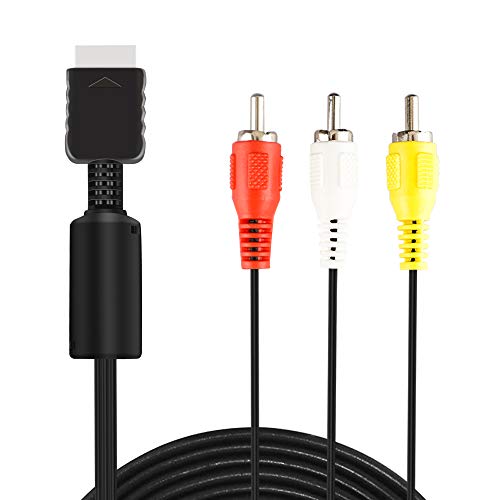
This 6-foot cord is the option whose construction is specifically described as copper wire inside with a flexible PVC housing. Its console compatibility covers PS1, PS2, and PS3, and its console-side connector leads to yellow, red, and white composite plugs. That combination suits someone prioritizing a flexible cord for a standard RCA setup. The compatibility wording does not separately name PS2 Slim, unlike some other choices, so buyers with that console should confirm the fit before ordering.
Bottom line: Choose it for a flexible 6-foot cord, after confirming the console-side fit if using PS2 Slim.
How to choose a PlayStation 2 AV cable
Match the cable to the display’s input before comparing anything else: standard composite uses three RCA jacks, typically yellow for video and red and white for stereo audio. A PS2 AV cable carries analog composite video, not a digital HDMI signal. If the TV has composite inputs, a direct cable is the simpler connection; if it has only HDMI, you need an active RCA-to-HDMI converter. With the converter option here, USB power from a 5-volt source is required. A cable’s console compatibility also matters, especially if using a PS2 Slim rather than another PS2 revision.
Measure the path from console to TV, allowing slack at both ends. A cable around 6 feet suits a short console-to-screen run; if the routed path is longer than 6 feet, check for a longer compatible cable rather than pulling the plugs taut.
Composite RCA and HDMI conversion
Composite RCA sends video over one yellow connector and analog stereo audio over red and white connectors. HDMI carries digital audio and video, so an RCA cable cannot plug directly into an HDMI-only port. An active converter bridges those signal formats and needs power; it does not give the PS2 native HD output. Composite is also lower in detail than component video, which uses separate color-difference signals and typically five RCA plugs for video and stereo audio. Confirm the TV’s input labels: a yellow composite video jack is not interchangeable with a green component-video jack simply because both are RCA-style connectors.
Use this quick decision guide to match the input on the display to the required connection.
| Display input | Connection needed | Key check |
|---|---|---|
| Yellow/red/white RCA | Direct composite cable | Match console plug and cable reach |
| HDMI only | Composite-to-HDMI converter | Provide converter USB power |
| Component RCA only | Component-compatible cable | Do not treat green as composite yellow |
Connecting the PS2 and avoiding common mistakes
Connect the console-side AV plug with the system powered off, then match each color-coded RCA plug to its corresponding input. Yellow is video; red and white are right and left audio. A wrong audio pairing can swap stereo channels, while a missing yellow connection prevents composite picture. Select the matching AV or composite input on the television after connecting; the TV’s source selection is separate from the cable itself. Keep the cable slack rather than bending it sharply at the console connector. For an HDMI converter, connect its USB power lead to a 5-volt source as required, then select that HDMI input on the display.
Picture quality depends on the signal path: composite is standard-definition analog video, and a converter cannot recover detail the PS2 did not send. Avoid buying a direct RCA cable for an HDMI-only display or forcing connectors that do not match.
Frequently Asked Questions
Can a PS2 AV cable connect to an HDMI-only TV?
A basic composite cable cannot connect directly to an HDMI-only TV. Use an active RCA-to-HDMI converter and provide USB power if the converter requires it; the converter does not create native HD output.
Which RCA plug carries PS2 video?
The yellow RCA plug carries composite video. Red and white carry the right and left stereo-audio channels, so connect all three for picture and sound.
Does a PS2 composite cable improve resolution?
No; a composite cable carries the PS2’s analog video signal rather than increasing its resolution. Converting that signal to HDMI changes the connector format, not the source detail.
Can I use a PS2 cable with a PS2 Slim?
Compatibility depends on the console-side AV connector, and several cables here explicitly include PS2 Slim. Check that the cable names your console revision before ordering, especially when its compatibility wording names PS2 but not Slim.
What is the difference between composite and component inputs?
Composite video uses one yellow RCA plug, while component video uses three video plugs, commonly green, blue, and red, plus separate stereo audio. Match the cable to the TV’s labeled input rather than relying on RCA connector shape alone.