
Best Printer Cleaning Kit: 4 Inkjet Options Compared

Inkjet Printhead Kit, 100 mL suits most inkjet owners because it pairs 100 mL of cleaning fluid with a 20 mL syringe. Choose a different option if you want 200 mL of fluid or prefer to compare solutions without a syringe listed among the product features.
Inkjet cleaning kits use fluid to address printhead or nozzle clogs; the right procedure depends on the printer’s design and manufacturer guidance.
We earn a commission if you buy through links on this page. As an Amazon Associate I earn from qualifying purchases. Products are compared on manufacturer specifications, not hands-on testing.
- Best overall: Inkjet Printhead Kit, 100 mL – Includes 100 mL of cleaning fluid and a 20 mL syringe.
- Best for larger fluid supply: Spaceink Printhead Cleaner, 200 mL – Provides 200 mL of cleaning fluid.
- Best for named printer families: Absonic Inkjet Cleaner, 100 mL – Its features name Epson EcoTank, WorkForce, and Expression lines, among others.
| Product | Best for | Fluid volume | Compatibility named | Shop |
|---|---|---|---|---|
| Inkjet Printhead Kit, 100 mL | Syringe-assisted cleaning | 100 mL | Epson, HP, Brother, Canon | Check Price on Amazon |
| Absonic Inkjet Cleaner, 100 mL | Named Epson models | 100 mL | Epson, HP, Canon, Brother | Check Price on Amazon |
| Fosgoit Inkjet Printhead Cleaner, 100 mL | General inkjet upkeep | 100 mL | Epson, HP, Canon, Brother | Check Price on Amazon |
| Spaceink Printhead Cleaner, 200 mL | More cleaning fluid | 200 mL | Epson, HP, Canon, Brother | Check Price on Amazon |
Best printer cleaning kits for inkjet printers
Compare the fluid amount, included syringe information, and printer families each kit identifies.
Inkjet Printhead Kit, 100 mL
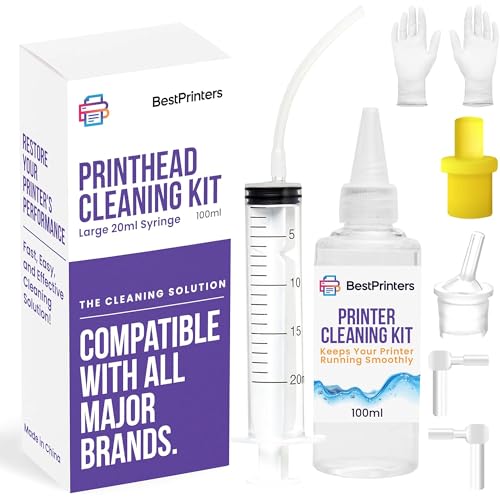
Unlike the fluid-only options described here, this kit pairs 100 mL of cleaning fluid with a 20 mL syringe. The maker says it is intended for common inkjet print-quality problems, including missing colors, streaks, and blank pages, and names Epson, HP, Brother, and Canon printer families among its compatible types. It may suit owners who want a syringe for applying fluid during cleaning. The maker advises running a printhead or power cleaning afterward to bring ink back into the printhead. Compatibility with a specific printer model still matters, so verify that model before using the fluid.
Bottom line: Choose this if you want a syringe included alongside 100 mL of cleaner.
Absonic Inkjet Cleaner, 100 mL

Absonic stands out for naming specific Epson series and example models in its features, including EcoTank, WorkForce, Expression, and Stylus. The 100 mL solution is also associated with HP, Canon, Brother, Samsung, Lexmark, and DTF printers. This option suits buyers who want to compare stated compatibility against a printer family before choosing a cleaner. Confirm the exact printer model before use rather than relying on a brand match alone.
Bottom line: Pick this when its named Epson series match your printer.
Fosgoit Inkjet Printhead Cleaner, 100 mL

Fosgoit offers 100 mL of cleaner and distinguishes itself by naming Epson EcoTank and WorkForce as well as HP OfficeJet and DeskJet printer families. Canon inkjet and Brother inkjet printers are also named. This is a straightforward option for buyers comparing a mid-size fluid supply across several common inkjet brands. Check the model’s own cleaning guidance and confirm compatibility before putting fluid into a printer.
Bottom line: Choose this if its named printer families fit your setup.
Spaceink Printhead Cleaner, 200 mL

Spaceink provides 200 mL of fluid, twice the amount in the 100 mL options here. Its features name Epson, HP, Canon, Brother, EcoTank, Lexmark, Kodak, and Samsung printers, and say the solution works with OEM/factory inks, dyes, sublimation inks, and thermal-transfer inks. That combination may suit owners who expect to need a larger fluid supply or work with one of the named ink types.
Bottom line: Pick this when 200 mL of fluid is your priority.
How to choose an inkjet printer cleaning kit
Start with the printer’s model-specific cleaning procedure, then choose a kit whose compatibility claims match that model. Inkjet printheads commonly use either thermal or piezoelectric ejection, and cleaning access and procedures can differ by design. A brand name alone is not a reliable fit check: confirm the exact model, especially for a printer used with sublimation or transfer inks. Next, compare what the kit actually includes; a named syringe can matter if the procedure calls for controlled fluid application. If your need is occasional maintenance, 100 mL is the smaller supply among these options; choose 200 mL only if the larger amount suits your expected use.
What cleaning fluid volume means for upkeep
Fluid volume tells you how much solution is supplied, not how many cleaning cycles a printer will need. The amount used per procedure depends on the printer design and the cleaning method, so there is no dependable cycle count to infer from the bottle size alone. For one printer and occasional troubleshooting, compare the 100 mL options; for a larger supply, the 200 mL option provides twice that volume. Avoid treating extra fluid as permission to repeatedly flush a head: repeated cleaning cycles can consume printer ink and may not clear a mechanical or electronic fault. Stop if the printer’s recommended maintenance steps do not resolve the issue.
How to use a printhead cleaner safely
Begin with the printer’s built-in nozzle check or maintenance cleaning, because it uses the printer’s intended route before any manual intervention. Printhead construction varies: some heads are integrated with cartridges, while others are fixed in the printer, and forceful handling can damage delicate nozzles or electrical contacts. Use only a cleaning method appropriate for the exact printer model; do not push fluid through a head unless its instructions call for that procedure. Keep cleaner off electrical contacts and let any cleaned part dry fully before reconnecting it. If a printhead remains clogged after the maker’s recommended maintenance, service may be safer than repeated manual flushing.
Common printer cleaning kit mistakes
The most common mistake is choosing by printer brand instead of exact model and printhead design. A second is confusing a fluid bottle’s volume with the amount required for one cleaning; these products do not give a standard dose that applies to every printer. Some inkjet systems use thermal ejection and others piezoelectric ejection, so a procedure suitable for one design may not suit another. Do not mix cleaning fluids or substitute household solvents, and avoid touching the nozzle plate or contact strip. If you use a kit with a syringe, apply it only as directed for your model; never force a blocked passage.
Frequently Asked Questions
Can printer cleaning fluid damage a printhead?
Yes, incorrect fluid or forceful cleaning can damage a printhead. Inkjet designs differ, so use only a procedure approved for the exact printer model and avoid forcing fluid through a blocked head.
Should I run a nozzle check before cleaning?
Yes, a nozzle check can show whether missing lines or colors are present before cleaning. Run the printer’s built-in maintenance step first, since manual cleaning may be unnecessary for a minor clog.
How much printer cleaning fluid do I need?
There is no universal amount because printer designs and cleaning methods differ. These kits contain 100 mL or 200 mL; choose based on the supply you need, not an assumed number of cleaning cycles.
Can I use a cleaning kit with sublimation ink?
Some cleaners name sublimation-ink compatibility, but that claim does not establish fit for every printer model or ink setup. Confirm both the printer model and the cleaning procedure before applying fluid.
Why should I avoid repeated power cleanings?
Repeated power cleanings can consume ink without fixing a damaged or mechanically blocked printhead. If the printer’s recommended maintenance does not restore the nozzle check, stop and consider model-specific service.