
Sony Memory Stick Pro Duo Reader: 4 Options Compared

Bawanfa 4-in-1 Reader is the clearest match for a Sony Memory Stick Pro Duo reader because its supported cards explicitly include Memory Stick Pro Duo. Choose another option if you need a different connector or broader card support, but confirm that its MS slot accepts your exact card.
A card reader connects a memory card to a phone or computer so files can be accessed or transferred.
We earn a commission if you buy through links on this page. As an Amazon Associate I earn from qualifying purchases. Products are compared on manufacturer specifications, not hands-on testing.
- Best overall: Bawanfa 4-in-1 Reader – Its supported formats explicitly include Memory Stick Pro Duo, and it offers USB-C, Lightning and USB-A connections.
- Best for CF cards: 4-in-1 USB-C Card Reader – It names Memory Stick Pro Duo support and also includes a CF slot with USB-C and a detachable USB adapter.
- Best for simultaneous cards: BENFEI 4-in-1 Reader – It says four card types can be read and written simultaneously, with USB-C and USB 3.0 connectors.
| Product | Best for | Card formats | Connectors | Transfer rate | Shop |
|---|---|---|---|---|---|
| Bawanfa 4-in-1 Reader | Multi-device use | MS Pro Duo, Pro-HG, Duo; SD, microSD, xD | USB-C, Lightning, USB-A | 480 Mbps | Check Price on Amazon |
| 4-in-1 USB-C Card Reader | CF card users | MS Pro Duo, SD, microSD, CF, RS-MMC | USB-C, USB-A adapter | — | Check Price on Amazon |
| BENFEI 4-in-1 Reader | Simultaneous access | MS, SD, microSD, CF | USB-C, USB 3.0 | Up to 160 MB/s | Check Price on Amazon |
| 5-in-1 USB-C Card Reader | Extra USB ports | MS, SD, microSD | USB-C, USB-A adapter; 2 USB-A ports | — | Check Price on Amazon |
Sony Memory Stick Pro Duo Reader Options
Compare card-format compatibility and host-device connections before choosing a reader.
Bawanfa 4-in-1 Reader

Unlike the other options, this reader explicitly names Memory Stick Pro Duo, Pro-HG and Duo compatibility, and provides Lightning alongside USB-C and USB-A. Its four slots support MS, SD, microSD and xD-Picture cards, making it relevant if you use more than one camera-card format. The maker states a transfer rate of 480 Mbps. It suits someone who needs connections for a mix of Apple, Android and computer devices. The trade-off is that its formats do not include CompactFlash, so it is not the pick for a CF workflow.
Bottom line: Choose this if explicit Pro Duo support and three device connector types matter most.
4-in-1 USB-C Card Reader

This option pairs explicit Memory Stick Pro Duo support with a CompactFlash slot, a combination that distinguishes it from readers without CF compatibility. The four-in-one design also lists SD, microSD and RS-MMC formats, and a detachable adapter adds USB-A to its USB-C connection. It is a practical match when you need to access several card types from newer USB-C devices or older USB-A ports. The feature set does not name Lightning, so Apple devices with only that connector need another solution.
Bottom line: Pick this for Pro Duo and CF cards with USB-C or USB-A access.
BENFEI 4-in-1 Reader
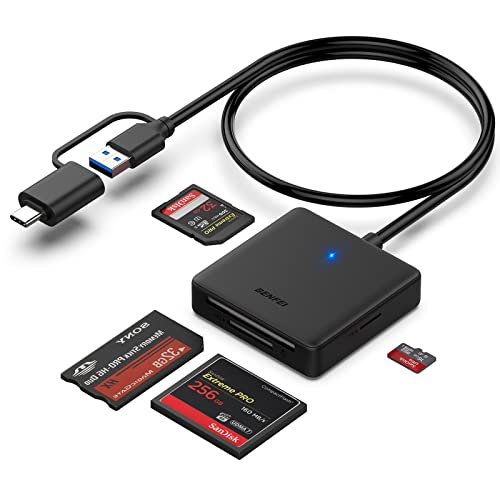
Its standout feature is simultaneous reading and writing across four card types: SD, microSD, MS and CF. The reader connects through USB-C or USB 3.0 and is backward compatible with USB 2.0 and 1.1. The maker gives a maximum UHS-I transfer rate of 160 MB/s; actual transfer speed depends on the card, port and host device. This suits users who want one reader for a mixture of common card types. The formats name MS generally rather than Memory Stick Pro Duo specifically, so verify the slot accepts your exact card before ordering.
Bottom line: Choose this for simultaneous multi-card access, after confirming Pro Duo fit.
5-in-1 USB-C Card Reader
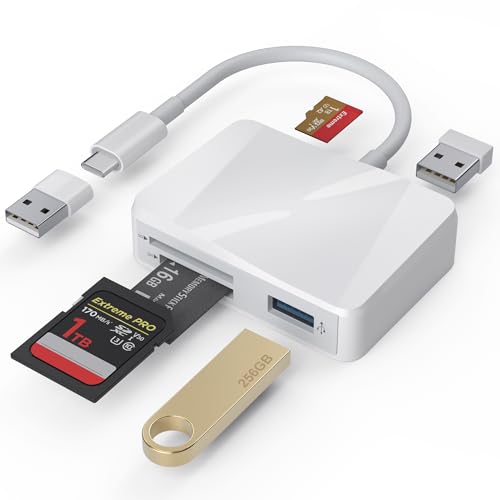
Two USB-A ports set this reader apart from the other options, while its card slots cover SD, microSD and MS. A detachable USB adapter complements the USB-C connector, giving it a mix of card reader and port-expansion functions. It may suit a phone, tablet or laptop user who also needs to connect USB-A accessories. Confirm Pro Duo compatibility and the port arrangement you need before choosing it.
Bottom line: Consider this when extra USB-A ports matter and the MS slot fits your card.
How to choose a Sony Memory Stick Pro Duo reader
Start by checking that the reader names Memory Stick Pro Duo, not just Memory Stick or MS. A reader can have a compatible-looking slot yet still lack support for a particular card type. Next, match the host connection: USB-C, USB-A and Lightning are different physical interfaces, and USB-C by itself does not guarantee a particular transfer speed. If your computer has USB-A, a USB-C-only reader needs a compatible adapter. The choice also changes if you use CF, xD, SD or microSD cards; select a model that names every format you need. For a mixed-device setup, count the connectors you can use directly before relying on adapters.
Memory Stick Pro Duo fit and compatibility
Memory Stick Pro Duo cards are physically smaller than standard Memory Stick cards: Pro Duo measures about 31 × 20 × 1.6 mm, while standard Memory Stick is about 50 × 21.5 × 2.8 mm. A slot labeled MS does not by itself establish support for every Memory Stick variant, so favor explicit Pro Duo compatibility. When you have an unusual card version or a card with an adapter attached, check the reader’s slot shape and supported formats before purchase. Also confirm the phone or computer can access external storage through its connector; a matching plug alone does not ensure file access. This is especially important when choosing a reader for mobile use.
Card reader connectors and transfer speeds
USB-C describes a connector shape, not a guaranteed data rate; the reader, card, device port and software all affect file transfer. USB 3.0 has a theoretical signaling rate of 5 Gbps, while USB 2.0 is 480 Mbps, but those figures are not promises of card-to-device speed. UHS-I cards can have bus rates up to 104 MB/s, and the actual card’s capabilities can be lower. The maker gives BENFEI 4-in-1 Reader a maximum UHS-I rate of 160 MB/s and Bawanfa 4-in-1 Reader a rate of 480 Mbps; these are not directly comparable guarantees of real-world transfer. If moving large video files, the slowest component sets the practical ceiling.
| Need | What to check |
|---|---|
| Pro Duo use | Explicit Memory Stick Pro Duo support |
| Older USB-A computer | USB-A connector or compatible adapter |
| Multiple card formats | Every required card type named |
| Faster file transfer | Card, reader and host port capabilities |
Common mistakes when using a card reader
Forgetting to match the connector is a common setup problem: a USB-C reader cannot plug directly into a Lightning-only device, and an adapter adds another compatibility point. Another mistake is assuming a card reader supports Pro Duo because its maker says only MS; verify the exact format. Do not remove a card while files are being copied, and use the device’s eject function when available to reduce the chance of interrupted writes. Large transfers can also take longer than a reader’s headline rate suggests because the card and host port constrain speed. Before copying important files, confirm the destination has enough free storage and that the files open correctly.
Frequently Asked Questions
Does a Memory Stick slot always accept Pro Duo cards?
No; an MS label alone does not confirm support for every Memory Stick format. Choose a reader that names Memory Stick Pro Duo, especially if your card is a specific Pro Duo variant.
Is USB-C faster than USB-A for card transfers?
Not necessarily, because connector shape does not define data speed. USB 3.0 has a theoretical 5 Gbps signaling rate, while the card, reader and host port determine the practical transfer rate.
Can I use a card reader with my phone?
Yes, if the connector matches and the phone supports access to external storage. USB-C, USB-A and Lightning are distinct interfaces, so confirm both the connector and device compatibility.
Why do card transfers take longer than the advertised rate?
The slowest part of the chain limits transfers: card, reader, port and host device. A maximum rate such as 160 MB/s does not guarantee that a particular card and phone will reach it.
Can one reader handle several card types at once?
Some readers support multiple card slots, and BENFEI 4-in-1 Reader says it can read and write four card types simultaneously. Check whether the specific types you use are supported rather than assuming every slot accepts every format.