
NVMe to SATA Adapter: Types and Compatibility Compared

For adding internal SATA ports from a spare M.2 NVMe slot, RIITOP M.2 to SATA 6-Port Adapter is the direct match because it provides six SATA ports. Choose an external enclosure instead if you need to connect an M.2 drive over USB, or a SATA-only converter if your SSD uses the M.2 SATA interface rather than NVMe.
We earn a commission if you buy through links on this page. As an Amazon Associate I earn from qualifying purchases. Products are compared on manufacturer specifications, not hands-on testing.
- Best overall: RIITOP M.2 to SATA 6-Port Adapter – Uses a spare M.2 NVMe slot to add six SATA ports.
- Best for tool-free external use: SABRENT Tool-Free M.2 Enclosure – Accepts both NVMe and SATA M.2 SSDs in three lengths and installs without tools.
- Best for SATA M.2 drives: M.2 SATA to SATA3 Adapter – Converts compatible M.2 SATA SSDs to a standard SATA connection.
| Product | Best for | Connection | Supported interface | Drive size or port count | Shop |
|---|---|---|---|---|---|
| RIITOP M.2 to SATA 6-Port Adapter | Internal SATA expansion | M.2 slot to SATA | NVMe M.2 | 6 SATA ports | Check Price on Amazon |
| M.2 SATA to SATA3 Adapter | SATA M.2 reuse | M.2 SATA to SATA | M.2 SATA only | 2230–2280 | Check Price on Amazon |
| SSK M.2 NVMe/SATA USB Enclosure | External M.2 storage | USB-C to computer | NVMe and SATA M.2 | 2242–2280 | Check Price on Amazon |
| SABRENT Tool-Free M.2 Enclosure | Tool-free external use | USB-C to computer | NVMe and SATA M.2 | 2242–2280 | Check Price on Amazon |
| ELUTENG M.2/mSATA to 2.5-Inch SATA | Legacy SATA drive reuse | SATA to 2.5-inch SATA | M.2 SATA or mSATA | — | Check Price on Amazon |
NVMe to SATA Adapters and M.2 Alternatives
Match the adapter to the SSD interface and decide whether you need internal SATA ports or an external USB connection.
RIITOP M.2 to SATA 6-Port Adapter

For internal storage expansion, RIITOP M.2 to SATA 6-Port Adapter turns one spare M.2 NVMe slot into six standard SATA ports. It uses an ASM1166 chipset and has an aluminum alloy cover, making it the only option here designed to add several internal SATA connections rather than connect one SSD externally. Choose it when the motherboard has a compatible spare M.2 slot and the system needs multiple SATA-attached drives. The key limitation is that it consumes an M.2 slot, so it is not a fit for a computer with no suitable slot available.
Bottom line: Choose it to add six SATA ports through a spare M.2 NVMe slot.
M.2 SATA to SATA3 Adapter
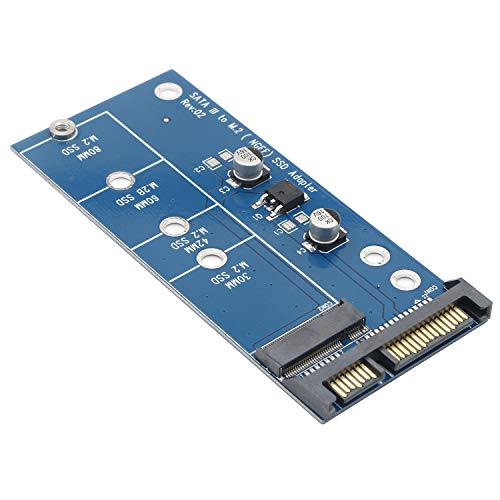
Unlike RIITOP M.2 to SATA 6-Port Adapter, M.2 SATA to SATA3 Adapter adapts an M.2 SATA SSD to a standard SATA connection; it expressly does not support PCIe NVMe SSDs. The board supports B+M-key M.2 SATA drives in 2230, 2242, 2260, and 2280 lengths, and it is intended for reuse with an existing SATA connection. This is a narrow but useful match if the drive itself is SATA-based. Do not choose it just because an NVMe drive has a similar M.2 shape: the interface, not the connector appearance alone, determines compatibility.
Bottom line: Pick it only for a supported M.2 SATA SSD, not an NVMe drive.
SSK M.2 NVMe/SATA USB Enclosure

For an external drive rather than internal SATA ports, SSK M.2 NVMe/SATA USB Enclosure houses an M.2 SSD and connects it over USB-C, supporting both NVMe and SATA M.2 drives in 2242, 2260, and 2280 sizes. Its aluminum alloy shell distinguishes it from the internal port-expansion card. It also supports UASP and TRIM, and the product specifies USB 3.2 Gen 2 at up to 10 Gbps, with backward compatibility for USB 3.1 Gen 1 and USB 3.0. It does not support M.2 PCIe AHCI drives, Wi-Fi or capture cards, mSATA, or other non-M.2 drives.
Bottom line: Choose it to use a compatible M.2 SSD as external USB storage.
SABRENT Tool-Free M.2 Enclosure
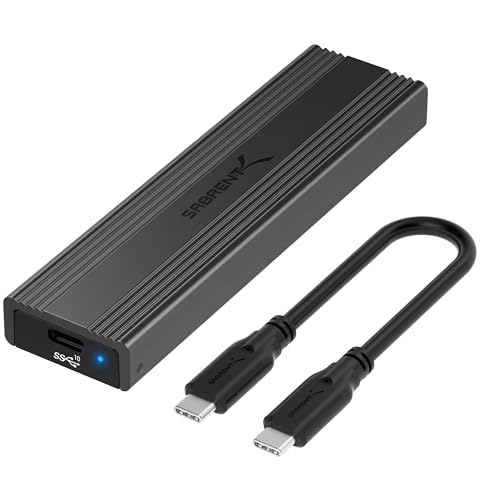
For quick external access without a screwdriver, SABRENT Tool-Free M.2 Enclosure is a tool-free USB-C enclosure for bare NVMe or SATA M.2 SSDs in 2242, 2260, or 2280 lengths. Its USB 3.2 Type-C connection is rated up to 10 Gbps, and it is bus powered with no driver installation required. Unlike an internal M.2-to-SATA card, this enclosure connects a single SSD to a computer by USB; it does not create SATA ports for internal drives. It also has no clearance for a pre-installed heatsink, so a heatsink-equipped drive will not fit.
Bottom line: Pick it for tool-free external access to a bare M.2 SSD.
ELUTENG M.2/mSATA to 2.5-Inch SATA

For adapting an M.2 SATA or mSATA drive to a 2.5-inch SATA form, ELUTENG M.2/mSATA to 2.5-Inch SATA is a different-purpose option from an NVMe-to-SATA card. It supports B-key or B+M-key SATA SSDs, but not M-key NVMe/PCIe drives. A selector switch chooses between NGFF and mSATA operation, and the product says the two drive types cannot work simultaneously. Consider it when reusing one of those compatible SATA-format drives; its interface limits make it unsuitable for adding ports to an NVMe M.2 slot.
Bottom line: Choose it for one compatible M.2 SATA or mSATA drive at a time.
How to Choose an NVMe to SATA Adapter
Choose by interface first: an NVMe-to-SATA expansion card uses a spare M.2 NVMe slot to provide SATA ports, while an M.2 SATA converter serves SATA-protocol drives. M.2 describes a form factor, not a guarantee of the drive protocol. Check the SSD label or model specifications for NVMe/PCIe versus SATA before selecting an adapter. For internal expansion, count the SATA devices you need to attach and confirm you have a compatible spare slot; for a portable one-drive setup, choose a USB enclosure instead. A B+M-key notch alone does not establish that a drive will work with every adapter.
M.2 Drive Sizes and Interface Fit
M.2 drive size is commonly expressed as four digits: 2280 means 22 mm wide and 80 mm long, while 2230, 2242, and 2260 indicate lengths of 30, 42, and 60 mm. Match the drive length to the supported sizes of the adapter or enclosure; a supported interface cannot compensate for a drive that does not physically fit. The SATA-only converter here supports 2230 through 2280, and the two external enclosures support 2242, 2260, and 2280. For a drive with a pre-installed heatsink, check physical clearance before choosing a case; one enclosure explicitly excludes heatsink-equipped drives.
Internal SATA Cards Versus USB Enclosures
Use an internal card when the goal is adding SATA connections inside a computer, and use a USB enclosure when the goal is connecting an M.2 SSD externally. SATA III has a 6 Gbps interface rate; USB 3.2 Gen 2 is rated at 10 Gbps, but those figures describe interface ceilings, not guaranteed transfer speeds. The card in this comparison provides six SATA ports from an M.2 NVMe slot, while the enclosures hold one M.2 drive each and connect through USB-C. A SATA M.2 converter is different again: it adapts a SATA-protocol M.2 drive, not an NVMe one.
This table separates the choices by the job they perform.
| Need | Adapter type | Compatibility check |
|---|---|---|
| Add internal SATA ports | M.2 NVMe to SATA card | Spare compatible M.2 slot and required port count |
| Reuse an M.2 SATA SSD | M.2 SATA to SATA adapter | Drive uses SATA, not NVMe/PCIe |
| Connect an M.2 SSD externally | USB enclosure | Drive interface and physical length |
Common M.2 Adapter Compatibility Mistakes
The most common mistake is buying by M.2 shape or notch without confirming whether the drive uses SATA or NVMe. Those interfaces are distinct, and a SATA-only adapter will not convert an NVMe SSD. Another mistake is confusing an enclosure with an internal port-expansion card: a USB enclosure connects a drive externally, while a multiport card provides SATA connections inside the computer. For a setup that requires six internal SATA devices, select a card with six ports and verify the motherboard has a compatible spare slot. If the drive is mSATA, use an adapter that specifically supports mSATA rather than assuming a standard M.2 enclosure will accept it.
Frequently Asked Questions
Can an M.2 SATA adapter work with an NVMe SSD?
No, a SATA-only M.2 adapter will not work with a PCIe NVMe SSD. Verify the drive protocol before buying; M.2 is a form factor, not a protocol.
What does the 2280 M.2 size mean?
A 2280 SSD is 22 mm wide and 80 mm long. The enclosure or adapter must support that length as well as the drive’s interface.
Does a 10 Gbps USB enclosure transfer at 10 Gbps?
10 Gbps is the USB 3.2 Gen 2 interface rate, not a promise of sustained file-transfer speed. Actual transfer rates also depend on the SSD, host port, and workload.
Can one adapter connect both NGFF and mSATA drives at once?
No, the selector-based adapter described for NGFF and mSATA cannot operate both drive types simultaneously. Switch to the mode matching the single drive in use.
Can I put a heatsink-equipped M.2 SSD in an enclosure?
Only if the enclosure has enough clearance for the heatsink. The tool-free enclosure here is specified for bare drives and has no room for a pre-installed heatsink.