
Smallest USB-C Thumb Drive: 4 Compact Picks Compared

For a small USB-C thumb drive, SanDisk Extreme Fit USB-C 128GB is the clearest fit because its dimensions are 0.2 × 6.0 × 4.0 inches; the SUNEAST drive gives more precise measurements, but those are larger. Choose SUNEAST Nano USB-C 128GB if its compatibility with iOS, Windows, macOS, Linux and Android matters more than the smallest footprint, or Verbatim Store ‘n’ Stay Nano 64GB if 64GB is enough.
We earn a commission if you buy through links on this page. As an Amazon Associate I earn from qualifying purchases. Products are compared on manufacturer specifications, not hands-on testing.
- Best overall: SanDisk Extreme Fit USB-C 128GB – Its dimensions are provided and it claims read speeds up to 400 MB/s.
- Best for fast transfers: SUNEAST Nano USB-C 128GB – It claims read speeds up to 450 MB/s and write speeds up to 400 MB/s.
- Best for discreet storage: Verbatim Store ‘n’ Stay Nano 64GB – The maker describes a nano form factor intended to stay connected.
| Product | Best for | Capacity | Read speed | Dimensions | Shop |
|---|---|---|---|---|---|
| SanDisk Extreme Fit USB-C 128GB | Compact 128GB storage | 128GB | Up to 400 MB/s | 0.2 × 6.0 × 4.0 in | Check Price on Amazon |
| SUNEAST Nano USB-C 128GB | Cross-device transfers | 128GB | Up to 450 MB/s | 0.42 × 0.79 × 0.53 in | Check Price on Amazon |
| Verbatim Store ‘n’ Stay Nano 64GB | Staying connected | 64GB | Up to 220 MB/s | — | Check Price on Amazon |
| Samsung Type-C USB 128GB | Reversible connector | 128GB | Up to 400 MB/s | 0.32 × 1.33 × 0.63 in | Check Price on Amazon |
Small USB-C thumb drives compared
Compare capacity, claimed read performance and stated size measurements before choosing a drive for your device.
SanDisk Extreme Fit USB-C 128GB

SanDisk Extreme Fit USB-C 128GB is a 128GB USB-C drive with measurements of 0.2 × 6.0 × 4.0 inches. SanDisk says USB 3.2 Gen 1 supports read speeds up to 400 MB/s on this capacity, and positions the drive as plug-and-stay storage for USB-C computers, tablets and other devices. That makes it a fit when leaving extra storage connected matters more than having a conventional protruding drive. The dimensions are unusual compared with the other entries, so confirm how they correspond to the physical drive before choosing based on exact footprint.
Bottom line: Choose it for the specified compact footprint and 128GB capacity.
SUNEAST Nano USB-C 128GB

SUNEAST Nano USB-C 128GB has the most precise measurements in the group: approximately 10.6 × 20 × 13.5 mm, or 0.42 × 0.79 × 0.53 inches. SUNEAST claims read speeds up to 450 MB/s and write speeds up to 400 MB/s, and says the exFAT-formatted drive works with USB-C devices running iOS/iPadOS, Android 14 or later, Windows, macOS and Linux. It suits buyers moving files among several operating systems.
Bottom line: Pick it if broad OS compatibility and its speed claims matter more than minimum footprint.
Verbatim Store ‘n’ Stay Nano 64GB

Verbatim Store ‘n’ Stay Nano 64GB is the only 64GB option and its maker emphasizes a nano shape designed to remain connected discreetly. Verbatim claims read speeds up to 220 MB/s and write speeds up to 140 MB/s, with compatibility extending to USB 2.0 ports. The smaller capacity can suit a laptop, TV, car stereo or console that needs modest added storage rather than the 128GB offered by the other drives. No dimensions are provided for a direct footprint comparison, and its claimed transfer speeds are lower than those of the 128GB choices.
Bottom line: Choose it when 64GB is sufficient and a stay-connected form is the priority.
Samsung Type-C USB 128GB
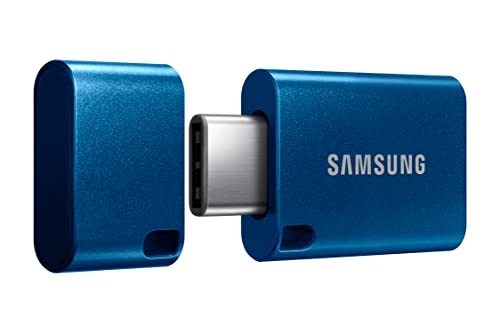
Samsung Type-C USB 128GB pairs 128GB capacity with a reversible USB-C connector, a useful distinction when inserting a drive into a tight port. Samsung claims read speeds up to 400 MB/s and compatibility with USB 3.0 and USB 2.0, as well as USB-C. Its dimensions are 0.32 × 1.33 × 0.63 inches, making it physically larger than the dimensions supplied for the SanDisk and SUNEAST options. The drive suits people who value the familiar full-size flash-drive shape and backward compatibility more than the smallest footprint.
Bottom line: Pick it for its reversible plug and backward-compatible USB support.
How to choose a small USB-C thumb drive
Choose by the physical footprint first if the drive will stay plugged in, then compare capacity and speed. A small plug-in drive can still protrude enough to catch on a bag or interfere with a neighboring port, so compare both dimensions and device-port spacing. USB 3.2 Gen 1 is the interface named for these drives; actual transfer rates depend on the host port, file size and workload, and the maximum read rates are manufacturer claims, not guaranteed everyday speeds. For large video files, write speed matters as well as read speed; for occasional documents, capacity and clearance may matter more. If you need an exact fit for a tight case, confirm the physical dimensions before ordering.
USB-C drive size and device fit
USB-C describes the connector shape, not the available clearance around a device port. Check whether a case covers the port recess and whether an adjacent port, cable or laptop body leaves room for the drive to remain attached. The measurements use inches for comparison, but the SanDisk fields give dimensions as 0.2 × 6.0 × 4.0 inches while SUNEAST gives approximately 0.42 × 0.79 × 0.53 inches; those SanDisk figures look atypical for a thumb drive, so verify its footprint before making a size decision. A low-profile design is most useful when it can remain connected without leverage on the port. Avoid treating the word “nano” as a precise size measurement.
Capacity, speed and file-system trade-offs
128GB is the capacity of three entries here, while the Verbatim offers 64GB; choose based on the files you intend to keep locally. Video and photo libraries consume capacity faster than documents, while many small files can take longer to move than a single large file even when peak speed claims look high. Only SUNEAST identifies exFAT formatting and gives OS compatibility spanning Windows, macOS, Linux, Android 14+ and iOS/iPadOS USB-C devices. Compatibility also depends on device software and file-system support: check that the destination accepts the format and capacity you plan to use. A USB 2.0 port can connect to compatible drives but may constrain transfer speed.
Using and protecting a USB-C flash drive
Safely eject a flash drive before unplugging it during writes; removing storage while data is being saved can corrupt files. Keep a second copy of important files because a thumb drive is portable storage, not a backup by itself. On phones and tablets, check the device’s file-management support and available USB-C clearance before transferring large folders. A drive left in a laptop or car stereo can be exposed to bumps and heat, so remove it when the device is transported or stored in a hot vehicle. For cross-device use, choose a file system supported by every device rather than assuming that a USB-C plug guarantees file access.
Frequently Asked Questions
Does USB-C mean every phone can read a flash drive?
No; the port must support USB data and the device software must mount the drive’s file system. The SUNEAST option claims compatibility with Android 14+ and iOS/iPadOS USB-C devices, but confirm support for your specific device.
Is a 450 MB/s read claim a real transfer speed?
It is a claimed maximum, not a guaranteed rate for every file or host. USB 3.2 Gen 1, the computer or phone port, and the type and size of files all affect transfer time.
What size USB drive works with a phone case?
The case opening and port recess determine whether the connector can seat fully. Compare the drive’s body dimensions with the available clearance, especially when the case has a raised lip around the USB-C port.
Can a USB-C thumb drive stay plugged into a laptop?
A low-profile drive can be convenient for added storage, but a protruding drive can be struck or put leverage on the port. Remove it before carrying the laptop in a bag or when the port area may be bumped.
Should I format a USB-C flash drive before use?
Format only when the target device requires a different file system, and back up anything already stored first. SUNEAST says its drive comes preformatted in exFAT; verify that every device in your transfer workflow supports exFAT.