
Mayflash F500 Elite: Fight Stick Models Compared

The Mayflash F500 Elite suits players who want a traditional joystick layout, with nine Sanwa controls and compatibility across several consoles and computers. Choose another model if you prefer an all-button leverless layout or need wireless connections.
The F500 Elite is a wired arcade fight stick: its joystick and arcade buttons provide physical controls for fighting games.
We earn a commission if you buy through links on this page. As an Amazon Associate I earn from qualifying purchases. Products are compared on manufacturer specifications, not hands-on testing.
- Best overall: Mayflash F500 Elite – Traditional joystick layout with nine Sanwa controls and broad platform compatibility.
- Best for leverless play: Mayflash F500 Flat Elite – Uses 15 Sanwa OBSF buttons instead of a joystick.
- Best for wireless play: Mayflash F700 Flat Elite – Offers Bluetooth, 2.4 GHz, and wired USB connections.
| Product | Best for | Control layout | Connection | Height | Shop |
|---|---|---|---|---|---|
| Mayflash F500 Elite | Joystick layout | Joystick + 9 buttons | USB wired | 5.67 in | Check Price on Amazon |
| Mayflash F500 Flat Elite | Leverless controls | 15 buttons, no lever | USB wired | 2.36 in | Check Price on Amazon |
| Mayflash F500 with MagicBoots-S5 | PS5 wired play | Joystick + buttons | USB wired | — | Check Price on Amazon |
| Mayflash F700 Flat Elite | Wireless leverless | 15 buttons, no lever | Bluetooth, 2.4 GHz, USB | 2.48 in | Check Price on Amazon |
Mayflash F500 Elite arcade controllers
Compare the traditional joystick and leverless layouts, then check platform and connection requirements for the games you play.
Mayflash F500 Elite

The F500 Elite is the traditional joystick option in this group, combining a 4-way joystick with nine Sanwa controls. It supports a broad mix of consoles, computers, handhelds, and mini systems, including Xbox Series X/S, Switch, PS4, Windows, and Steam Deck. Headset audio and online chat are supported on PS4 and Xbox consoles, and turbo functions are included. The enclosure is accessible for modding. This is a wired stick, so players who want a leverless button layout or wireless connection should choose a different model.
Bottom line: Pick this if you want a joystick and Sanwa buttons in a wired arcade stick.
Mayflash F500 Flat Elite

The F500 Flat Elite replaces the joystick with an all-button layout, using 15 Sanwa OBSF buttons. Its compatibility spans PS4, older Xbox consoles, Switch, Windows, macOS, Android, Steam Deck, and several mini systems. Macro programming, button mapping, and turbo functions are supported. For PS4 and Xbox consoles, a wired PS4 or Xbox controller must be connected to the stick; PS5 use requires a compatible MAYFLASH adapter. The button-only arrangement suits players who prefer directional inputs on buttons, but it is not a match for anyone seeking a physical joystick.
Bottom line: Choose it for an all-button leverless layout, not a joystick.
Mayflash F500 with MagicBoots-S5
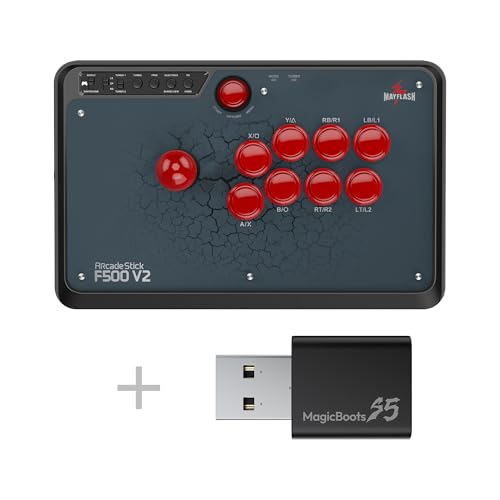
The F500 bundle pairs a joystick fight stick with MagicBoots-S5, giving it a route to PS5 use without plugging in an original PS4 or PS5 controller. It also supports PS4, PS3, Xbox Series X/S, Xbox One, Xbox 360, Switch, Windows, macOS, Steam Deck, Raspberry Pi, and Android. Headset audio is supported on PS4 and Xbox One, and PC use offers X-input and D-input. Xbox 360 and Xbox One console play still requires a wired Microsoft Xbox controller. Choose this bundle when PS5 compatibility is central; the platform information does not identify the button count or dimensions.
Bottom line: Pick this bundle when you want a joystick stick with the included PS5 adapter.
Mayflash F700 Flat Elite

The F700 Flat Elite is the wireless leverless choice, with Bluetooth, 2.4 GHz, and wired USB connection options alongside 15 Sanwa OBSF buttons. It supports PS5 for fighting games, as well as PS4, PS3, Xbox Series X/S, Switch, Windows, Apple devices, Android, Steam Deck, and mini systems. A 2.4 GHz receiver is included, with a compartment to store it. Switch 2 Bluetooth use requires a firmware update. Since this is a flat, all-button controller rather than a joystick stick, it suits players who want leverless inputs and flexible connections.
Bottom line: Choose it for wireless options and an all-button layout.
Choosing a joystick or leverless fight stick
Choose by control layout first: a joystick stick uses a physical lever for directions, while a leverless model assigns directional inputs to buttons. Joystick layouts are familiar to players who use a stick to move and execute motions; leverless layouts place all inputs under the fingers and require learning button-based directions. The F500 Elite is the joystick choice here, while both Flat Elite models are leverless. Check whether your game and platform support the controller connection you plan to use, because console requirements differ even among compatible models.
A wired USB connection avoids charging and wireless pairing, while wireless options add flexibility for a desk or living-room setup. The F700 Flat Elite supports Bluetooth, 2.4 GHz, and wired USB; the F500 Elite models are wired.
Checking console compatibility before connecting
Console compatibility can depend on a required pass-through controller or adapter, not only the fight stick itself. The F500 Flat Elite requires a wired PS4 or Xbox controller for PS4 and Xbox console use, and PS5 use calls for a compatible MAYFLASH adapter. The F500 with MagicBoots-S5 bundle removes the original PS4/PS5 controller requirement for PS5, but Xbox 360 and Xbox One still require a wired Microsoft Xbox controller.
For the F700 Flat Elite, PS5 support is limited to fighting games, and Switch 2 Bluetooth operation requires a firmware update. Check your target console and connection method before choosing; a compatible platform name does not guarantee that every setup has identical requirements.
Comparing fight stick layouts and connections
The layout and connection combination determines which of these Mayflash sticks fits your setup. Use this comparison to narrow the choice by controls and connection rather than shared platform support.
| Need | Choose | Key distinction |
|---|---|---|
| Physical joystick | F500 Elite or F500 with MagicBoots-S5 | Joystick plus arcade buttons |
| Wired leverless controls | F500 Flat Elite | 15 buttons; console pass-through requirements apply |
| Wireless leverless controls | F700 Flat Elite | Bluetooth, 2.4 GHz, or wired USB |
Pick a traditional stick if lever movement matters more than wireless convenience. Pick a flat model when you want directional inputs on buttons; among those, choose the F700 if wireless modes matter.
Understanding size and portability
Published dimensions can help estimate desk fit, but height alone does not tell you whether a stick will rest comfortably on your lap. The F500 Elite measures about 16.34 by 11.10 by 5.67 inches, and the F500 Flat Elite measures about 14.17 by 9.09 by 2.36 inches. The F700 Flat Elite measures about 14.80 by 9.76 by 2.48 inches.
Use length and width to assess storage or desk space, and consider weight when carrying a controller. The weights range from about 5.07 to 6.94 pounds for the products with dimensions and weights provided.
Frequently Asked Questions
Does the Mayflash F500 Elite have a joystick?
Yes. The F500 Elite has a precision 4-way joystick and nine Sanwa buttons, making it the joystick-layout option rather than a leverless controller.
Can the F500 Elite work with a PS5?
The F500 Elite’s platform compatibility does not include PS5. The F500 bundle with MagicBoots-S5 supports PS5, while the F700 Flat Elite supports PS5 for fighting games.
Does the F500 Flat Elite need another controller?
Yes, for PS4 and Xbox Series X/S, Xbox One, and Xbox 360 use, the F500 Flat Elite requires a wired PS4 or Xbox controller plugged into it. Its PS5 compatibility requires a compatible MAYFLASH adapter.
Can the F700 Flat Elite connect without a cable?
Yes. The F700 Flat Elite supports Bluetooth and 2.4 GHz as well as wired USB; its included 2.4 GHz receiver has a storage compartment.
What is the difference between a leverless and joystick fight stick?
A joystick fight stick uses a physical lever for directional movement, while a leverless controller uses buttons for those inputs. Choose based on the control method you prefer to use in fighting games.