
MacBook Air Replacement Keys: Match Models and Parts

For MacBook Air replacement keys, match the A-number on your laptop before choosing: Bfenown US Keycap Set for Air A2337 is for A2337, while Bfenown Full Keycap Set, A2681/A3113/A2941/A3114 covers several newer Air models. Choose another option if you need a scissor hinge or a single key rather than a full keycap set.
Keycaps are the visible tops of keys; the scissor mechanism beneath them is a separate part, so matching the repair part to the damaged component matters.
We earn a commission if you buy through links on this page. As an Amazon Associate I earn from qualifying purchases. Products are compared on manufacturer specifications, not hands-on testing.
- Best overall: Bfenown Full Keycap Set, A2681/A3113/A2941/A3114 – A full black keycap set covers multiple Air models, including A2681, A3113, A2941, and A3114.
- Best for A2337: Bfenown US Keycap Set for Air A2337 – This full black set is specifically matched to the MacBook Air Retina A2337.
| Product | Best for | Compatible Air models | Part included | Color | Shop |
|---|---|---|---|---|---|
| Bfenown Full Keycap Set, A2681/A3113/A2941/A3114 | Newer Air models | A2681, A3113, A2941, A3114 | Full keycap set | Black | Check Price on Amazon |
| Bfenown US Keycap Set for Air A2337 | A2337 Air owners | A2337 | Full keycap set | Black | Check Price on Amazon |
| Bfenown Midnight Keycaps for Air M4 A3240/A3241 | Midnight M4 Air | A3240, A3241 | Keycaps; quantity unclear | Midnight | Check Price on Amazon |
MacBook Air replacement keys by model fit
Match your laptop’s A-number and the damaged component before selecting a keycap or key-and-hinge replacement.
Bfenown Full Keycap Set, A2681/A3113/A2941/A3114

For a broader group of newer MacBook Air models, this black full keycap set lists compatibility with A2681, A3113, A2941, and A3114. The package includes keycaps and an installation tool, making it relevant when multiple caps are damaged or missing. Bfenown says the keycaps provide backlight visibility. The set does not include scissor hinges, and the maker says hinge-clip problems cannot be fixed with this part. Choose it only when your Air’s model number matches and the hinge mechanism is intact.
Bottom line: Choose this set for a compatible newer Air when you need keycaps, not hinges.
Bfenown US Keycap Set for Air A2337
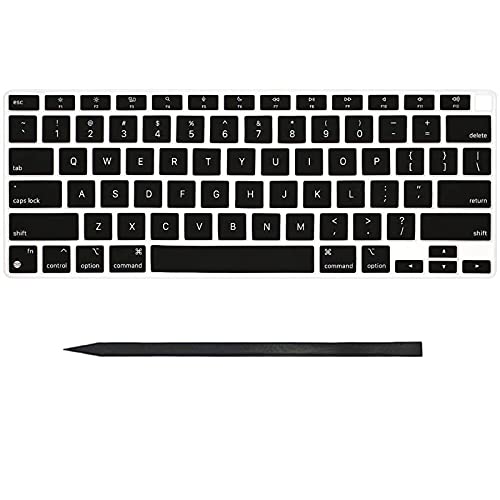
For the MacBook Air Retina A2337, this option is specifically identified as a US keyboard keycap set. It includes a full set of black keycaps and an installation tool, rather than a single replacement key. Bfenown says the caps offer backlight visibility. The scissor hinge is not included, so this set is a mismatch if the underlying hinge clip is broken; the maker also warns that hinge-clip issues cannot be resolved with keycaps alone. Verify that your laptop is A2337 before selecting it.
Bottom line: Pick this full set when your Air is model A2337 and only keycaps need replacing.
Bfenown Midnight Keycaps for Air M4 A3240/A3241

For the Air M4 in Midnight, this option targets the 13-inch A3240 and 15-inch A3241, unlike the black full sets. The maker describes it as a way to replace individual damaged or missing keys, with a finish intended to match the laptop’s Midnight appearance. The package quantity is unclear from the specifications, so confirm what keys are included before ordering. This is not a hinge repair: the maker says a scissor hinge problem cannot be solved by replacing the keycap.
Bottom line: Choose this when you have a Midnight Air M4 A3240 or A3241 and need a keycap.
How to match replacement keys to a MacBook Air
Match the model identifier, not just the screen size or chip name. Apple’s A-number is printed on the computer’s underside and can also be found in About This Mac; compare that number with the compatibility list before buying. A 13-inch Air can belong to different generations with different key mechanisms, so the diagonal measurement alone is not enough. For example, the choices here separately identify A2337, A2681/A3113/A2941/A3114, and A3240/A3241. If your A-number is absent from the matching option’s list, do not assume a similar-looking keycap will fit. Also distinguish a single-key repair from a full set: a package described as a full set is not the same as a single replacement cap.
Keycap, scissor hinge, and silicone cup differences
A keycap is the visible plastic top; a scissor hinge supports its movement, and a silicone cup beneath helps the key rebound. Replace the part that is actually damaged: a cap-only set cannot repair a broken hinge clip or a failed rebound cup. The full sets in this comparison exclude scissor hinges, while the left-arrow package includes one hinge but excludes the clear silicone cup. A practical decision rule is to choose a cap-only option when the hinge clip and rebound feel are intact; if the hinge is visibly broken, select a compatible key-and-hinge part instead. Stop before forcing a cap into place: small hinge clips can break during removal or installation.
Full keycap sets versus single-key replacements
Full sets suit multiple missing or damaged caps, while a single-key part targets one specified position. Use this guide to narrow the repair by the affected component and key coverage.
| Repair need | Part type | Important limit |
|---|---|---|
| Several caps missing or damaged | Full keycap set | Hinges excluded |
| Left-arrow cap and hinge | Single keycap plus scissor hinge | Silicone cup excluded |
| Broken hinge clip or rebound cup | Part-specific repair needed | Cap alone is insufficient |
Count the affected keys and inspect the mechanism before choosing. A full set can leave the root problem untouched if the issue is a broken hinge or silicone cup; conversely, a left-arrow replacement will not supply caps for other positions.
Installing a replacement keycap safely
Small scissor mechanisms are fragile, so use light, even pressure and stop if the cap does not seat. These replacement choices include an installation tool, but none of the specifications establish a detailed removal sequence for each model. Before starting, compare the key position and mechanism with the replacement part and keep the laptop powered off. Do not pry against the display or adjacent caps, and avoid repeated force when a clip does not engage. If the hinge is detached, cracked, or missing, a cap-only repair is not the right part. A qualified repair provider is a safer route when the mechanism or underlying cup appears damaged or you cannot identify the exact matching model.
Frequently Asked Questions
How do I find my MacBook Air model number?
The A-number is printed on the underside of the MacBook Air and can also be found in About This Mac. Match that identifier to the replacement’s compatibility list; screen size alone cannot confirm key fit.
Can a replacement keycap fix a broken hinge?
No, a cap-only replacement does not repair a broken scissor hinge or hinge clip. Choose a compatible part that includes the hinge when that mechanism is damaged; a silicone-cup issue needs a different repair part.
Do replacement keycaps include all keyboard keys?
Some are sold as full keycap sets, while a single-key replacement covers only a named key such as the left arrow. Check the package scope before choosing, especially when more than one cap is missing.
Can I replace a MacBook Air keycap myself?
Some replacement sets include an installation tool, but the small hinge clips are easy to damage if forced. Stop if the cap does not seat with light, even pressure, particularly when the hinge or silicone cup appears damaged.
Are MacBook Air keys interchangeable between generations?
Do not assume they are interchangeable: these options divide compatibility by A-number, including A2337, A2681-family models, and A3240/A3241. Match the exact model identifier rather than relying on a shared screen size or Air name.