
Tablet With Ethernet Port: 5 Models Compared

RAYPODO 10.1-inch Android 14 PoE Tablet is the direct match for a tablet with an Ethernet port: its RJ45 connection supports PoE, so a compatible switch or injector can carry power and network data on one cable. Choose another model only if a different screen size, operating system or rugged/mobile format matters more than built-in Ethernet.
We earn a commission if you buy through links on this page. As an Amazon Associate I earn from qualifying purchases. Products are compared on manufacturer specifications, not hands-on testing.
- Best overall: RAYPODO 10.1-inch Android 14 PoE Tablet – Its RJ45 port supports PoE for combined power and network over one compatible cable.
- Best for rugged Windows: Panasonic Toughbook CF-20 MK2 Tablet – Its 10.1-inch Windows 11 Pro tablet has a magnesium chassis and MIL-STD-810G and IP65 certifications.
- Best for a large panel: 15.6-inch Industrial Touch Panel PC – Its 15.6-inch industrial touchscreen pairs Windows 11 Pro with a 1920 × 1080 IPS display.
| Product | Best for | Screen | Platform | Shop |
|---|---|---|---|---|
| RAYPODO 10.1-inch Android 14 PoE Tablet | Fixed PoE installs | 10.1 inches | Android 14, RK3576S | Check Price on Amazon |
| Panasonic Toughbook CF-20 MK2 Tablet | Rugged Windows use | 10.1-inch WUXGA | Windows 11 Pro, Core i5 | Check Price on Amazon |
| 15.6-inch Industrial Touch Panel PC | Large Windows panel | 15.6-inch, 1920 × 1080 | Windows 11 Pro, Celeron N5095 | Check Price on Amazon |
| 15.6-inch Android RK3399 Panel PC | Android automation panel | 15.6-inch, 1920 × 1080 | Android 12, RK3399 | Check Price on Amazon |
| Fusion5 10.1-inch Windows 11 Rugged Tablet | Rugged Windows tablet | 10.1-inch, Full HD | Windows 11, Intel 13th Gen | Check Price on Amazon |
Tablets With Ethernet Ports and Related Panel PCs
Only one model here explicitly includes an RJ45 Ethernet port; compare the others by form factor and platform rather than assuming wired-network support.
RAYPODO 10.1-inch Android 14 PoE Tablet

Built-in RJ45 Ethernet with PoE support distinguishes this fixed-installation tablet from the other models here. It has a 10.1-inch screen, Android 14, an RK3576S processor, 4GB RAM and 64GB storage, with desktop and wall-mount use identified for commercial installations such as meeting-room scheduling and kiosks. PoE can simplify cabling when a compatible switch or injector supplies both network and power. Its fixed-installation orientation is less suited to buyers seeking a rugged, handheld Windows tablet; verify that your network equipment provides compatible PoE before planning a one-cable setup.
Bottom line: Choose this for a wall- or desktop-mounted Android setup that needs built-in PoE Ethernet.
Panasonic Toughbook CF-20 MK2 Tablet

Rugged construction sets this 10.1-inch detachable-style tablet apart from the fixed-installation panel computers. It has a magnesium chassis, a 1920 × 1200 touchscreen with stylus, 8GB RAM, a 256GB SSD and Windows 11 Pro; its features also identify MIL-STD-810G, MIL-STD-461F, IP65 and 5-foot drop resistance. This format suits mobile work where the durability certifications matter more than a wall-mounted PoE design. An RJ45 port is not among the features, so do not choose it on the assumption that it has built-in Ethernet.
Bottom line: Choose this for a rugged Windows tablet and stylus rather than a confirmed built-in Ethernet port.
15.6-inch Industrial Touch Panel PC

A 15.6-inch IPS touchscreen and Windows 11 Pro distinguish this panel PC from the smaller Android PoE tablet. The fanless all-in-one configuration uses a Celeron N5095 with 8GB RAM and 128GB storage, and the product is identified for kiosk, automation and point-of-sale contexts with VESA mounting. It is a better form-factor match when a larger fixed display is the priority. Ethernet and PoE are not among its features, so buyers who require a wired connection should confirm the exact port configuration before selecting it.
Bottom line: Choose this for a large Windows touch panel, not as a confirmed Ethernet-equipped tablet.
15.6-inch Android RK3399 Panel PC

Android 12 on an RK3399 platform makes this 15.6-inch panel PC a distinct alternative to the Windows industrial display. It combines 4GB RAM and 64GB storage with a 1920 × 1080 touchscreen and fanless design; the named use cases include office, automation, kiosk, bar and warehouse settings. The larger all-in-one format is suited to fixed touch-interface tasks rather than a compact mobile tablet role. No built-in Ethernet or PoE feature is identified in its features, so it should not be treated as a wired-network match without confirming the ports.
Bottom line: Choose this for an Android panel-PC format when Ethernet is not the deciding requirement.
Fusion5 10.1-inch Windows 11 Rugged Tablet
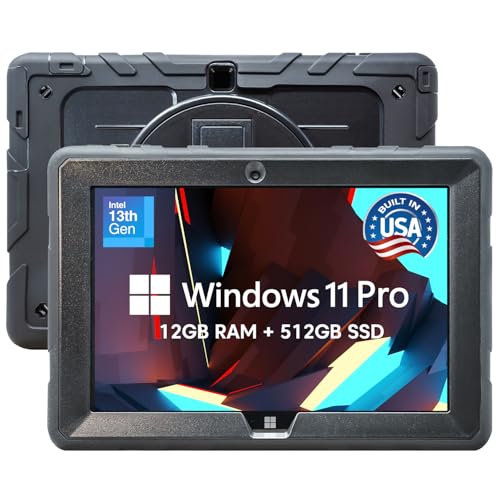
A 10.1-inch rugged Windows format separates this tablet from the larger fixed panel PCs. The features identify Windows 11 Professional, an Intel 13th-generation processor, 12GB RAM, a 512GB SSD, HDMI and USB-C, along with a two-year warranty that includes coverage for up to two accidental-damage incidents. That configuration fits buyers prioritizing Windows and the storage and memory over a fixed PoE installation. The ports do not include RJ45 Ethernet, so check port compatibility if a wired network is essential.
Bottom line: Choose this for its rugged Windows tablet configuration, not for confirmed built-in RJ45 Ethernet.
How to Choose a Tablet With Ethernet
Start with whether Ethernet must be built in or whether a supported adapter is acceptable. An RJ45 jack provides a direct wired connection; USB-to-Ethernet adapters require a compatible port, operating-system support and, in some cases, a driver, so verify all three before relying on one. For a fixed installation, PoE can carry power and network data over one cable, but the switch or injector must support the PoE standard required by the device. A PoE-capable jack alone does not supply power without suitable network equipment. If cable simplicity is the goal, select a model that explicitly supports PoE; if the device will move between work areas, weigh adapter management and cable strain against the convenience of Wi-Fi.
PoE, Ethernet and Power Requirements
PoE combines electrical power and Ethernet data on one cable, reducing separate wiring at a wall-mounted endpoint. A PoE switch or injector must match the device’s supported power requirements; standard IEEE PoE classes include 802.3af, 802.3at and 802.3bt, with different available power levels. Do not assume an endpoint accepts every class simply because it has PoE. The product features here do not identify a specific IEEE class, so verify compatibility with the equipment planned for the installation. For non-PoE Ethernet, the tablet still needs a separate power source. Keep cable runs within the usual 100-meter Ethernet channel limit, including patch leads, and avoid routing network cable alongside high-voltage wiring where local code or interference concerns apply.
Fixed Panel PCs Versus Mobile Tablets
Fixed panel PCs and mobile tablets solve different installation problems: a panel PC prioritizes a larger mounted touch surface, while a tablet prioritizes portability. A 10.1-inch screen is a compact choice for a wall control or mobile task, whereas 15.6 inches gives a larger interface but requires more mounting space. The products span Android and Windows, so confirm that the applications, peripherals and management tools you need support the selected operating system. Rugged claims also differ: military and ingress ratings are not interchangeable, and IP65 indicates dust-tight protection and resistance to water jets under specified test conditions, not submersion. Match the device’s actual documented rating to exposure at the worksite rather than treating every rugged label as equivalent.
| Installation need | Better fit | Reason |
|---|---|---|
| One cable for data and power | Explicit PoE tablet | Requires compatible PoE network equipment |
| Large mounted touch display | 15.6-inch panel PC | Larger fixed interface |
| Portable rugged Windows work | 10.1-inch rugged tablet | Compact format and listed durability features |
Mounting, Cables and Setup Checks
Plan the mounting position before choosing screen size: measure the usable wall or enclosure area and leave room for the power and network cable bend radius. VESA compatibility is useful only when the panel’s VESA pattern matches the mount; check the specific hole spacing and supported load rather than relying on the term alone. For PoE, test the network drop and injector or switch with the intended endpoint before final installation, and label both ends of permanent cable runs. In a fixed kiosk or control setting, secure cabling against pulls and keep vents clear on fanless hardware so its passive cooling path is not obstructed. For public touchscreens, use a cleaning method approved for the display surface; abrasive cleaners can damage coatings.
Frequently Asked Questions
Can a PoE tablet work without a PoE switch?
Yes, but it needs another supported power source and a network connection. A PoE injector can add power to an Ethernet run when its output matches the tablet’s PoE requirements.
Does every RJ45 tablet port support PoE?
No. RJ45 identifies the Ethernet connector, while PoE support is a separate power feature. Confirm PoE compatibility and power class before connecting equipment.
Can I add Ethernet to a tablet with USB-C?
Often, if the tablet’s operating system and USB-C port support a compatible Ethernet adapter. Check driver or plug-and-play support and whether the adapter will interfere with charging.
How long can an Ethernet cable run to a tablet?
A typical Ethernet channel can run up to 100 meters, including patch cables. Longer links need appropriate network equipment such as a switch or extender rather than one uninterrupted standard copper run.
Is an IP65 tablet safe to submerge?
No. IP65 indicates dust-tight protection and resistance to water jets under specified test conditions, not immersion. Keep the device within its documented exposure limits and protect its ports as required.