
Keyboard With Scroll Wheel: 3 Trackball Models Compared

For a keyboard with a scroll wheel, Perixx Periboard-522 is the strongest fit for most desk users because it pairs a tilting scroll wheel with a 55 mm trackball. Choose Banalove Mini Handheld Trackball Keyboard instead if you want a Ctrl+scroll zoom shortcut or wireless couch control; the wired Perixx models are less suited to setups where cable-free use matters.
We earn a commission if you buy through links on this page. As an Amazon Associate I earn from qualifying purchases. Products are compared on manufacturer specifications, not hands-on testing.
- Best overall: Perixx Periboard-522 – Its 55 mm trackball and tilting scroll wheel combine cursor and scrolling control in a wired full-size keyboard.
- Best for zooming: Banalove Mini Handheld Trackball Keyboard – The wheel works with Ctrl for quick zoom control, and the keyboard uses 2.4 GHz wireless.
- Best for USB ports: Perixx Periboard-322 – Two built-in USB 2.0 hubs add connectivity, alongside a 55 mm trackball and backlighting.
| Product | Best for | Connection | Trackball diameter | Keyboard format | Shop |
|---|---|---|---|---|---|
| Perixx Periboard-522 | Wired desk use | Wired USB | 55 mm | Full size | Check Price on Amazon |
| Banalove Mini Handheld Trackball Keyboard | Wireless zooming | 2.4 GHz wireless | — | 13.62 × 6.3 in | Check Price on Amazon |
| Perixx Periboard-322 | Hubs and lighting | Wired USB | 55 mm | Full size | Check Price on Amazon |
Keyboards With Scroll Wheels
Compare the wheel controls, connection types and layouts to find a trackball keyboard that suits your setup.
Perixx Periboard-522

Perixx Periboard-522 stands out with its large 55 mm trackball and tilting scroll wheel in a full-size mechanical keyboard. The glossy ball surface is intended for smooth movement, and an Fn+F9 combination adjusts trackball sensitivity. Nine function keys include multimedia and keyboard-lock functions. The ball can be removed from a hole underneath for cleaning. This is a wired USB model for Windows 7, 8 and 10, so it suits a stationary desk setup better than a couch arrangement where a cable is inconvenient.
Bottom line: Choose it for a wired full-size layout and a large ball with adjustable sensitivity.
Banalove Mini Handheld Trackball Keyboard
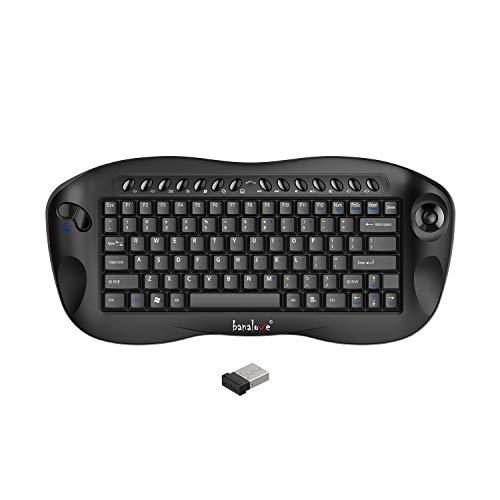
Banalove Mini Handheld Trackball Keyboard is the choice here with a Ctrl+scroll zoom shortcut, useful when the task is enlarging small on-screen text or presentation details. Its built-in trackball and multimedia keys let you navigate a Smart TV, HTPC or PC from a seat without a separate mouse. The connection is 2.4 GHz wireless only, not Bluetooth. At 13.62 by 6.3 inches, it is a handheld-style keyboard rather than a conventional full-size desk board; the fields describe a scroll wheel but do not specify its trackball diameter.
Bottom line: Pick it for wireless media-center navigation and the Ctrl+scroll zoom shortcut.
Perixx Periboard-322

Perixx Periboard-322 adds two USB 2.0 hubs and RGB backlighting with six lighting effects, distinguishing it from the other wired full-size option. Its 55 mm trackball has a tilting scroll wheel, and Fn combinations adjust ball sensitivity and lighting. The ball is removable from the underside for cleaning. This mechanical keyboard uses a wired USB connection and lists Windows 7, 8 and 10 as system requirements. The additional hubs and lighting are useful only if those features matter; the board’s 18.49-inch length calls for ample desk space.
Bottom line: Choose it if built-in USB hubs and configurable lighting matter on your desk.
How to Choose a Keyboard With a Scroll Wheel
Start with the way you will use the wheel: scrolling through documents, controlling media from a couch, or zooming a screen call for different shortcuts and connections. A scroll wheel moves through a page in increments; a trackball moves the cursor by rolling the ball, so the keyboard itself can stay still. For a desk workstation that prioritizes a larger ball and familiar full-size layout, compare the wired options; for seating farther from a PC or TV, favor a wireless connection. A 2.4 GHz receiver needs an available USB port, while Bluetooth models pair directly; check which connection your host supports before choosing. If you expect to use zoom, verify the key combination works with the operating system and app you rely on.
Trackball Size and Desk Fit
Trackball diameter affects the feel and available control surface, while keyboard footprint determines how much desk space remains. A 55 mm ball is a notably larger control surface than a 19 mm ball, but size alone does not establish which feels more comfortable; hand reach and pointer speed settings matter too. Measure the available desk depth and width before choosing a full-size board: the Perixx models here measure 18.49 inches long and 6.59 inches wide. Compact keyboards can leave more room for other equipment, but their smaller key layouts may require adjustment. Keep the keyboard on a stable, level surface and leave room to reach both the keys and ball without shifting the board.
Trackball Keyboard Controls Compared
Trackball keyboards combine typing with cursor control, but scroll wheels and scrolling shortcuts are not interchangeable. A tilting wheel scrolls through content directly, while a Ctrl+scroll combination can control zoom in compatible software. Wired USB removes wireless pairing steps but ties placement to cable reach; 2.4 GHz wireless needs a receiver and a usable USB port. The table summarizes the control and connection distinctions that matter most for these options.
| Need | Control to look for | Connection consideration |
|---|---|---|
| Scroll pages | Tilting scroll wheel | Wired USB or wireless receiver |
| Zoom screen content | Ctrl+scroll shortcut | Confirm app supports the shortcut |
| Navigate from a seat | Integrated trackball | Wireless avoids a cable across the room |
Cleaning and Using a Trackball Keyboard
Trackballs collect skin oil and dust, so periodic cleaning helps keep ball movement smooth; the interval depends on use and the surrounding environment. Remove a ball only using the release method intended for that keyboard, and avoid forcing it through the opening. Disconnect a wired keyboard before cleaning, and keep liquids away from the ball socket and electronics. A sensitivity shortcut can adjust cursor movement without changing how far the ball rolls. Start with a moderate setting, then adjust in small steps until pointer movement is controllable across the screen; unusually high sensitivity can make precise selection harder.
Frequently Asked Questions
Can a trackball keyboard work without a mouse?
Yes, an integrated trackball controls the cursor without moving a separate mouse. The keyboard still needs a compatible USB or wireless connection to the computer.
Does Ctrl and scroll always zoom a screen?
No, Ctrl+scroll zoom behavior depends on the operating system and application. Check the software’s shortcut settings if the combination does not change magnification.
How often should I clean a keyboard trackball?
Clean a trackball when movement becomes gritty or less consistent; use and dust levels affect how often that occurs. Remove the ball using its intended release method and keep liquid out of the socket.
How much desk space does a full-size trackball keyboard need?
Allow at least the keyboard’s footprint plus room for hands and any cable routing. The Perixx full-size models here measure 18.49 inches long by 6.59 inches wide.
What should I check before choosing a wireless trackball keyboard?
Check that the computer supports the keyboard’s connection method and has a free USB port if a 2.4 GHz receiver is required. Bluetooth pairing avoids the receiver but requires Bluetooth support.