
Active Capacitive Stylus 1.5mm Superfine Nibs Compared

For a 1.5mm active capacitive stylus, 2-in-1 Active Stylus 1.5mm is the clearest match if you want a rechargeable pen with an 8-hour use claim; Evach Active Stylus 1.5mm is another active 1.5mm option. Buyers seeking replacement tips or a clear-tip capacitive pen should choose a different type.
A capacitive stylus works with a touchscreen by interacting with its touch-sensitive surface; active models may add powered electronics for a finer tip. Device and app compatibility can vary, so match the stylus to the exact device and intended app before choosing.
We earn a commission if you buy through links on this page. As an Amazon Associate I earn from qualifying purchases. Products are compared on manufacturer specifications, not hands-on testing.
- Best overall: 2-in-1 Active Stylus 1.5mm – Its 1.5mm tip is paired with a built-in battery, Micro USB charging, and an 8-hour active-use claim.
- Best for no Bluetooth: Evach Active Stylus 1.5mm – It has a 1.5mm tip and the maker says it needs no Bluetooth connection.
- Best for replacement tips: M5 Aluminum Replacement Nibs, 8-Pack – The set contains eight aluminum tips with an M5 thread for compatible styluses.
| Product | Best for | Tip or thread | Power or connection | Quantity or design | Shop |
|---|---|---|---|---|---|
| 2-in-1 Active Stylus 1.5mm | Rechargeable writing | 1.5mm tip | Built-in battery; Micro USB | — | Check Price on Amazon |
| Evach Active Stylus 1.5mm | No Bluetooth setup | 1.5mm tip | No Bluetooth required | — | Check Price on Amazon |
| M5 Aluminum Replacement Nibs, 8-Pack | Threaded replacements | M5 thread | — | 8 tips | Check Price on Amazon |
| BoxWave FineTouch Capacitive Stylus | Visible clear tip | Clear tip | No Bluetooth required | Clear-tip design | Check Price on Amazon |
Active Capacitive Stylus 1.5mm Superfine Nib Options
Compare the active pens with replacement tips and a general-purpose capacitive stylus to find the type that fits your touchscreen use.
2-in-1 Active Stylus 1.5mm

Among these 1.5mm active pens, 2-in-1 Active Stylus 1.5mm is the option with battery and charging details: it has a built-in battery and uses Micro USB. The maker claims up to 8 hours of active use after a 60-minute charge. Its 146mm length and 13.3g weight suit buyers who want a light pen for writing or drawing across compatible touchscreens. Compatibility is not universal, and some devices or iPad apps may not work with it, so confirm device and app support before relying on it.
Bottom line: Choose this if you want a rechargeable 1.5mm active stylus and your device and app are compatible.
Evach Active Stylus 1.5mm
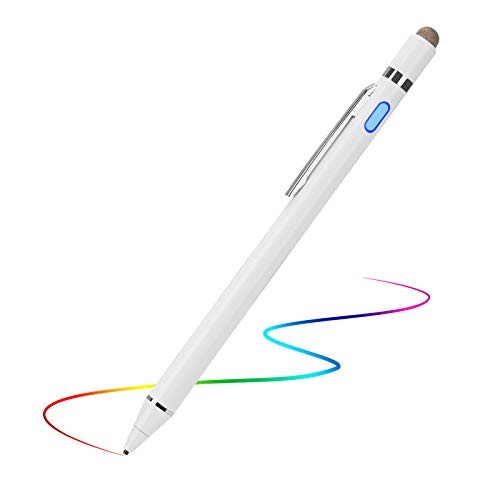
Evach Active Stylus 1.5mm separates itself from 2-in-1 Active Stylus 1.5mm by explicitly requiring no Bluetooth connection; it is an active stylus with a 1.5mm tip for touchscreen writing and drawing. The maker describes it as compatible with most touchscreens, including iPads, iPad Pros, Samsung tablets, and cellphones. That broad claim does not guarantee compatibility with every device or app, and this product’s features do not establish a charging method or runtime. Choose it when the no-Bluetooth setup matters, but verify support for your particular device and app.
Bottom line: Pick this for a 1.5mm active pen that does not require Bluetooth.
M5 Aluminum Replacement Nibs, 8-Pack

Rather than a complete active stylus, M5 Aluminum Replacement Nibs, 8-Pack is a set of eight aluminum replacement tips with an M5 thread. It suits buyers whose existing stylus accepts that thread and who need spare tips, not someone shopping for a complete 1.5mm pen. The maker describes the tips as responsive and wear-resistant, but the product name does not establish that they are 1.5mm or compatible with either active pen here. Check your stylus’s thread before buying; a mismatched fitting will not serve as a replacement.
Bottom line: Choose these only if your stylus takes M5-thread replacement tips.
BoxWave FineTouch Capacitive Stylus

BoxWave FineTouch Capacitive Stylus is a general capacitive stylus compatible with Umidigi Active T1, not a 1.5mm active pen. Its clear tip is intended to make the point of contact visible while writing, drawing, or tapping, and it needs no Bluetooth connection. The maker says it works with capacitive touchscreens, but the maker does not give a nib measurement or battery features. It is a better fit for someone prioritizing a visible point on a compatible touchscreen than for someone who specifically needs a 1.5mm superfine nib.
Bottom line: Pick this if a visible clear tip matters more than a 1.5mm nib.
How to Choose a 1.5mm Active Capacitive Stylus
Start by separating complete active pens from passive capacitive styluses and replacement nibs. An active pen may power a narrow tip electronically; passive styluses typically use a conductive tip that mimics a finger, so a narrow-looking replacement tip is not automatically an active 1.5mm stylus. Check whether the product gives a tip measurement, charging method, and device compatibility before choosing. For drawing or handwriting, choose a measured 1.5mm pen when the nib width is a requirement; choose an M5 replacement set only when your current stylus has an M5 fitting. Bluetooth support is not the same as screen compatibility: a pen that needs no Bluetooth can still fail to work with a particular device or app.
Check Device and App Compatibility
Compatibility depends on the touchscreen and the stylus’s operating method, not just the connector or brand name. Capacitive input is common on phones and tablets, but active styluses are not universally interchangeable with Apple Pencil or Samsung S Pen features. A capacitive pen may handle basic touch input without offering pressure sensitivity, tilt detection, or palm rejection; confirm those features only when the product explicitly supports them. Some apps also limit stylus support. If a stylus is meant for a particular tablet, match the exact model rather than assuming similar product names mean the same fit. For a device-specific task, confirm device and app support before ordering.
Active Pens, Replacement Tips, and Clear-Tip Styluses
Choose by the kind of item you need: a powered active pen, a replacement nib set, or a general capacitive stylus. Those categories solve different problems and should not be compared by nib width alone. A threaded spare tip must match the stylus’s fitting; an M5 thread is a mechanical fit, not a universal touchscreen standard. A clear-tip design can make the point of contact easier to see, while a measured 1.5mm tip answers a specific nib-width requirement. Use this quick guide to avoid buying a spare when you need a whole pen.
| Need | Choose | Check |
|---|---|---|
| Complete 1.5mm active pen | Measured active stylus | Device and app fit |
| Replacement nibs | Threaded tip set | Matching thread |
| Visible contact point | Clear-tip capacitive stylus | Device compatibility |
Care for Stylus Tips and Touchscreens
Keep a stylus tip and screen free of grit, since trapped particles can scratch a display or wear a soft tip. Wipe the screen with a clean, lint-free microfiber cloth and avoid abrasive cleaners; use only cleaning products approved for the device screen. Inspect replaceable tips for looseness or visible damage, and stop using a damaged tip rather than pressing harder. Threaded tips should seat without force: forcing a mismatched thread can damage the stylus. Keep charging ports dry, and use the cable and charging method specified for the pen. These habits protect the screen and help avoid a poor touch response caused by dirt or a loose nib.
Frequently Asked Questions
Does a 1.5mm stylus work on every tablet?
No; a 1.5mm measurement describes the tip, not universal compatibility. Check support for your exact tablet and the app you plan to use, especially when relying on an active stylus.
What is the difference between an active and passive stylus?
An active stylus uses powered electronics to interact with a touchscreen, while a passive capacitive stylus relies on conductive contact like a finger. Active pens may require charging, and neither type guarantees compatibility with every device or app.
Do capacitive styluses need Bluetooth to work?
Some capacitive styluses work without Bluetooth, while other active pens use wireless pairing for particular functions. No Bluetooth requirement does not guarantee compatibility with a specific device or app.
How can I tell whether replacement nibs will fit?
Match the replacement’s thread to the stylus’s fitting; an M5 thread is not universal. If the fitting does not match, the tip may not attach securely.
Can a capacitive stylus replace an Apple Pencil?
Not necessarily; a capacitive stylus may support basic touch input without Apple Pencil features such as pressure sensitivity or palm rejection. Check the exact device and app requirements before choosing a substitute.