
Aftermarket CD Player for Car: 5 Options Compared

For most drivers adding CD playback without replacing a stereo, ENVYCLOUD Portable Car CD Player is a versatile pick because it connects through USB or AUX. These portable players add a disc drive to a compatible existing system; choose an installed aftermarket head unit instead if you want to replace the stereo itself.
We earn a commission if you buy through links on this page. As an Amazon Associate I earn from qualifying purchases. Products are compared on manufacturer specifications, not hands-on testing.
- Best overall: ENVYCLOUD Portable Car CD Player – USB and AUX connections offer two ways to connect with a compatible stereo.
- Best for format support: USB/AUX Car CD Player with Remote – Supports CD, CD-R, CD-RW, MP3, WMA, and WAV playback.
- Best for included accessories: DDup Portable Car CD Player – Includes a USB-C adapter, extension cable, and remote control.
| Product | Best for | Connection | Supported formats | Dimensions | Shop |
|---|---|---|---|---|---|
| ENVYCLOUD Portable Car CD Player | USB or AUX | USB, AUX | — | 4.5 × 4.5 × 0.85 in. | Check Price on Amazon |
| USB/AUX Car CD Player with Remote | Format variety | USB, AUX | CD, CD-R, CD-RW, MP3, WMA, WAV | — | Check Price on Amazon |
| DDup Portable Car CD Player | Included accessories | USB, AUX; USB-C adapter | CD, CD-R/RW, MP3, WMA, WAV | — | Check Price on Amazon |
| POSSPO Jupiter USB CD Player | USB-only setups | USB; AUX with decoder | — | 6.3 × 6.1 × 2.0 in. | Check Price on Amazon |
| MONODEAL Bluetooth/USB Car CD Player | Bluetooth connection | Bluetooth, USB | AAC, ALAC, MP3, WAV, WMA | 6.0 × 6.5 × 1.5 in. | Check Price on Amazon |
Portable aftermarket CD players for car
Compare each player’s connection options and disc support with the inputs and formats your stereo can handle.
ENVYCLOUD Portable Car CD Player
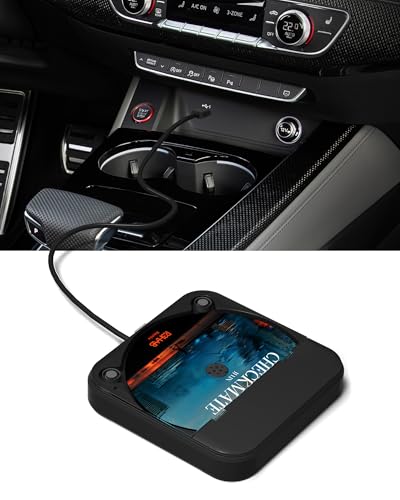
USB and AUX connectivity distinguish this portable player from the USB-only options. The unit measures 4.5 × 4.5 × 0.85 inches and is intended for a car stereo without a built-in CD drive. The maker says it supports touchscreen and steering-wheel control after connection, which may suit drivers whose stereo offers those controls. The tradeoff is that the supported disc and audio formats are not identified here, so buyers with a particular disc collection should verify compatibility before choosing it.
Bottom line: Choose this if your stereo has USB or AUX and you want a compact player.
USB/AUX Car CD Player with Remote

Its format support sets this model apart: it plays CD, CD-R, CD-RW, MP3, WMA, and WAV, but not DVD discs. The player connects through USB or AUX and draws power over USB, according to the maker. Those formats make it a practical match for buyers who use recordable discs or MP3 files as well as standard CDs.
Bottom line: Pick this if your collection includes CD-R/RW or supported audio files.
DDup Portable Car CD Player

The included USB-C adapter, extension cable, and remote make this model distinct among the options. It connects to compatible stereos over USB or AUX and supports CD, CD-R/RW, MP3, WMA, and WAV playback. Four rubber feet are intended to help stabilize the player, while a magnetic cover and internal locking mechanism hold and protect the disc.
Bottom line: Choose it if the included adapter, cable, and remote suit your setup.
POSSPO Jupiter USB CD Player

This model is built around a USB connection to the car stereo, and the maker says the stereo must have a USB port for that setup. It measures 6.3 × 6.1 × 2.0 inches and includes an extension cable for flexible placement. The maker also describes AUX connection using a decoder for louder, clearer sound, plus anti-skip playback and resume. Its USB-first design is a limitation for cars without a compatible USB input; confirm the connection path your stereo supports before selecting it.
Bottom line: Pick it if your stereo has USB and you want flexible placement.
MONODEAL Bluetooth/USB Car CD Player
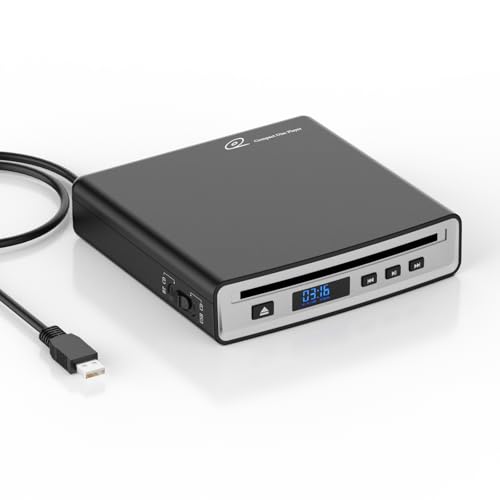
Bluetooth connectivity distinguishes this player from the USB/AUX models, and USB is also available as a connection method. It measures 6.0 × 6.5 × 1.5 inches and supports AAC, ALAC, MP3, WAV, and WMA CDs, according to the maker. The maker says its anti-shock chip is intended to maintain playback on bumpy roads. The limitation is that stereo compatibility still matters: confirm that your vehicle system supports the chosen connection and these formats before buying.
Bottom line: Choose it if Bluetooth is the connection you want to use.
How to choose an aftermarket car CD player
Start with the stereo inputs, because a portable CD player needs a compatible way to send audio to the car system. USB and AUX are wired options; Bluetooth is another route when both the player and stereo support it. A USB socket may be intended for charging or media files rather than accepting audio from an external player, so check the stereo manual for USB audio support. If you use AUX, confirm the stereo has a 3.5 mm input. Match the player’s formats to your discs, especially if you use recordable CD-R or CD-RW media.
Connection choice
| Connection | What to confirm | Good fit when |
|---|---|---|
| USB | Stereo accepts audio from an external USB player | Your stereo supports USB audio |
| AUX | Stereo has a matching audio input | You want a wired audio connection |
| Bluetooth | Stereo pairs with an audio source | You prefer a wireless connection |
Check audio and disc compatibility
Audio CDs, recordable CDs, and computer-file formats are not interchangeable: support for MP3 or WAV playback does not by itself establish support for every disc type. Standard audio CDs and CD-R/CD-RW are distinct formats, so check both the disc type and audio file format against the player’s support. DVD compatibility is separate from CD support; a CD player should not be assumed to read DVDs. For a collection of burned discs, choose a model that explicitly names CD-R or CD-RW and the file formats you use. If the stereo does not recognize the player, its USB input may not accept an external CD source.
Place and secure a portable CD player
Portable players need a stable location that leaves the stereo controls and vehicle controls accessible. Measure the intended console or storage space in inches and compare it with the unit’s footprint; allow room for the cable and for inserting or removing a disc. An extension cable can help with placement, but it should not cross a pedal area or interfere with shifting. Anti-skip features and rubber feet may help manage movement, but they do not make handling a disc safe while driving. Set up playback while parked and keep attention on the road.
Common compatibility mistakes
The common mistake is assuming that any USB port can play audio from an external CD drive. Some vehicle USB ports support only charging or music files on a flash drive, so verify that the stereo recognizes an external player before choosing a USB-only unit. Another mistake is treating Bluetooth, AUX, and USB as equivalent: each requires corresponding support on the stereo. Buyers should also avoid assuming that steering-wheel or touchscreen controls work with every car; those functions depend on the player and vehicle system. With no compatible input, a portable player cannot provide audio through that stereo.
Frequently Asked Questions
Will a USB CD player work with any car stereo?
No; the stereo must accept audio from an external USB player, not merely provide power or read flash drives. Check the stereo manual for supported USB audio sources before choosing a USB-only model.
Can a car CD player play CD-R and CD-RW discs?
Only if the player supports those disc types. Check for explicit CD-R or CD-RW support, and confirm file-format support too if the discs contain MP3 or other audio files.
Can a portable car CD player play DVDs?
CD playback does not imply DVD playback. Choose a unit that explicitly supports DVDs if you need that format; one of these options explicitly says it does not play DVD discs.
Where should I place a portable CD player in my car?
Use a stable surface or storage area that does not obstruct controls, shifter movement, or pedals. Measure the available space in inches and route cables clear of the driver’s footwell.
Is it safe to change CDs while driving?
No; handle and change discs while parked. Set up playback before driving and keep your attention on the road.