
Airties 4971 WiFi Extender: Fit and Setup Guide

The Airties AT&T Air 4971 is the right fit if you have a Pace 5268AC, BGW210 or BGW320 gateway, since it is designed to work exclusively with those AT&T models. Choose another extender if your router is outside that set or you need a different Wi-Fi system.
A Wi-Fi extender relays a router’s signal into a weaker-coverage area; placement and compatibility matter as much as the advertised band count.
We earn a commission if you buy through links on this page. As an Amazon Associate I earn from qualifying purchases. Products are compared on manufacturer specifications, not hands-on testing.
- Best overall: AT&T Air 4971 Tri-Band Wi-Fi 6 Extender – It is the only named Air 4971 and supports the compatible AT&T gateways, tri-band Wi-Fi 6 and two Gigabit Ethernet ports.
- Best for EasyMesh: TP-Link RE315 AC1200 Wi-Fi Extender – It identifies EasyMesh compatibility and provides one Ethernet port, but is a different Wi-Fi 5 extender.
- Best for an Air 4920: AT&T Air 4920 Smart Wi-Fi Extender – It is another AT&T Air extender, but it is the Air 4920 rather than the requested 4971.
| Product | Best for | Wi-Fi bands | Ethernet ports | Size (inches) | Shop |
|---|---|---|---|---|---|
| AT&T Air 4971 Tri-Band Wi-Fi 6 Extender | Compatible AT&T gateways | Tri-band, Wi-Fi 6 | 2 Gigabit | 4 × 4 × 10 | Check Price on Amazon |
| Frontier Secure Air 4920 Dual-Band Extender | Frontier Wi-Fi 5 | Dual-band, Wi-Fi 5 | Ethernet ports (count unknown) | 4 × 4 × 4 | Check Price on Amazon |
| TP-Link RE315 AC1200 Wi-Fi Extender | EasyMesh networks | Dual-band, Wi-Fi 5 | 1 Ethernet | 4.89 × 3.5 × 2.05 | Check Price on Amazon |
| AT&T Air 4920 Smart Wi-Fi Extender | Air 4920 users | Dual-band | — | 3.94 × 4.27 × 1.63 | Check Price on Amazon |
Airties 4971 WiFi Extender and Alternatives
Start with gateway compatibility, then compare the bands and wired connections each extender offers.
AT&T Air 4971 Tri-Band Wi-Fi 6 Extender

The AT&T Air 4971 is the only exact match here, and its gateway requirement is the deciding constraint: it works exclusively with Pace 5268AC, BGW210 or BGW320 Wi-Fi Gateways. It has two 5 GHz bands and one 2.4 GHz band, plus two Gigabit Ethernet ports for wired devices. AT&T’s model supports a single network name with automatic band steering and WPS pairing. Its 4 × 4 × 10-inch body is larger than the other measured extenders, so check the shelf or outlet space where you plan to place it. It is not a fit for other gateways.
Bottom line: Choose it if you use one of the three named AT&T gateways and want tri-band Wi-Fi 6.
Frontier Secure Air 4920 Dual-Band Extender
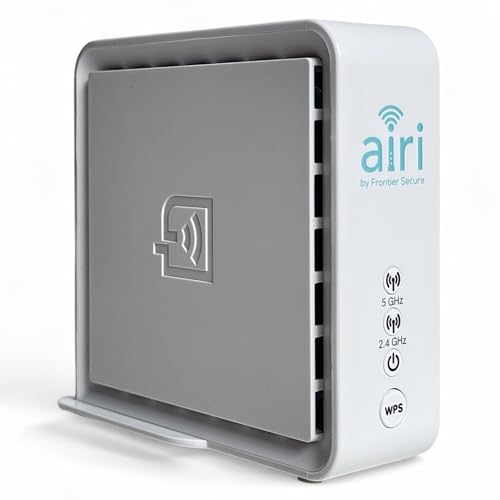
The Frontier Secure Air 4920 is a dual-band Wi-Fi 5 mesh extender, not the AT&T Air 4971, so the relevant distinction is its Frontier Secure identity and 802.11ac radio. Its feature claims describe 2.4 GHz and 5 GHz operation, WPS setup, Ethernet ports and a unified network for roaming. Choose it only when a Wi-Fi 5 extender is appropriate for your setup; the specifications do not establish compatibility with the AT&T gateways required by the Air 4971. The compact 4 × 4 × 4-inch dimensions may suit a smaller placement area.
Bottom line: Consider it for a Frontier Secure setup seeking a dual-band Wi-Fi 5 extender.
TP-Link RE315 AC1200 Wi-Fi Extender

The TP-Link RE315 differs from the Air 4971 by using dual-band Wi-Fi 5 rather than tri-band Wi-Fi 6, and it names EasyMesh compatibility. Its feature claims give maximum link rates of 867 Mbps on 5 GHz and 300 Mbps on 2.4 GHz, with one Ethernet port and two adjustable external antennas. TP-Link also gives a coverage figure of up to 1,500 square feet and support for up to 32 devices; actual performance can change with distance and obstacles. It is an alternative for an EasyMesh setup, not a substitute for the Air 4971’s specified AT&T gateway pairing.
Bottom line: Pick it when EasyMesh support and one wired port matter more than matching the AT&T Air 4971.
AT&T Air 4920 Smart Wi-Fi Extender

The AT&T Air 4920 is the closest alternative by family name, but it is an older, different model than the requested Air 4971. Its features identify dual-band 2.4 GHz and 5 GHz operation and a compact white enclosure; the measurements are about 3.94 × 4.27 × 1.63 inches. The specifications describe integration with compatible networking equipment but do not identify gateway models, so confirm the exact gateway fit before choosing it. Buyers specifically seeking the 4971’s tri-band Wi-Fi 6 and two Gigabit Ethernet ports should choose the matching model instead.
Bottom line: Choose it only if you specifically want the Air 4920 and have confirmed gateway compatibility.
How to choose an Airties 4971 WiFi extender
Choose the Air 4971 only if your gateway is a Pace 5268AC, BGW210 or BGW320; those are the compatible models named for this extender. The Air 4971 is tri-band Wi-Fi 6, with two 5 GHz bands and one 2.4 GHz band, while a dual-band extender uses one band in each range. A second 5 GHz band can help separate backhaul traffic from client traffic, but it does not remove the need for a strong signal from the gateway. For a general extender purchase, match the extender’s mesh system to the router rather than assuming that a shared Wi-Fi generation guarantees roaming compatibility. Pick a different type if the gateway model is not on the Air 4971’s supported list.
Where to place a Wi-Fi extender
Place an extender between the gateway and the weak-signal room, where it can still receive a useful signal; putting it inside the dead zone gives it little signal to relay. A practical starting point is roughly halfway between the router and the target area, then adjust based on connection quality. Walls, floors, metal appliances and neighboring networks can weaken Wi-Fi, so a straight-line distance is not a reliable coverage measure. For a two-story home, test a location near the stairwell or open landing rather than behind furniture or inside a cabinet. Keep the extender out in the open and avoid placing it beside large metal objects or other electronics that may obstruct or interfere with the signal.
What Wi-Fi bands and Ethernet ports change
Wi-Fi 2.4 GHz usually reaches farther and passes through obstacles better, while 5 GHz can carry more data over shorter distances; the best band depends on the room and device. A tri-band extender adds a second 5 GHz radio, which may provide a separate path for traffic between extender and gateway. An extender’s advertised combined rate is not the same as a single device’s real-world speed, because wireless links share airtime and overhead. Ethernet ports let nearby wired devices connect directly to the extender, but a wired connection to the extender does not make its gateway link wired. Compare port count to the number of nearby devices that lack Wi-Fi.
Extender setup mistakes to avoid
Pair the Air 4971 to a supported gateway using its WPS process, but confirm the gateway model before setup; WPS is a pairing method, not a compatibility guarantee. A common mistake is placing the extender at the far edge of coverage, where the relay link is already weak. Another is expecting a Wi-Fi 6 extender to make an older phone or laptop operate as a Wi-Fi 6 client; each device uses the capabilities it supports. Give the extender open space and keep it away from cabinets and dense obstructions. If a device can use Ethernet near the extender, the wired link avoids an extra wireless segment between that device and the extender.
Frequently Asked Questions
Which AT&T gateways work with the Air 4971?
The Air 4971 works exclusively with Pace 5268AC, BGW210 or BGW320 Wi-Fi Gateways. Check the gateway model label before choosing this extender.
Does the Air 4971 support Wi-Fi 6?
Yes, the Air 4971 is an 802.11ax Wi-Fi 6 extender with two 5 GHz bands and one 2.4 GHz band. Connected client speeds still depend on each device’s Wi-Fi capabilities and signal conditions.
Where should I put a Wi-Fi extender?
Start roughly halfway between the router and the weak-coverage room, where the extender can still receive a good signal. Walls, floors and metal objects can change the best location, so test an open spot rather than placing it in the dead zone.
Will a Wi-Fi extender increase my internet plan speed?
No; an extender relays the connection it receives and does not increase the speed provided by the internet plan. The farther or more obstructed its link to the router, the less useful capacity may reach the extended area.
Can I connect wired devices to the Air 4971?
Yes, the Air 4971 has two Gigabit Ethernet ports for wired devices. Ethernet connects a device to the extender, but the extender still needs a wireless link to its gateway.