
AMD Wraith Stealth Cooler: Fit and Features Compared

AMD Wraith Stealth 90 mm AM4 is the closest match for an AMD Wraith Stealth cooler, with AM4 support, a 90 mm fan, and direct screw mounting. Choose Wraith Stealth AM4/AM5 if you need AM5 support; consider Wraith Prism 95 mm RGB only if you want a Wraith Prism-style cooler rather than a Stealth.
These are CPU air coolers: a fan moves air across a heatsink to carry heat away from the processor. Check the cooler’s socket support against your motherboard and CPU before ordering.
We earn a commission if you buy through links on this page. As an Amazon Associate I earn from qualifying purchases. Products are compared on manufacturer specifications, not hands-on testing.
- Best overall: AMD Wraith Stealth 90 mm AM4 – It is explicitly an AM4 Wraith Stealth cooler with a 90 mm fan and direct screw mounting.
- Best for AM5 support: Wraith Stealth AM4/AM5 – Its compatibility claims include both AM4 and AM5 sockets.
- Best for RGB lighting: Wraith Prism 95 mm RGB – It is a Wraith Prism-style alternative with a 95 mm RGB fan and copper heat pipes.
| Product | Best for | Socket support | Fan size | Heatsink design | Shop |
|---|---|---|---|---|---|
| AMD Wraith Stealth 90 mm AM4 | AM4 replacement | AM4 | 90 mm | Aluminum | Check Price on Amazon |
| Wraith Stealth AM4/AM5 | AM5 compatibility | AM4, AM5 | — | Aluminum | Check Price on Amazon |
| Wraith Prism 95 mm RGB | RGB alternative | AM4, AM5, AM2/3 and others | 95 mm | Aluminum, copper base, four heat pipes | Check Price on Amazon |
AMD Wraith Stealth Coolers
Compare socket compatibility and cooler design before choosing a replacement or alternative.
AMD Wraith Stealth 90 mm AM4

AMD Wraith Stealth 90 mm AM4 is the closest match to the Wraith Stealth name and specifies AM4 mounting with a 90 mm fan. Its aluminum heatsink has pre-applied thermal paste, and the cooler mounts directly to an AM4 motherboard with screws. The 4-pin PWM connector lets a compatible motherboard control fan speed. This is a straightforward choice for an AM4 build that needs a like-for-like cooler. It does not claim AM5 support, so it is the wrong fit for a board using that socket.
Bottom line: Pick this for an AM4 system that needs a Wraith Stealth-style replacement.
Wraith Stealth AM4/AM5
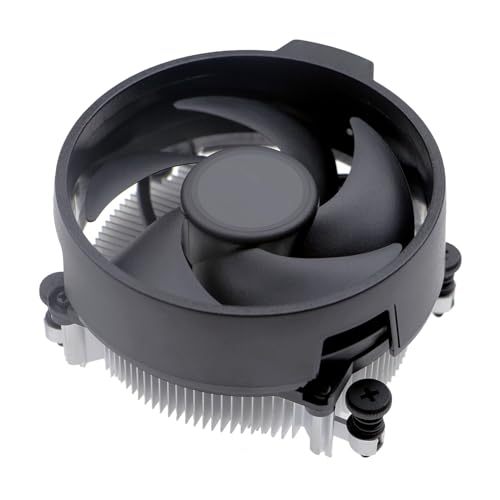
Wraith Stealth AM4/AM5 stands apart by claiming compatibility with both AM4 and AM5, while retaining the Wraith Stealth name and an aluminum heatsink. Its screw-mount design is intended for supported motherboards, and the dimensions are 3.5 by 3.5 inches across with a 2-inch height. The product also claims a quiet fan for everyday work and light use.
Bottom line: Choose this when AM5 support is the deciding requirement.
Wraith Prism 95 mm RGB

Wraith Prism 95 mm RGB is a Wraith Prism alternative, not a Wraith Stealth: it has a 95 mm RGB fan, an aluminum heatsink, a copper base, and four integrated 6 mm copper heat pipes. The cooler includes pre-applied silicone thermal paste and claims broad AMD socket compatibility, including AM4 and AM5. That different heatsink design makes it relevant for buyers seeking a Prism-style option rather than a direct Stealth replacement. It uses the standard bracket on many AMD boards, which is not included with the cooler, so check your mounting hardware first.
Bottom line: Choose this if you want a Prism-style cooler and have the required bracket.
How to choose an AMD Wraith Stealth cooler
Start with socket compatibility, then compare mounting and dimensions. AM4 and AM5 are different socket platforms; a cooler’s broad Ryzen compatibility claim does not establish that it fits every motherboard, so confirm the exact socket and mounting hardware. Fan diameter is another practical difference: 90 mm and 95 mm fans are not interchangeable specifications, and a larger fan may require more clearance. Check the case’s CPU-cooler height limit against the cooler’s height, and allow room for nearby memory modules. If either socket or case clearance is uncertain, confirm it before ordering rather than relying on the product name alone.
AM4 and AM5 cooler fit
Socket support is the key fit rule: choose a cooler that explicitly supports the socket on your motherboard. AM4 boards commonly use a backplate with retention hardware, while many coolers attach using either the board’s retention brackets or screws into the backplate. AM5 retains the same cooler mounting-hole spacing as AM4, but compatible mounting hardware is still essential. Do not assume a cooler fits solely because it is advertised for Ryzen; processor generation and board socket must match. With a claimed AM4/AM5 model, check whether the necessary bracket or backplate is included and whether your board’s existing hardware must remain in place.
Stealth and Prism cooler designs
A Stealth-style cooler prioritizes a compact aluminum heatsink and fan, while the Prism-style option here adds a copper base, heat pipes, and RGB lighting. The heat pipes provide another path for transferring heat from the base into the fin stack; the fan then moves air through those fins. A 95 mm fan is larger than a 90 mm fan, but fan diameter alone does not establish cooling performance or noise. Use the actual cooler height and case clearance as the measurable fit test, and choose a Prism design only if its mounting parts and dimensions suit the build.
| Need | Choice | Reason |
|---|---|---|
| AM4 Stealth-style replacement | AMD Wraith Stealth 90 mm AM4 | AM4 support and direct screw mounting |
| AM5 support | Wraith Stealth AM4/AM5 | Claims both AM4 and AM5 compatibility |
| RGB and heat pipes | Wraith Prism 95 mm RGB | Prism design with copper base and four heat pipes |
Installing and maintaining a CPU cooler
Install a CPU cooler with the system powered off and unplugged, and avoid touching the thermal paste or CPU contacts. Pre-applied paste is ready for a first installation, but if a cooler is lifted after mounting, clean off the old compound and apply fresh paste before reinstalling; disturbed paste can leave gaps. Tighten screws gradually in an alternating pattern so pressure spreads evenly across the processor. Before powering on, connect the fan to the motherboard’s CPU_FAN header and confirm that the fan spins. Keep dust from building up between heatsink fins, since blocked airflow reduces the air reaching the fin surfaces.
Frequently Asked Questions
What should I check for CPU cooler case clearance?
Compare the cooler’s height with the case’s maximum CPU-cooler clearance, leaving room for the side panel. Also check nearby memory height and fan overhang; a 90 mm or 95 mm fan diameter does not give the cooler’s full height.
When should I replace thermal paste on a CPU cooler?
Replace the paste whenever the cooler is removed from the processor. A fresh, thin layer fills microscopic surface gaps; disturbed paste can leave air pockets and reduce heat transfer.
Where does a CPU cooler fan connect?
Connect the fan to the motherboard’s CPU_FAN header so the board can monitor its speed. A 4-pin PWM fan supports speed control when the motherboard header and settings are compatible.
Do Wraith Stealth and Wraith Prism coolers mount the same way?
Mounting depends on the exact cooler and motherboard hardware, not just the Wraith name. Check that the correct bracket or backplate is present before installation, especially when switching between cooler designs.