
Apple Pencil 2 Tip Replacement: 5 Options Compared

For an Apple Pencil (2nd generation) tip replacement, Apple Pencil Tips (4 pack) is the direct match: its four replacement tips are compatible with Apple Pencil (2nd generation) and other Apple Pencil models. Choose a different set if you want metal or fine-point styles, or more tip options in one pack.
We earn a commission if you buy through links on this page. As an Amazon Associate I earn from qualifying purchases. Products are compared on manufacturer specifications, not hands-on testing.
- Best overall: Apple Pencil Tips (4 pack) – Four replacement tips with explicit Apple Pencil (2nd generation) compatibility.
- Best for mixed styles: Inesore Mixed Tips with Case (8 Pack) – Eight tips across four styles, plus a storage case.
- Best for a fine point: Mixed Metal Replacement Tips (4 Pack) – The set includes a long metal tip intended for precise control.
| Product | Best for | Pack size | Tip styles | Compatible models | Shop |
|---|---|---|---|---|---|
| Apple Pencil Tips (4 pack) | Original-style replacement | 4 tips | Apple Pencil tips | Pro, 2nd gen, USB-C, 1st gen | Check Price on Amazon |
| SIXFU Replacement Tips (4 Pack) | Familiar nib feel | 4 tips | Original-style | Pro, 2nd gen, 1st gen, USB-C, Logitech Crayon | Check Price on Amazon |
| Mixed Metal Replacement Tips (4 Pack) | Fine-point control | 4 tips | Mixed; includes metal | Pro, 2nd gen, 1st gen, USB-C, Logitech Crayon | Check Price on Amazon |
| Inesore Mixed Tips with Case (8 Pack) | Multiple tip styles | 8 tips | Original, short, fine, long | Pro, 2nd gen, 1st gen, USB-C | Check Price on Amazon |
| AWINNER Replacement Tips (4 Pack) | POM plastic tips | 4 tips | POM plastic | 1st gen, 2nd gen, Pro, Logitech Crayon | Check Price on Amazon |
Apple Pencil 2 tip replacement options
Compare these compatible tip sets by included styles and the Apple Pencil models they support.
Apple Pencil Tips (4 pack)

Apple Pencil Tips (4 pack) is the direct replacement choice for Apple Pencil (2nd generation), with four extra Apple Pencil tips in the pack. Apple says the tips also work with Apple Pencil Pro, USB-C, and 1st-generation models, so this set suits someone seeking the standard replacement rather than a different point style. The package is compact at 3.2 × 2.6 × 0.6 inches. Its main limitation is the single tip style: choose another option if you specifically want a fine or metal point.
Bottom line: Choose this set for straightforward replacement tips with explicit second-generation compatibility.
SIXFU Replacement Tips (4 Pack)

SIXFU Replacement Tips (4 Pack) focuses on four replacement nibs described as retaining the appearance and feel of original Apple Pencil tips. The maker says the tips support pressure and tilt sensing and fit Apple Pencil Pro, 2nd generation, 1st generation, USB-C, and Logitech Crayon digital pencils. That broad model range makes this a candidate for households with more than one supported stylus. The pack is a fit only if a familiar nib profile is the goal; it does not offer the assorted point styles of mixed sets.
Bottom line: Pick this when you want a familiar-style tip and use one of its supported pencils.
Mixed Metal Replacement Tips (4 Pack)

Mixed Metal Replacement Tips (4 Pack) differs from standard-style packs by including a long, slender metal point alongside an original-shape model and other replacement tips. The maker positions the metal point for clearer visibility and precise control during design work, and says the set is compatible with Apple Pencil (2nd generation), other Apple Pencil models, and Logitech Crayon. It suits detail-oriented drawing or writing where a narrow contact point is useful. Skip it if you want only a uniform set of standard-style tips.
Bottom line: Choose this set if fine-point options matter more than getting four matching nibs.
Inesore Mixed Tips with Case (8 Pack)

Inesore Mixed Tips with Case (8 Pack) offers the broadest style range: two each of original-style, short, fine, and long tips, plus a storage case. Its maker says the ABS and TPU options provide a familiar, quieter feel, while rounded copper metal tips offer a different writing experience; the fine metal style is intended to reduce visual obstruction at the contact point. Compatibility includes Apple Pencil (2nd generation), Pro, 1st generation, and USB-C. This variety suits people choosing between writing and detailed lines, but it is less suitable if you want a uniform four-tip replacement set.
Bottom line: Pick this if you want to compare several tip styles and keep spares in a case.
AWINNER Replacement Tips (4 Pack)
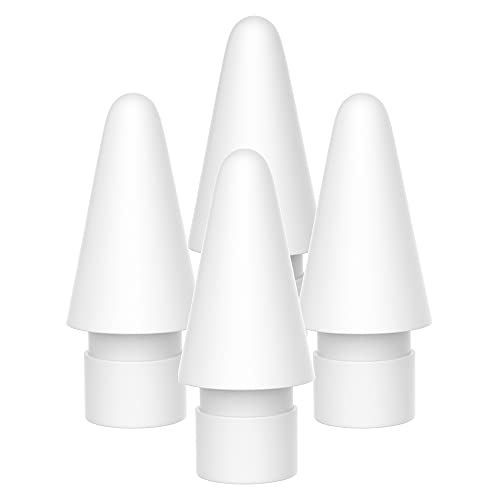
AWINNER Replacement Tips (4 Pack) is a four-tip replacement set made from POM plastic, distinct from the mixed-style packs that include metal points. Its maker says the nibs are designed for smooth writing, drawing, and note-taking, and names Apple Pencil (2nd generation), 1st generation, Pro, and Logitech Crayon as compatible models. The maker also describes installation as a simple twist. This set suits someone who wants matching plastic nibs; it is not the pick for varied point shapes or a storage case.
Bottom line: Choose this if you want four POM plastic tips for a supported pencil.
How to choose Apple Pencil 2 replacement tips
Start with the point style, then confirm your stylus generation. Standard-shaped replacement tips preserve a familiar contact profile, while fine or long metal styles can make small marks easier to see around the nib. Pack counts also differ: a four-tip set suits a like-for-like replacement, while an eight-tip mixed set gives more styles to compare. For notes and ordinary writing, a familiar-style point is the simpler choice; for detailed linework, consider a fine point. Metal tips can feel and sound different from plastic or polymer, so select them for the intended task rather than assuming every style writes alike.
Compatibility should be checked by exact model, not just the phrase “Apple Pencil.” The sets here name support for the 2nd generation, but their compatibility with other devices differs. If the pencil is not one of the named models, confirm its fit before ordering.
Apple Pencil tip styles compared
Tip material and shape affect the contact point and writing feel. Use this table to match the style to the task rather than treating every replacement nib as interchangeable in use.
| Need | Tip choice | Trade-off |
|---|---|---|
| Everyday notes | Original-style | Familiar shape, fewer style choices |
| Fine detail | Fine or long metal point | Different feel from standard tips |
| Several tasks | Mixed-style pack | Must choose and store spare styles |
Metal points are not automatically the right match for every screen setup. If you use a screen protector, verify that the tip maker supports that pairing and stop using a tip if it appears to scratch or damage the surface.
When to replace an Apple Pencil tip
Replace a tip when its outer point is visibly worn, cracked, or loose, or when the pencil no longer makes consistent contact. Apple Pencil tips screw onto the pencil; turn the old tip counterclockwise to remove it and turn the replacement clockwise until secure. Avoid overtightening, which can damage the tip or pencil. Keep the pencil powered off or disconnected while changing tips, and check that the replacement sits evenly before writing.
There is no universal replacement interval because wear depends on use, pressure, and the surface. A hard screen protector or heavy pressure can wear a tip faster than light note-taking on a smoother surface. Inspect the point periodically instead of replacing it by calendar schedule.
Compatibility and screen-surface checks
Apple Pencil generations do not all share every accessory fit, so match the replacement pack to the exact pencil model. The products here name compatibility with Apple Pencil (2nd generation), but support for Pro, USB-C, 1st generation, and Logitech Crayon varies by set. Confirm the model before ordering, especially if the pencil was bundled with a particular iPad or is used across devices.
Tip material matters at the screen. Metal points, polymer, ABS, and TPU can have different friction and sound, and a screen protector can change how a nib glides. Do not press harder to compensate for a point that feels wrong; check installation and compatibility first, then stop if the screen surface shows damage.
Frequently Asked Questions
How do I replace an Apple Pencil 2 tip?
Turn the existing tip counterclockwise to remove it, then screw the replacement clockwise until it is secure. Do not overtighten; the point should sit evenly before you resume writing.
Do Apple Pencil 2 tips fit other generations?
Some replacement sets support several models, but compatibility varies by pack. Check that Apple Pencil (2nd generation) is named and verify any other pencil model separately.
When should I change my Apple Pencil tip?
Replace a tip when it is visibly worn, cracked, loose, or making inconsistent contact. Usage and surface affect wear, so inspect the point rather than relying on a fixed calendar interval.
Can a metal tip scratch an iPad screen?
A metal tip and screen protector pairing can affect surface wear, so verify that the tip is suitable for your setup. Stop using it if you see scratches or other screen damage.
Are Apple Pencil tips universal across screen protectors?
No; screen protectors change friction and how a tip contacts the display. If a nib feels rough or inconsistent, check the protector and tip compatibility rather than pressing harder.