
Auto Feed Paper Shredders: 4 Models Compared

For most people handling large batches, Amazon Basics 200-Sheet Auto Feed is the strongest fit because its 200-sheet auto tray pairs with a 60-minute run time and an 8.5-gallon bin. Choose Bonsaii 120-Sheet Autofeed Micro-Cut or QUIETLEMON OL287 2.0 120-Sheet if a smaller footprint matters more, or Bonsaii 240-Sheet Auto Feed Micro-Cut for a 240-sheet tray and longer continuous run time.
An auto feed paper shredder pulls a stack through without hand-feeding every sheet; manual slots handle smaller batches and other items on some models.
We earn a commission if you buy through links on this page. As an Amazon Associate I earn from qualifying purchases. Products are compared on manufacturer specifications, not hands-on testing.
- Best overall: Amazon Basics 200-Sheet Auto Feed – A 200-sheet auto tray, 60-minute auto run time and 8.5-gallon bin suit substantial batches.
- Best for largest batches: Bonsaii 240-Sheet Auto Feed Micro-Cut – Its 240-sheet tray is the largest listed, and it runs for up to 60 minutes.
- Best for micro-cut output: Bonsaii 120-Sheet Autofeed Micro-Cut – Its 4 x 12 mm cut pieces are smaller than the other cut size.
- Best for compact footprint: QUIETLEMON OL287 2.0 120-Sheet – Its width is 13.85 inches, narrower than the other products with dimensions supplied.
| Product | Best for | Auto-feed capacity | Manual-feed capacity | Bin capacity | Shop |
|---|---|---|---|---|---|
| Amazon Basics 200-Sheet Auto Feed | Large office batches | 200 sheets | 10 sheets | 8.5 gal | Check Price on Amazon |
| Bonsaii 240-Sheet Auto Feed Micro-Cut | Maximum tray capacity | 240 sheets | 12 sheets | 8.1 gal | Check Price on Amazon |
| Bonsaii 120-Sheet Autofeed Micro-Cut | Smaller cut pieces | 120 sheets | 12 sheets | 6 gal | Check Price on Amazon |
| QUIETLEMON OL287 2.0 120-Sheet | Narrower work areas | 120 sheets | 8 sheets | 5.28 gal | Check Price on Amazon |
Auto Feed Paper Shredders Compared
Compare tray size, manual-feed capacity and bin volume to match a shredder to your batch size and work area.
Amazon Basics 200-Sheet Auto Feed

Amazon Basics 200-Sheet Auto Feed balances a high-capacity tray with a large bin: the auto-feed tray holds 200 sheets, and the pullout bin holds 8.5 gallons. Its P-4 cross-cut output measures 4 x 20 mm, and the manual slot handles up to 10 sheets at once without removing staples. Brand says the auto tray can run 60 minutes before a 45-minute cooldown; manual feed runs 10 minutes before the same cooldown. That makes it a practical match for sizable batches. Its 32.9-pound weight and 22.83-inch height matter when planning a fixed spot.
Bottom line: Choose this for large batches when you want a bigger bin and stated cooldown interval.
Bonsaii 240-Sheet Auto Feed Micro-Cut

Bonsaii 240-Sheet Auto Feed Micro-Cut has the largest auto-feed tray here at 240 sheets, so it suits offices that want to load a larger stack between visits. It uses micro-cut shredding, has an 8.1-gallon pullout bin with casters, and accepts up to 12 sheets through the manual feed. Brand says the auto mode runs for up to 60 minutes, while manual mode runs for up to 30 minutes. The 33.9-pound unit is substantial, so its casters are useful if the shredder needs to move. The bin volume is smaller than Amazon Basics 200-Sheet Auto Feed’s.
Bottom line: Pick this when the largest auto-feed batch and longer manual run time matter most.
Bonsaii 120-Sheet Autofeed Micro-Cut

Bonsaii 120-Sheet Autofeed Micro-Cut stands out for its 4 x 12 mm micro-cut pieces, smaller than the 4 x 20 mm cross-cut output of Amazon Basics 200-Sheet Auto Feed. Its auto tray holds 120 sheets, and the manual feed handles 12 sheets plus mail, cards and staples. Brand says auto mode runs 30 minutes on and 60 minutes off; manual mode runs 10 minutes on and 60 minutes off. A 6-gallon bin and casters support a mobile home-office setup. The limitation is the shorter auto run time and smaller tray compared with the higher-capacity choices.
Bottom line: Choose this if smaller stated cut pieces matter more than maximum batch capacity.
QUIETLEMON OL287 2.0 120-Sheet
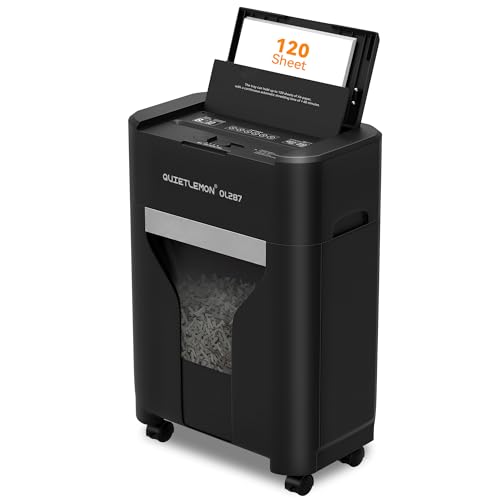
QUIETLEMON OL287 2.0 120-Sheet has the narrowest width among models with dimensions supplied: 13.85 inches, compared with 14.02 inches for Amazon Basics 200-Sheet Auto Feed and 15.75 inches for Bonsaii 240-Sheet Auto Feed Micro-Cut. The 120-sheet auto tray and 8-sheet manual feed suit smaller jobs, while its 5.28-gallon bin is the smallest capacity here. Brand says it runs for up to 40 minutes and identifies P-4 security and micro-cut output. Its manual slot accepts fewer sheets than Bonsaii 120-Sheet Autofeed Micro-Cut, Amazon Basics 200-Sheet Auto Feed or Bonsaii 240-Sheet Auto Feed Micro-Cut, so frequent mixed-item feeding may be less convenient.
Bottom line: Pick this for a tighter work area and moderate batches rather than maximum tray or bin size.
How to choose an auto feed paper shredder
Choose by batch size, cut type and how often you want to empty the bin. Auto-feed tray capacity ranges from 120 to 240 sheets in these models; a 240-sheet tray can reduce reload interruptions, but it does not mean the bin holds 240 sheets. P-4 is a common security level for confidential office paper, and cut dimensions help distinguish output: smaller pieces generally make reconstruction harder. Compare the manual slot separately because it may accept a different sheet count and materials. For recurring batches above 120 sheets, favor a tray rated for at least the stack you plan to load; for smaller batches, bin volume and workspace fit may matter more.
This table separates the main tradeoffs without treating tray and bin capacity as the same measure.
| Need | Compare | Reason |
|---|---|---|
| Largest single stack | Auto-feed sheets | Tray capacity sets the batch limit |
| Fewer emptying stops | Bin gallons | Bin volume affects collection capacity |
| Cards or stapled pages | Manual-feed rules | Accepted items and sheet limits differ |
P-4 cross-cut and micro-cut output
P-4 shredders are designed for confidential paper disposal, but the particle dimensions still differ by model. Amazon Basics 200-Sheet Auto Feed specifies cross-cut pieces of 4 x 20 mm, while Bonsaii 120-Sheet Autofeed Micro-Cut specifies micro-cut pieces of 4 x 12 mm; smaller pieces can be a useful preference for sensitive paperwork, though disposal needs vary by organization. P-4 is not the highest paper security level: higher levels use smaller particles for more sensitive material. Check workplace retention and disposal rules before destroying records, because shredding is irreversible. Never assume that a shredder’s paper security level also establishes a security rating for every material it accepts.
Run time, cooldown and batch planning
Continuous run times range from 30 to 60 minutes among the products with an exact figure, and cooldown periods differ. Amazon Basics 200-Sheet Auto Feed specifies a 45-minute cooldown after its 60-minute auto-feed run; Bonsaii 120-Sheet Autofeed Micro-Cut specifies 60 minutes off after a 30-minute auto run. A larger tray is most useful when the motor can keep pace with the batch, so plan around both sheet capacity and run cycle. If your work routinely exceeds the auto run time, divide it into sessions rather than assuming an uninterrupted cycle. Keep the shredder in a ventilated, accessible location and clear paper jams only with the controls and procedures supplied by its maker.
Safe setup and maintenance
Keep fingers, loose clothing, jewelry and hair away from feed openings; shredders use powered cutting mechanisms that can pull in loose items. Do not spray or store aerosol products near Bonsaii 120-Sheet Autofeed Micro-Cut, as its maker specifically warns against that use. Place the unit on a stable floor with enough clearance to open its bin and reach controls; a bin that is hard to access is more likely to be overfilled. Empty the collection bin before paper reaches the cutter area, and use shredder oil only if the maker permits it. Paper clips, cards and staples are accepted only where the specific model’s manual-feed rules allow them, not through every tray.
Frequently Asked Questions
How many sheets can an auto feed shredder handle?
Tray capacity is model-specific: the choices here hold 120, 200 or 240 sheets. Load no more than the tray rating, and account for the fact that heavier paper can make a stack thicker than an equivalent sheet count of standard paper.
What does P-4 security mean for paper shredding?
P-4 is a paper-shredder security level commonly used for confidential office documents, with a maximum particle area of 160 square millimeters. The 4 x 20 mm cross-cut pieces measure 80 square millimeters each, while 4 x 12 mm pieces measure 48 square millimeters.
Can I shred staples and credit cards automatically?
Do not assume auto trays accept staples or cards: the models describe those items for manual feed. Bonsaii 120-Sheet Autofeed Micro-Cut and Bonsaii 240-Sheet Auto Feed Micro-Cut specifically say their manual modes handle cards and staples, so use that feed and its sheet limit.
How long should I let a shredder cool down?
Use the model’s duty cycle rather than a generic interval. Amazon Basics 200-Sheet Auto Feed calls for a 45-minute cooldown after up to 60 minutes of auto feeding, while Bonsaii 120-Sheet Autofeed Micro-Cut specifies 60 minutes off after a 30-minute auto cycle.
How much clearance should I leave around a shredder?
Leave enough open floor space to access the feed, controls and collection bin without moving the shredder while it runs. Allow at least 2 inches of open space at the sides and rear for ordinary airflow, and more space where the bin pulls out.