
AV Cable for Wii U: 4 Composite Options Compared

For most Wii U setups with yellow, red, and white RCA inputs, TENINYU 6-Foot Composite AV Cable is a 6-foot composite cable; choose a different type if your TV lacks those inputs or you need component video.
Composite cables carry video and stereo audio over three RCA plugs, so the display’s input type—not the console’s HDMI port—decides whether this cable fits.
We earn a commission if you buy through links on this page. As an Amazon Associate I earn from qualifying purchases. Products are compared on manufacturer specifications, not hands-on testing.
- Best overall: TENINYU 6-Foot Composite AV Cable – A 6-foot composite RCA cable with a 480p compatibility claim in its name.
- Best for color-coded plugs: 6-Foot Wii/Wii U Composite AV Cable – Its red, white, and yellow RCA connectors are explicitly identified.
- Best for standard-definition TVs: Wii/Wii U AV Cable, 1.8 m – It specifies stereo AV and 480i video support.
| Product | Best for | Length | Connector type | Resolution claim | Shop |
|---|---|---|---|---|---|
| TENINYU 6-Foot Composite AV Cable | 6-foot RCA setup | 6 ft | Composite RCA | 480p compatibility claim | Check Price on Amazon |
| 6-Foot Wii/Wii U Composite AV Cable | Clearly marked RCA | 6 ft | Composite RCA | — | Check Price on Amazon |
| 6-Foot Composite AV Cable | Simple RCA connection | 6 ft | Composite RCA | — | Check Price on Amazon |
| Wii/Wii U AV Cable, 1.8 m | 480i standard definition | 5.9 ft | Stereo AV | 480i | Check Price on Amazon |
AV Cable for Wii U Options
Match the cable’s connector layout to your display’s inputs, then compare length and resolution claims.
TENINYU 6-Foot Composite AV Cable

TENINYU 6-Foot Composite AV Cable is the only option here whose name explicitly pairs a 6-foot composite cable with 480p compatibility. It has the standard yellow video and red/white audio connection type for a Wii or Wii U, and gold-plated connectors. Choose it when your display has composite inputs and you want a 6-foot run. Its resolution claim does not establish that every television will accept a 480p composite signal; check the TV’s input support if resolution is a deciding factor.
Bottom line: Pick this for a 6-foot RCA connection when the 480p compatibility claim matters.
6-Foot Wii/Wii U Composite AV Cable
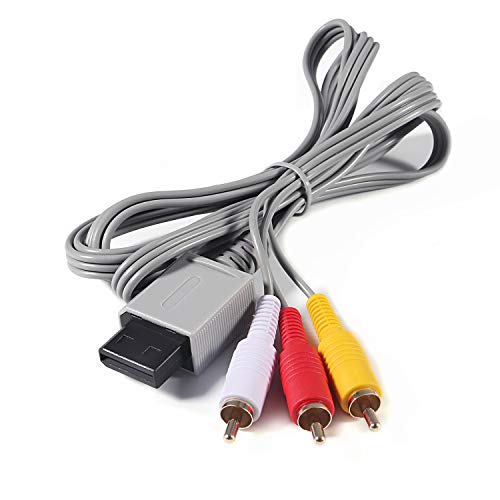
6-Foot Wii/Wii U Composite AV Cable spells out the color-coded RCA arrangement: yellow for composite video and red/white for audio, with a 6-foot length. That makes it the clearest fit for someone matching plugs to a TV’s composite AV input. It connects at the console end using a Wii/Wii U-specific plug. The maker does not give a resolution claim, so buyers choosing by a particular video mode should verify that requirement with their display and console settings before ordering.
Bottom line: Choose this when plug colors and a 6-foot cable are your main selection criteria.
6-Foot Composite AV Cable

6-Foot Composite AV Cable emphasizes plug-and-play color coding for a standard composite connection: yellow video plus red and white audio, in a 6-foot cable. It is presented as a replacement for Wii and Wii U consoles and for displays with RCA inputs. This suits a straightforward connection where the television already has composite jacks. The maker does not establish a specific resolution mode, so it is a weaker choice than a model with an explicit resolution claim if video mode is central to the decision.
Bottom line: Pick this for a basic 6-foot composite hookup to a TV with RCA inputs.
Wii/Wii U AV Cable, 1.8 m
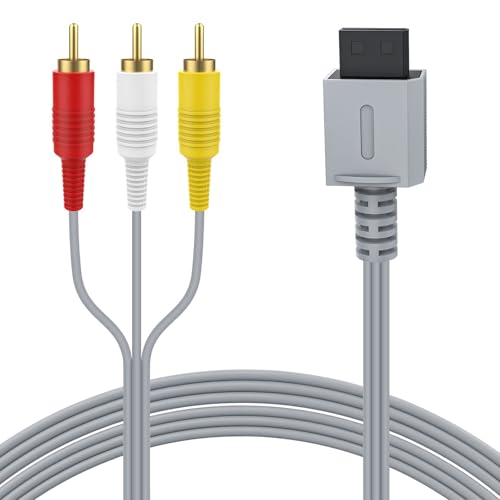
Wii/Wii U AV Cable, 1.8 m is the only option that explicitly limits its video support to 480i and calls out stereo audio. Its 1.8-meter cord is about 5.9 feet, slightly shorter than the 6-foot choices. It is intended for standard-definition setups rather than an HDTV path requiring 480p, so check the TV’s available inputs and target resolution before choosing it. Gold-plated connectors are also part of its design, but the 480i limit is the more important distinction when comparing display compatibility.
Bottom line: Choose this for a standard-definition connection where 480i is sufficient.
How to choose a Wii U AV cable
Choose the cable by the inputs on the display: composite uses yellow video and red/white stereo audio plugs, while component video uses separate Y, Pb, and Pr plugs plus audio. Composite sends one video signal and is the simplest match for a TV with a yellow RCA jack. Component separates the video channels and supports higher-definition analog modes when both the console and display accept them. Wii U’s analog AV connection is distinct from HDMI, so check the TV or receiver input panel before selecting a cable. If the TV has no composite input, a composite cable is not the right fit; choose a compatible alternate input path instead.
Composite versus component for Wii U
Composite and component cables use different TV inputs and should not be treated as interchangeable. Composite has three RCA plugs total; component typically has five, with three video plugs and two audio plugs. A Wii U can output analog video through its multi-out connection, but the display must support the chosen signal type. Composite generally serves standard-definition viewing, while component is used for progressive 480p and can support higher analog modes where compatible. With a TV that has only component jacks, choose a component cable; with yellow/red/white jacks, choose composite. Confirm both ends before purchase, especially when an adapter or receiver sits between the console and screen.
Wii U cable length and setup fit
A 6-foot cable measures 72 inches, while 1.8 meters is about 70.9 inches, so these lengths are nearly the same. Measure the route from the console to the TV or receiver, including any path around furniture; allow slack at both connectors instead of pulling the cable taut. Keep analog video leads away from power cords where practical to reduce interference and avoid tight bends at the plugs. For a connection that must cross a room or run behind a cabinet, measure the complete route before choosing a length. The short cable length also makes these options better suited to nearby displays than distant wall-mounted screens.
Connecting and troubleshooting Wii U AV
Connect the Wii U end to the console’s AV port, then match the RCA plugs to the same-color TV inputs: yellow for video, red and white for audio. Select the corresponding AV input on the television; some sets label the source “Video” rather than “Composite.” If sound works but the screen stays blank, check the yellow plug and selected input first. If the picture appears but audio does not, check the red/white plugs and the TV’s mute setting. Composite carries standard analog signals, so it will not provide the same picture detail as HDMI or component. Avoid forcing plugs into an incompatible port; RCA connectors should seat without excessive pressure.
Frequently Asked Questions
Does the Wii U have a yellow RCA video output?
Yes, a Wii U composite AV cable uses the console’s AV connection and provides a yellow RCA video plug. The TV must have a matching composite input, often alongside red and white audio jacks.
Can a Wii U composite cable support 480p?
Composite video is generally associated with standard-definition 480i, while progressive 480p is typically delivered over component or HDMI. Check the cable’s specific compatibility claim and the display’s accepted modes before relying on 480p.
What do red white and yellow plugs connect to?
Yellow carries composite video, while red and white carry the two stereo audio channels. Match each plug to the same color on the TV or receiver, then select that AV input.
How long is a 1.8 meter Wii cable?
A 1.8-meter cable is about 70.9 inches, or roughly 5.9 feet. A 6-foot cable is 72 inches, making the two lengths nearly identical.
Will a Wii U AV cable work with a TV that has no RCA inputs?
A composite AV cable requires composite RCA inputs, including a yellow video connection. If the TV lacks those jacks, use a compatible input method such as HDMI or component, depending on the TV’s available ports.