
Best Laptop Sun Shade: 5 Options Compared for Outdoor Work

For most outdoor laptop users, TopShade Adjustable Clip-On Sun Shade is the most adaptable pick because its clip mount attaches to a laptop or another suitable surface, and its shade can be repositioned as the sun moves. Choose a tent-style privacy shield instead if you want more enclosure, or a backpack-shade combination if you also need a carry bag.
A laptop sun shade blocks some direct light from reaching the display; it cannot make a dim screen brighter or eliminate reflections from every angle.
We earn a commission if you buy through links on this page. As an Amazon Associate I earn from qualifying purchases. Products are compared on manufacturer specifications, not hands-on testing.
- Best overall: TopShade Adjustable Clip-On Sun Shade – The adjustable support rod and clip mount let you reposition shade and attach it to several suitable surfaces.
- Best for carrying gear: GiMiUiTo Laptop Shade Backpack, 12–16 in. – Its 17-by-12-by-6.5-inch bag doubles as a laptop tent and includes multiple pockets.
- Best for larger screens: Lap Shade Reflective Hood, up to 17 in. – It is sized for screens up to 17 inches.
| Product | Best for | Laptop fit | Shade design | Portability | Shop |
|---|---|---|---|---|---|
| TopShade Adjustable Clip-On Sun Shade | Flexible setup | — | 12 × 18 in. open | 6-in. circle folded | Check Price on Amazon |
| GiMiUiTo Laptop Shade Backpack, 12–16 in. | Bag and shade | 12–16 in. | Backpack converts to tent | 17 × 12 × 6.5-in. bag | Check Price on Amazon |
| Lap Shade Reflective Hood, up to 17 in. | Larger screens | Up to 17 in. | Foldable hood tent | 22 × 14.5 in. | Check Price on Amazon |
| HoYiXi Foldable Laptop Sun Shade, 13–16 in. | Compact packing | 13–16 in. | Foldable tent with pockets | 16.93 × 14.96 × 18.11 in. | Check Price on Amazon |
| HoYiXi Universal Foldable Sun Shade, 13–16 in. | Privacy tent | 13–16 in. | Foldable tent with pockets | 19.29 × 17.72 × 16.93 in. | Check Price on Amazon |
Laptop Sun Shades for Outdoor Work
Choose by screen size and whether you prefer a clip-on shade, a foldable tent, or a bag that converts into a shade.
TopShade Adjustable Clip-On Sun Shade

Unlike the tent-style covers, this shade uses a clip mount and a flexible support rod that can be repositioned as the sun shifts. It opens to 12 by 18 inches and collapses into a 6-inch circle for packing. The clip can attach to a laptop, tablet, desk, chair, or another suitable surface, making it a fit for people who change work spots. The tradeoff is its open shade format: buyers seeking a more enclosed privacy shield should consider a tent-style design instead.
Bottom line: Pick this when adjustable positioning and a clip mount matter more than an enclosed tent.
GiMiUiTo Laptop Shade Backpack, 12–16 in.
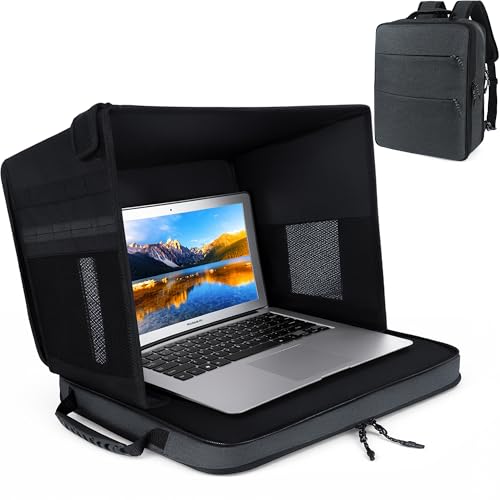
This is the only option here that combines a carry bag with a laptop shade: the 17-by-12-by-6.5-inch Oxford backpack converts into a computer tent. It fits 12- to 16-inch laptops and has a double-zip main compartment, four pouches, and four outer pockets, so it suits someone carrying work materials along with a laptop. Its larger bag format is less suited to buyers who want only a compact, separate shade; choose a foldable shield or clip-on option if you do not need the backpack.
Bottom line: Choose this if you want a laptop-carrying bag that also converts into a shade tent.
Lap Shade Reflective Hood, up to 17 in.

For a screen larger than the 16-inch maximum on several other options, this hood is sized for displays up to 17 inches. Its silver reflective fabric is described as waterproof and heat reflective, and the foldable hood design provides a tent-like shade for outdoor work. It may suit users who prioritize screen coverage and a reflective material. The fit is a maximum screen size rather than a range, so check your screen diagonal before choosing if it is close to 17 inches.
Bottom line: Pick this for a laptop screen over 16 inches, up to 17 inches.
HoYiXi Foldable Laptop Sun Shade, 13–16 in.

This foldable tent-style shield is sized for 13- to 16-inch laptops and packs into a small round bag, unlike the backpack-style option. It also has built-in pockets for paper, a pen, or other light items, and its water-resistant claim makes it relevant for outdoor travel. The maker describes it as suitable for outdoor work and activities such as camping or beach trips. The fit starts at 13 inches, so users with smaller laptops should choose an option whose range includes their screen size.
Bottom line: Choose this for a 13- to 16-inch laptop when round-bag packing is useful.
HoYiXi Universal Foldable Sun Shade, 13–16 in.
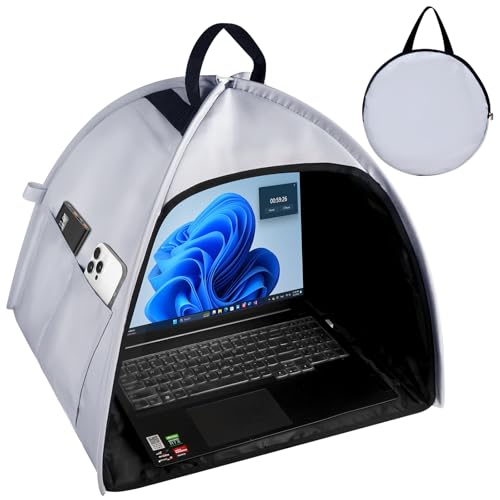
This HoYiXi version has the same 13- to 16-inch fit and built-in pockets as the other HoYiXi tent, but its dimensions are larger: 19.29 by 17.72 by 16.93 inches. The foldable round-bag design targets people who want a portable outdoor shade with a privacy-shield format. The maker also describes the fabric as waterproof and durable. Its larger stated dimensions may matter when packing; compare your available bag space if you need the smallest packed setup.
Bottom line: Pick this if its larger dimensions suit your packing space and you want a foldable privacy tent.
How to choose a laptop sun shade
Start with screen fit, then choose the shade format that matches where you work. Compare the laptop-size range with the screen diagonal, measured from one corner of the visible display to the opposite corner; a 16-inch screen is not the same as a laptop’s outside width. A clip-on shade is useful when you need to move coverage or attach it to another suitable surface, while a tent-style cover offers a more enclosed setup. A reflective hood is another format to consider when the maker specifies a larger screen fit. Sun shades reduce direct light, but strong ambient glare can still wash out a display. If your laptop remains hard to read in shade at its brightest setting, a shade alone may not solve the visibility problem.
Screen fit and outdoor placement
A shade should cover the display without blocking the keyboard or the laptop’s ventilation openings. Check the actual screen diagonal against the fit range before buying; for a screen larger than 16 inches, the option here sized up to 17 inches is the relevant match. Position the shade between the screen and direct sun, then adjust the laptop angle to reduce reflections from bright pavement, water, or windows. Screen glare depends on both the sun’s direction and reflective surroundings, so moving a few feet or turning the display can help more than adding extra shade. Avoid covering side or rear vents, and do not leave a running laptop baking in direct sun: shade is not a substitute for airflow or temperature monitoring.
Clip-on shades and tent-style laptop covers
Clip-on shades and tent-style covers solve the glare problem in different ways. A clip-on shade is an open panel supported by a mount; the TopShade opens to 12 by 18 inches and can be repositioned. A tent-style cover surrounds more of the working area and may offer added privacy, but its larger fabric shape needs room around the laptop. Backpack-convertible styles combine carry storage with shade deployment. Use this comparison to match the design to your setup rather than treating all shades as interchangeable.
| Format | Best match | Tradeoff |
|---|---|---|
| Clip-on panel | Changing sun angle or mounting surface | Open rather than enclosed |
| Foldable tent | More surrounding shade and privacy | Needs setup and packing room |
| Backpack convertible | Carry storage plus shade | Bag-sized carry format |
For a very small work surface, favor an open clip-on panel; for privacy, prioritize a tent-style shape.
Heat, airflow, and safe laptop use
A laptop can overheat even when its screen is shaded, especially during demanding work or in hot, still air. Keep intake and exhaust vents unobstructed; many laptops draw air from the bottom or sides and expel warm air through side or rear vents. Never place a fabric cover over those openings, and stop work if the computer shows a temperature warning or becomes unusually hot. A shade can reduce direct solar exposure, but it does not guarantee a safe operating temperature. Work in a breezy spot, raise the laptop on a stable surface if that leaves its vents clear, and move indoors if the device continues heating. Keep the shade secured in gusty conditions so it does not pull or tip the laptop.
Frequently Asked Questions
Will a laptop sun shade make a dim screen readable outside?
A shade can cut direct sunlight, but it cannot increase screen brightness. If the display remains difficult to read at maximum brightness in shade, move to a darker location or use the laptop indoors.
How do I measure my laptop for a sun shade?
Measure the visible screen diagonally from corner to corner, not the laptop’s width. Compare that number with the shade’s screen range; for a screen over 16 inches, choose a model specifically sized up to 17 inches.
Can a laptop sun shade prevent overheating?
A shade can reduce direct sun on the laptop, but it does not guarantee that the computer will stay cool. Keep vents uncovered and move the device out of hot, still conditions if it becomes unusually warm.
Should a laptop shade cover the keyboard too?
The shade should block direct light from the display without covering the keyboard or ventilation openings. Adjust the laptop and shade together so the screen is covered while intake and exhaust vents remain clear.
Does a laptop sun shade stop reflections from every angle?
No; a shade mainly blocks direct light from the direction it covers. Reflections from water, pavement, or nearby windows can remain, so changing the screen angle or work position may help.