
Best Membrane Gaming Keyboard: 3 Sizes Compared

Redragon K512 RGB suits most people because its 104-key layout combines six onboard macro keys with 26-key anti-ghosting. Choose GEODMAER 65% 68-Key instead if desk space matters more than a number pad, or GEODMAER 104-Key if you want a full-size layout with 12 multimedia keys and a simpler two-color backlight.
A membrane keyboard uses a flexible membrane and rubber domes beneath its keys, rather than individual mechanical switches.
We earn a commission if you buy through links on this page. As an Amazon Associate I earn from qualifying purchases. Products are compared on manufacturer specifications, not hands-on testing.
- Best overall: Redragon K512 RGB – Its full-size layout, six onboard macro keys and 26-key anti-ghosting cover a broad range of gaming needs.
- Best for compact desks: GEODMAER 65% 68-Key – Its 68-key layout retains separate arrow keys while omitting the number pad.
- Best for multimedia keys: GEODMAER 104-Key – Its full-size layout includes 12 multimedia keys and 19-key anti-ghosting.
| Product | Best for | Layout | Anti-ghosting | Lighting | Shop |
|---|---|---|---|---|---|
| Redragon K512 RGB | Macros and RGB | 104 keys | 26 keys | 13 modes | Check Price on Amazon |
| GEODMAER 65% 68-Key | Compact desk setups | 68 keys | 26 keys | Backlit | Check Price on Amazon |
| GEODMAER 104-Key | Simple full-size setup | 104 keys | 19 keys | Two-color | Check Price on Amazon |
Membrane gaming keyboards
Compare these membrane keyboards by key layout, simultaneous-key handling and backlighting.
Redragon K512 RGB
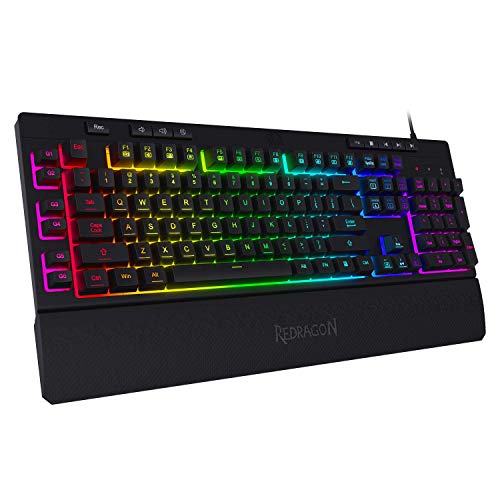
Six onboard macro keys are the main distinction here: G1–G6 can be recorded or reassigned on the fly without software. The 104-key layout also includes dedicated media controls, and its 26-key anti-ghosting rating is the highest among the full-size options here. Lighting offers 13 modes, including six customizable slots, and the wrist rest detaches. The trade-off is its full-size footprint, which takes more desk space than a compact keyboard. Choose it if you want programmable shortcuts and lighting choices without giving up a number pad.
Bottom line: Pick this if you want onboard macros and configurable lighting in a full-size layout.
GEODMAER 65% 68-Key

The 68-key layout is the compact choice: it keeps separate arrow keys but leaves out the number pad, freeing space for mouse movement or a smaller desk. The keyboard connects through a detachable Type-C cable and offers 26-key no-conflict input, matching the highest anti-ghosting count in this group. It also has 11 media buttons and a Windows-key lock. Its compact layout means number entry requires a separate keypad or a different keyboard. Choose it when desk footprint matters more than full-size convenience.
Bottom line: Pick this when a smaller footprint matters more than having a number pad.
GEODMAER 104-Key

Twelve multimedia keys distinguish this full-size option, making quick media controls part of its classic 104-key layout. It connects by a 1.5-meter wired cable and supports 19-key anti-ghosting, which is fewer simultaneous keys than the other full-size model here. Its two-color backlit keycaps and plug-and-play setup keep the feature set straightforward, while the Win-key lock can help avoid accidental presses during play. Choose it for a familiar full-size layout and multimedia shortcuts; look elsewhere if onboard macros or more lighting modes are priorities.
Bottom line: Pick this for a familiar full-size layout with dedicated multimedia keys.
How to choose a membrane gaming keyboard
Start with layout and rollover, then decide whether macros or lighting matter. A membrane board uses rubber domes and a flexible circuit membrane to register key presses; the feel depends on dome shape and key travel, so the word “membrane” alone does not guarantee a particular sound or resistance. Anti-ghosting describes how many simultaneous key presses the board can register without conflicts, but the count does not tell you which key combinations are supported. For games that require frequent multi-key input, favor the higher stated count. If you mainly use movement keys and occasional shortcuts, a smaller count may be enough.
Layout is a measurable desk-fit decision: choose a 68-key board if you can do without a number pad, or a 104-key board if number entry and familiar key placement matter. Also check whether you need onboard macro recording or dedicated media controls.
Choosing between 68 and 104 keys
A 68-key layout saves the space occupied by a number pad, while a 104-key layout keeps the full conventional key set. That difference affects more than desk appearance: number entry, spreadsheets, and some games or workflows may rely on a dedicated keypad. A compact board can leave more room for mouse movement, but some functions may require a modifier key or external keypad.
Use this decision rule: choose 68 keys if you rarely enter numbers and need more mouse room; choose 104 keys if you use the number pad regularly. Separate arrow keys help compact layouts remain usable for navigation, but confirm the exact layout before switching from a full-size keyboard.
What anti-ghosting counts mean
Anti-ghosting helps a keyboard register multiple keys pressed together without adding unintended input or dropping a supported press. The number is a useful comparison point, not a promise that every possible combination works equally well. Common gaming combinations include movement keys plus a modifier or action key, so the relevant question is whether your frequent combination is supported.
For the options, the counts range from 19 to 26 keys. A higher count is a sensible tiebreaker if you regularly press many keys at once, but it should not outweigh layout or macro needs. Membrane keyboards are not automatically unsuitable for gaming; feel and rollover implementation vary by model.
Membrane keyboard care and spill safety
Membrane keyboards are not all spill-proof, and backlighting does not indicate water protection. Disconnect a wired keyboard promptly if liquid reaches it, then let it dry fully before reconnecting; liquid can reach the membrane layers and cause missed or repeated inputs. A “spill-resistant” claim is not the same as a quantified ingress-protection rating.
For a damp-cloth clean, unplug the board first and avoid spraying liquid directly onto keys. Remove loose dust with a soft brush or compressed air held at an angle, and avoid pulling keycaps unless the maker permits removal. A low-profile keyboard or a wrist rest does not change spill risk, so keep drinks away from the board during use.
Frequently Asked Questions
Are membrane keyboards good for gaming?
Yes, membrane keyboards can work well for gaming when their rollover supports your key combinations. Compare the anti-ghosting count, and prioritize the layout and feel you prefer.
What does 26-key anti-ghosting mean?
A 26-key anti-ghosting rating indicates support for up to 26 simultaneous key presses without input conflicts under the keyboard’s supported combinations. It does not guarantee that every possible combination is recognized.
Is a 68-key keyboard enough for gaming?
A 68-key layout can be enough if you do not need a dedicated number pad. It retains separate arrow keys, but regular number entry may call for a separate keypad or 104-key layout.
Can I use a membrane keyboard for typing?
Yes. Membrane keyboards are also used for general typing, but key feel varies with the rubber-dome design and key travel. If you use a number pad frequently, choose a full-size layout.
How should I clean a membrane gaming keyboard?
Unplug the keyboard before cleaning, then remove loose dust with a soft brush or angled compressed air. Do not spray cleaner onto the keys, and let any damp board dry fully before reconnecting it.