
Best Oculus Quest 2 Sweat Guards by Fit and Type

The Abnaok five-pack is the best fit for most Oculus Quest 2 users who want a wearable sweat band, because its adjustable mask is recommended for head circumferences up to 23 inches. Choose a replacement facial pad instead if you want a cushion that sits between your face and headset; the cooling pad is a more specialized option.
We earn a commission if you buy through links on this page. As an Amazon Associate I earn from qualifying purchases. Products are compared on manufacturer specifications, not hands-on testing.
- Best overall: Abnaok VR Sweat Masks, 5 Pack – A five-pack of adjustable, breathable VR masks is recommended for head circumferences up to 23 inches.
- Best for ventilation: AMZDM Quest 2 PU Leather Face Cushion – Its replacement PU-foam cushion has an L-shaped vent design and an improved nosepiece.
- Best for a cooling feel: DESTEK Quest 2 Cooling Face Pad – The face pad uses cooling gel and breathable ice silk; the maker says the cooling effect lasts about 20 minutes under typical conditions.
| Product | Best for | Type | Quest 2 fit | Fit or material | Shop |
|---|---|---|---|---|---|
| Abnaok VR Sweat Masks, 5 Pack | Wearable sweat barrier | Wearable mask | Quest 2 and other headsets | Up to 23 in. circumference | Check Price on Amazon |
| AMZDM Quest 2 PU Leather Face Cushion | Ventilated face cushion | Replacement face cushion | Oculus Quest 2 | PU leather foam | Check Price on Amazon |
| SUPERUS Quest 2 Facial Interface and Pad | Interface with vents | Interface and face pad | Quest 2 original spacer | PU leather and sponge foam | Check Price on Amazon |
| DESTEK Quest 2 Cooling Face Pad | Cooling face contact | Cooling face pad | Meta/Oculus Quest 2 | Ice gel and ice silk | Check Price on Amazon |
Oculus Quest 2 Sweat Guards
Choose between a wearable VR mask and replacement face pads based on where you want the sweat guard to sit.
Abnaok VR Sweat Masks, 5 Pack

Unlike the replacement cushions, the Abnaok set is a wearable mask that slips on and off, so it suits users who want a layer between their face and the headset. The five-pack is described as breathable and elastic, with compatibility that includes Oculus Quest 2, HTC Vive, Samsung Gear and PS headsets. The maker recommends it for head circumferences up to 23 inches. The main limitation is that this is a head-worn mask rather than a padded facial interface; choose a replacement cushion if you want to swap the surface that touches the headset.
Bottom line: Pick this if you want multiple wearable masks and your head circumference is within the recommended range.
AMZDM Quest 2 PU Leather Face Cushion

The AMZDM cushion stands out for its L-shaped vents, unlike the wearable mask and the other replacement pads here. It is a PU-leather foam replacement for the Quest 2, and the maker says the cushion is sweatproof and that its vents exhaust heat without light leakage. The nosepiece is designed to reduce light entering around the nose. Choose it if you want a ventilated cushion rather than a separate mask. It replaces the facial contact pad, so it is not the right choice for someone looking specifically for a wearable barrier.
Bottom line: Choose this if you want a PU-foam replacement cushion with a vented design.
SUPERUS Quest 2 Facial Interface and Pad
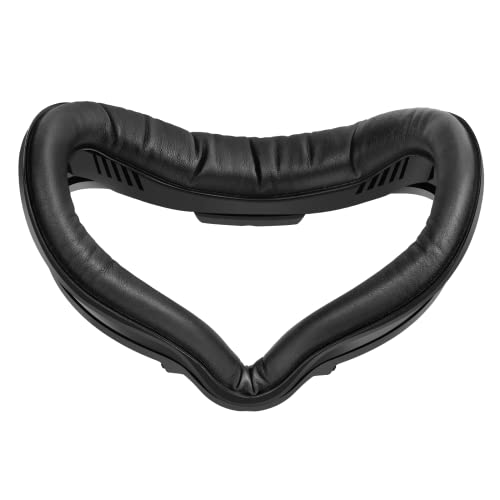
The SUPERUS set includes a facial interface bracket as well as a PU-leather and sponge-foam face pad, making it distinct from cushion-only replacements. Its bracket is compatible with the Quest 2 original spacer and has passive air vents. The maker says the design is intended to improve airflow and reduce fogging, pressure and facial marks. The set suits buyers replacing both the interface and its cushion rather than adding a mask. Its compatibility is tied to the original spacer, so confirm the spacer fit before choosing it.
Bottom line: Pick this if you need an interface-and-pad set compatible with the original spacer.
DESTEK Quest 2 Cooling Face Pad

The DESTEK pad is the specialized choice for a cooling sensation: it uses ice gel and breathable ice silk instead of the PU-leather foam used by the other replacement cushions. The maker says the cooling effect lasts about 20 minutes under typical conditions and suggests chilling the pad in a refrigerator for about five minutes first; actual duration can vary with use and environment. This option suits someone seeking a cool-feeling face pad, not a wearable sweat mask. The cooling sensation is temporary, so it may not suit buyers who want a consistent feel throughout a longer session.
Bottom line: Choose this if a temporary cooling sensation matters more than a wearable mask.
How to choose a Quest 2 sweat guard
Choose first by where you want the barrier: a wearable mask goes on your head, while a replacement pad sits on the headset’s facial interface. Masks can be easier to swap between users; a replacement pad changes the surface against your face. For workouts or shared use, prioritize a piece you can remove and clean or replace, and let damp fabric or foam dry fully before storing it. A sweat guard should not cover the headset’s front tracking cameras, lenses, or ventilation openings. If you want a mask, check its circumference against your own measurement; if you want a replacement pad, confirm compatibility with your interface or spacer.
Mask versus replacement face pad
A wearable mask and a replacement facial pad address different points of contact, so neither format is a universal upgrade. A mask is worn on the head under the headset; a pad is attached at the facial interface and cushions the face. This table summarizes the practical distinction.
| Type | Where it sits | Useful when |
|---|---|---|
| Wearable mask | Between face and headset | You want a separate layer or multiple masks |
| Replacement cushion | On the facial interface | You want to change the headset’s face-contact surface |
| Interface and cushion set | Replaces interface parts | Your existing bracket or pad needs replacement |
Do not assume a mask and a pad have the same fit: a thicker layer can change how the headset rests, while an incompatible interface may not seat properly.
Check fit and ventilation before use
Fit the sweat guard without covering the headset’s tracking cameras or pressing the pad into the lenses. The Quest 2 uses outward-facing cameras for tracking, so keep the camera windows clear. A facial interface should sit evenly around the face rather than leave a gap that causes shifting; adjust the headset strap before adding extra padding. If the Quest 2 feels unusually hot or fogged, pause and let the headset and guard air out rather than blocking vents with cloth or tape. A replacement set identified for the original spacer should be checked against that spacer before purchase. For a wearable mask, measure head circumference where the band will sit and compare it with its limit.
Cleaning and care for VR sweat guards
Clean sweat-contact parts after heavy exercise and let them dry completely before reinstalling them. Removable fabric masks and foam or PU-leather pads can have different cleaning limits, so use care appropriate to the material and avoid soaking foam or leaving moisture against the headset. Keep cleaning liquid away from lenses and electronics; use a clean, dry microfiber cloth for the lenses. Do not share a damp sweat guard, and do not store a wet pad inside the headset. If a surface becomes cracked, peeling, or difficult to clean, replace the guard rather than relying on it as a hygiene barrier.
Frequently Asked Questions
How tight should a Quest 2 sweat mask fit?
A sweat mask should stay in place without pinching or shifting the headset. The Abnaok mask is recommended for head circumferences up to 23 inches, so measure around the band’s intended position before choosing it.
Can a sweat guard block Quest 2 tracking?
Yes, a guard or loose fabric can interfere if it covers an outward-facing tracking camera. Keep all camera windows, headset vents, and lenses unobstructed during use.
Can I use a sweat mask with a face pad?
A wearable mask sits between your face and the facial pad, but the extra layer can change headset fit. Check that the headset remains secure and the mask does not shift over cameras or press against the lenses.
How often should I clean a VR sweat guard?
Clean sweat-contact parts after a sweaty session and let them dry fully before reuse. Damp foam or fabric can hold moisture against the headset, so do not store the guard while wet.
Why does my Quest 2 fog during workouts?
Warm, moist air near cooler lenses can cause fogging, especially during intense activity. Pause to let the headset air out, keep vents clear, and make sure a face pad is seated evenly rather than trapping extra material near the lenses.