
Best Paddles for PS4 Controllers: 3 Options Compared

For most PS4 players, Eagolloar Wireless Elite Controller is the strongest fit because it pairs PS4 compatibility with four programmable back paddles.
Back paddles are extra controls on a controller’s rear that can be mapped to other buttons, helping keep your thumbs on the sticks during play.
We earn a commission if you buy through links on this page. As an Amazon Associate I earn from qualifying purchases. Products are compared on manufacturer specifications, not hands-on testing.
- Best overall: Eagolloar Wireless Elite Controller – Four paddles map to other function buttons, and the controller is made for PS4.
- Best for multi-platform play: AceGamer Hypershadow D4 – It has four macro paddles and lists PS4, Switch, PC, iOS, Android and Steam Deck compatibility.
| Product | Best for | Rear controls | Connection | Headset jack | Shop |
|---|---|---|---|---|---|
| Eagolloar Wireless Elite Controller | Four programmable paddles | 4 paddles | Wireless | 3.5 mm TRRS | Check Price on Amazon |
| AceGamer Hypershadow D4 | Multi-platform gaming | 4 macro paddles | Wireless; wired | — | Check Price on Amazon |
| Mayfan Elite Controller | Four rear paddles | 4 paddles | Wireless | 3.5 mm TRRS | Check Price on Amazon |
PS4 controllers with paddles and back buttons
Compare the rear-control count and mapping options first, then choose the features that match your setup.
Eagolloar Wireless Elite Controller
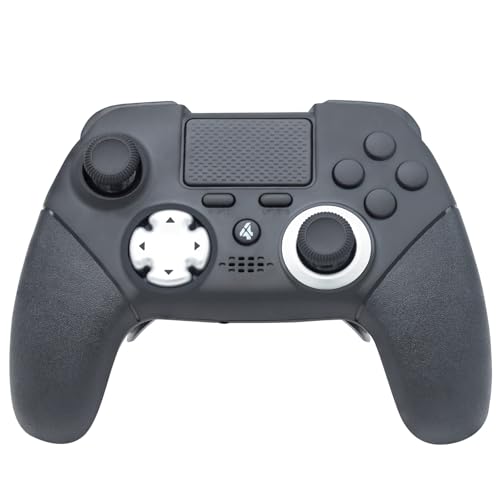
Four programmable paddles and two mapping modes distinguish this PS4-compatible controller. The M1–M4 paddles can be assigned to other function buttons, and the mode switch lets you save or use different configurations. It also has an ergonomic, non-slip handle, a 3.5 mm TRRS headset jack, a 3D joystick and a 6-axis sensor. Choose it if you want four rear inputs and the ability to change their assignments. The main trade-off is that the features do not identify which specific buttons can be assigned, so players who need a particular layout should confirm that mapping before choosing.
Bottom line: Choose it for four paddles with two mapping modes.
AceGamer Hypershadow D4

Multi-platform compatibility sets this four-paddle controller apart: AceGamer lists PS4, Switch, PC, iOS, Android and Steam Deck. It has TMR joysticks, mechanical buttons, instant trigger switches, gyro, turbo and four macro back paddles. AceGamer says it supports wireless and wired connections, with Bluetooth and a 2.4G receiver among its connection options; its PS4 note says PS4 does not use the receiver. A first wired charge is required to unlock the controller. This option suits players moving between platforms, but its many connection modes make it important to verify the intended PS4 pairing method before choosing.
Bottom line: Choose it if you want four paddles across several platforms.
Mayfan Elite Controller
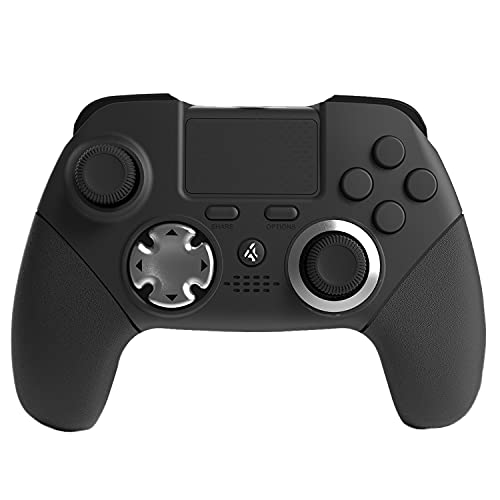
Grip-focused shaping is the distinguishing feature of this four-paddle PS4-compatible controller. Its front has an anti-slip surface, and the four M1–M4 paddles can be mapped to other function buttons in programming mode. The controller also has a 3.5 mm TRRS jack for a headset. It suits players who want four rear controls and a textured front grip, with headset connection built into the controller. The features do not explain how to enter programming mode or save assignments, so anyone who needs a specific paddle setup should verify that process before choosing.
Bottom line: Choose it for a textured grip and four programmable paddles.
How to choose PS4 paddles
Start with the number of rear inputs you will actually use: the options here have either two back buttons or four paddles. A paddle is most useful when it maps an action you currently reach for with a face button, such as a jump or reload, while your thumbs stay on the sticks. On a standard DualShock 4, the four face buttons are on the right side, and the two sticks handle movement and aiming; mapping a familiar action to the back can reduce that thumb switch. Check whether the controller supports the specific input assignments you want, not just a programmable label. If two rear inputs cover your needs, avoid paying attention to a four-paddle layout as an automatic upgrade.
Four paddles versus two back buttons
Four paddles give more possible assignments, while two buttons keep the rear layout simpler. Match the count to the actions you want available without taking your thumbs off the sticks; extra controls have little value if you do not use their mappings. Controller terminology can be confusing: “paddles” and “back buttons” both refer to rear-mounted inputs, but the hardware and supported assignments differ by model. The products here make that distinction measurable: three list four paddles and one lists two macro buttons. Compare those counts alongside the mapping feature, because the number of controls does not establish which game inputs they can copy.
| Need | Rear control count | What to prioritize |
|---|---|---|
| Several rear assignments | 4 paddles | Programmable mapping |
| A simpler rear layout | 2 back buttons | Two-button mapping |
Check PS4 connection and headset fit
PS4 compatibility and connection method are separate checks: a controller may support several platforms without using every connection method on PS4. One option here explicitly says its 2.4G receiver cannot connect to PS4, despite offering wireless support elsewhere, so verify the PS4 pairing route before relying on a receiver. Wired and wireless modes can also affect how you position the controller relative to the console. For headset users, look for a 3.5 mm jack and make sure your headset plug matches the controller’s jack type; two options specify TRRS. A headset jack alone does not establish microphone compatibility, so confirm that requirement if voice chat matters.
Map paddles around your game
Assign rear controls to actions that are frequent and safe to trigger under pressure, then keep less-used menu actions on the face buttons. A typical controller has four face buttons, two shoulder buttons and two triggers, so there are several potential actions to remap; actual mapping choices depend on the controller’s programming support. Change one assignment at a time and practice in a low-stakes match or training area before using the layout competitively. If a controller offers multiple modes, record which actions belong to each mode to avoid switching to an unfamiliar setup mid-session. Do not assume that a “macro” label means a sequence of actions; confirm whether the feature maps one button or supports more complex commands.
Frequently Asked Questions
Do PS4 paddle controllers replace a DualShock 4?
These products are complete controllers rather than add-on paddle attachments. Check that the selected controller supports your PS4 connection method before replacing your current controller.
How many paddles should a PS4 controller have?
Two rear inputs can cover a small set of frequently used actions, while four offer more possible assignments. Choose four only when you can name at least three or four actions you intend to map.
Can I map paddles to any PS4 button?
Mapping options depend on the controller’s programming feature, so do not assume every button is assignable. Confirm that your intended inputs—such as face or shoulder buttons—are supported before choosing.
Will a 2.4G receiver work with every PS4 controller?
No; connection support is model-specific. One option here explicitly says its 2.4G receiver cannot connect to PS4, so confirm the PS4 pairing method for the exact controller.
Can I use a headset with these PS4 controllers?
Some include a 3.5 mm headset jack, and two specify a TRRS jack. Match your headset plug and microphone needs to the controller’s jack before relying on voice chat.