
Best Portable CD Player for Car With USB Compared

USB/AUX Car CD Player suits most drivers because it combines USB and AUX connections with support for CD, CD-R, CD-RW, MP3 and WAV discs. Choose POSSPO Jupiter USB CD Player instead if your stereo has a USB port and you want an included extension cable to position the player elsewhere in the cabin.
A portable car CD player connects an external disc drive to a vehicle stereo; before choosing, confirm that your stereo can play audio from the player through its USB or AUX connection.
We earn a commission if you buy through links on this page. As an Amazon Associate I earn from qualifying purchases. Products are compared on manufacturer specifications, not hands-on testing.
- Best overall: USB/AUX Car CD Player – Offers USB and AUX connections and supports CD, CD-R, CD-RW, MP3 and WAV.
- Best for flexible placement: POSSPO Jupiter USB CD Player – Includes a USB extension cable and supports CD playback through a car stereo USB port.
- Best for a compact footprint: ENVYCLOUD Portable Car CD Player – Measures 4.5 inches square and 0.85 inch high.
| Product | Best for | Connection | Supported formats | Dimensions | Shop |
|---|---|---|---|---|---|
| USB/AUX Car CD Player | USB and AUX | USB and AUX | CD, CD-R/RW, MP3, WMA, WAV | — | Check Price on Amazon |
| POSSPO Jupiter USB CD Player | USB cable reach | USB; AUX with decoder | CD; — | 6.3 × 6.1 × 2.0 in | Check Price on Amazon |
| ENVYCLOUD Portable Car CD Player | Small footprint | USB and AUX | — | 4.5 × 4.5 × 0.85 in | Check Price on Amazon |
Portable CD Players for Cars With USB
Compare the connection method, supported formats and size to find a player compatible with your stereo.
USB/AUX Car CD Player

USB and AUX connections set this player apart for cars that offer either input. The maker says it supports touchscreen and steering-wheel control after connection, and its compatible formats include CD, CD-R, CD-RW, MP3, WMA and WAV. USB powers the player, so a separate power adapter is not required. It can also connect to laptops, TVs and Android 4.4-or-newer devices, according to the maker. The key limitation is that it does not play DVDs; choose it for audio discs, and confirm your stereo accepts audio through the input you plan to use.
Bottom line: Pick this if your car offers USB or AUX and you want broad audio-disc support.
POSSPO Jupiter USB CD Player

An included USB extension cable makes this model the option for placing the drive away from the stereo, such as in a glove box or center console. The maker says the player connects to a car stereo USB port, where tracks appear for selection; its instructions also describe AUX use with a decoder for louder, clearer sound. The unit measures 6.3 by 6.1 by 2 inches. This connection is less flexible than a model with a USB/AUX adapter, and the stereo must recognize the player as a USB drive for the described USB method to work.
Bottom line: Choose this when you have a compatible USB stereo and want extra cable reach.
ENVYCLOUD Portable Car CD Player
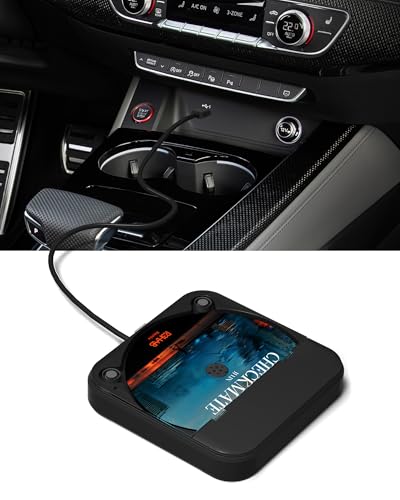
A 4.5-inch-square footprint and 0.85-inch height make this the smallest-dimension option among the measured USB/AUX models here. It is described for connection to a car USB or AUX port, as well as a laptop, TV or computer. The maker says touchscreen and steering-wheel controls work once connected. Its compact size may suit a crowded console, but dimensions alone do not establish where it can be mounted or how it handles discs; confirm the available placement space and stereo compatibility before choosing it.
Bottom line: Pick this if cabin space is tight and your stereo supports its connection.
How to choose a USB car CD player
Start with the stereo input, because USB ports do not all work as audio-player connections. A USB port may provide power or read storage, while AUX is an analog audio input; the stereo must support the particular connection method the player uses. If your stereo has AUX but not a compatible USB audio path, prioritize a model that offers AUX. If you plan to use USB, confirm that the stereo can recognize the external player and browse its tracks. For the models here, USB/AUX Car CD Player offers USB and AUX, while POSSPO Jupiter USB CD Player describes USB-drive recognition and AUX use with a decoder.
Connection quick guide
This table summarizes the connection choice to make before selecting a model.
| Stereo capability | What to prioritize |
|---|---|
| USB audio support | A player that the stereo recognizes |
| AUX input | A player with AUX output |
| Neither confirmed | Verify compatibility before ordering |
Do not assume a USB socket that charges a phone will also play audio from a CD drive.
USB versus AUX connection differences
USB can carry power and digital data, while AUX carries analog audio, so the stereo’s input capability matters more than the connector’s presence alone. A USB player may rely on the head unit to identify it and display tracks; a car USB port meant only for charging cannot do that. AUX generally requires selecting the AUX source on the stereo, and it may not provide track browsing on the stereo display. The maker describes POSSPO Jupiter USB CD Player as using AUX with a decoder and USB as a drive recognized by the stereo. USB/AUX Car CD Player provides both connector options, which gives a fallback if one input is unsuitable.
Check disc formats and cabin fit
Match the player to the discs you own: CD-R and CD-RW are recordable disc types, and MP3 or WAV support refers to audio formats rather than DVD video. USB/AUX Car CD Player lists CD, CD-R, CD-RW, MP3, WMA and WAV; do not assume every player accepts the same formats. Measure the intended resting space before buying: ENVYCLOUD Portable Car CD Player is 4.5 inches square and 0.85 inch high, while POSSPO Jupiter USB CD Player is 6.3 by 6.1 by 2 inches. A player that fits a glove box still needs enough room for the disc slot to open and for the cable to reach without obstructing controls or pedals.
Safe placement and use in the car
Secure the player before driving and keep it, its cables and any remote from the driver’s pedals, steering wheel and sightlines. Controls that work from the stereo can reduce the need to reach toward a loose drive, but verify operation while parked before relying on them. Never insert or remove a disc while driving; road movement can distract the driver and a loose player can shift during sudden braking. An extension cable, like the one included with POSSPO Jupiter USB CD Player, can help with placement, but route it away from footwells and moving parts. Avoid placing the unit where it can slide or block access to vehicle controls.
Frequently Asked Questions
Will a USB car CD player work with any USB port?
No; the stereo must support data or audio playback from the external player, not merely provide charging power. Confirm that the head unit can recognize the drive and browse its tracks before choosing a USB-only connection.
Can I connect a portable CD player through AUX?
Yes, if both the player and the car stereo support AUX audio. AUX carries sound rather than track data, so track selection may need to happen on the player rather than through the stereo display.
What is the difference between CD-R and CD-RW?
CD-R is generally written once, while CD-RW can be erased and recorded again. Check that the player supports the disc type you use; support for standard CDs does not automatically guarantee CD-RW playback.
Can these car CD players play DVDs?
Do not expect DVD video playback from a USB car CD player. USB/AUX Car CD Player explicitly excludes DVD discs, and the other players here are presented for CD or audio playback rather than DVD use.
Where should I place a portable CD player in my car?
Place it on a stable surface that does not obstruct controls, visibility or pedals, and keep cables out of the footwell. Measure the space first; a unit 2 inches high may need more clearance for access to its slot.