
Best Rocketfish TV Mount for Tilt and Fit

Rocketfish Tilting TV Wall Mount, 32–55 in. is the best match for most people seeking a Rocketfish TV mount because it is a tilting wall mount for 32- to 55-inch TVs, with an 80-pound maximum capacity. Choose a fireplace drop-down or ceiling mount instead if you need the screen to lower from above a mantel or fold down from the ceiling.
TV mounts attach a screen to a wall or ceiling; the right style depends on the mounting surface, the TV’s size and weight, and the viewing position.
We earn a commission if you buy through links on this page. As an Amazon Associate I earn from qualifying purchases. Products are compared on manufacturer specifications, not hands-on testing.
- Best overall: Rocketfish Tilting TV Wall Mount, 32–55 in. – A Rocketfish steel tilting wall mount for 32- to 55-inch TVs, rated for up to 80 pounds.
- Best for fireplace height adjustment: Mount-It! Gas-Spring Pull-Down Mount – A gas-spring drop-down mount with a 10.8-inch height-adjustment range for 37- to 80-inch TVs.
- Best for ceiling mounting: TOPSKY Motorized Ceiling TV Mount – A motorized flip-down ceiling mount for 32- to 70-inch TVs, with tilt up to 80 degrees.
| Product | Best for | TV size | Weight capacity | Mount style | Shop |
|---|---|---|---|---|---|
| Rocketfish Tilting TV Wall Mount, 32–55 in. | Tilting wall mount | 32–55 in. | 80 lb | Tilting wall mount | Check Price on Amazon |
| Mount-It! Gas-Spring Pull-Down Mount | Fireplace viewing | 37–80 in. | 88 lb | Pull-down wall mount | Check Price on Amazon |
| MOUNT-IT! Motorized Fireplace TV Mount | Motorized mantel setup | 37–70 in. | 77 lb | Motorized pull-down | Check Price on Amazon |
| TOPSKY Motorized Ceiling TV Mount | Ceiling drop-down | 32–70 in. | 88 lb | Motorized ceiling mount | Check Price on Amazon |
Rocketfish TV mount and alternatives
Compare each mount’s supported screen size, capacity, and movement style against your installation needs.
Rocketfish Tilting TV Wall Mount, 32–55 in.

For a Rocketfish-branded wall mount with tilt, this steel model supports 32- to 55-inch TVs weighing up to 80 pounds. Its purpose is adjustable tilt for viewing, rather than lowering a screen from above a fireplace or ceiling. Choose it when a fixed wall position works and the TV falls within both its size and weight limits. It will not suit a screen larger than 55 inches or a setup that needs a powered lift or height-adjustable drop-down arm. Confirm the TV’s mounting-hole pattern and wall construction before installation.
Bottom line: Pick this if you want a Rocketfish tilting wall mount and your TV meets both limits.
Mount-It! Gas-Spring Pull-Down Mount

A gas-spring arm and a 10.8-inch height-adjustment range distinguish this fireplace-oriented wall mount from the tilting Rocketfish model. It fits 37- to 80-inch TVs up to 88 pounds, extends 22.4 inches, swivels up to 90 degrees in either direction, and tilts 10 degrees up or down. That movement suits a screen mounted high above a fireplace or used from more than one seating position. It is a different brand and mounting style, so it is not a Rocketfish substitute for someone who specifically needs that brand or a simple tilting wall mount.
Bottom line: Choose this for a high fireplace position that needs drop-down height adjustment.
MOUNT-IT! Motorized Fireplace TV Mount

Motorized raising and lowering set this fireplace mount apart from the gas-spring alternative. The product name gives a maximum capacity of 77 pounds and VESA compatibility up to 600 × 400; its maker identifies a 37- to 70-inch TV range. That makes it a possible fit for a mantel installation where powered height adjustment matters. It is not a Rocketfish wall mount, and its maximum load is lower than the manual gas-spring option here. Check the TV’s actual weight and mounting pattern before choosing it.
Bottom line: Pick this when powered movement above a fireplace is the priority.
TOPSKY Motorized Ceiling TV Mount
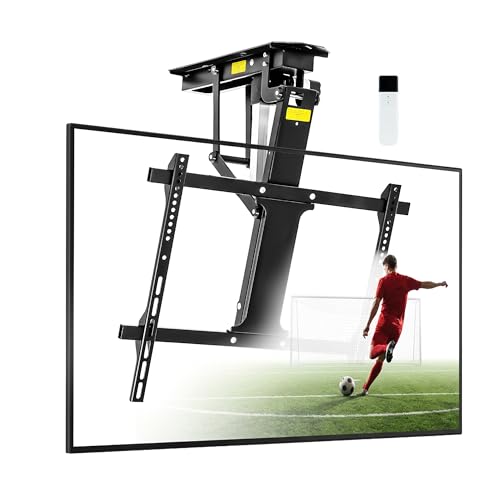
A ceiling installation and powered flip-down movement make this mount a different choice from the wall-mounted options. It supports 32- to 70-inch TVs up to 88 pounds, tilts from 0 to 80 degrees, and levels the screen by ±2 degrees. The maker says it fits flat and select angled ceilings, folds toward the ceiling, and has no left-right swivel. Choose it when a ceiling attachment point is appropriate and tilt is enough; it will not work for a wall-only setup or a viewing position that requires horizontal swivel.
Bottom line: Choose this for a ceiling-mounted screen that needs motorized tilt, not swivel.
How to choose a TV mount
Choose a mount by matching the TV’s weight, screen-size range, VESA pattern, and installation surface before comparing movement. VESA refers to the horizontal and vertical spacing of the mounting holes on the back of a TV, measured in millimeters; a mount must support that pattern. Weight capacity is a separate limit, so a screen can fit the size range yet still be too heavy. For a fixed wall position where you only need to angle the screen, a tilting mount is simpler than a drop-down arm. If the TV sits above a fireplace, consider whether the installation needs height adjustment. For ceiling installs, verify the ceiling structure can support the combined load.
Use this quick rule: if the TV’s weight exceeds the mount’s rating or its VESA pattern is unsupported, do not use that mount. Check all four compatibility points rather than relying on screen size alone.
Wall, fireplace, and ceiling mounts compared
Mount style determines where the screen can move: tilting wall mounts angle the screen, fireplace mounts add vertical movement, and ceiling mounts attach overhead. A tilt adjustment can help aim a screen, but it does not lower a high-mounted TV. Gas-spring and motorized drop-down mounts provide height movement; motorized models need a suitable power arrangement. Ceiling mounts can fold upward, but a flip-down-only model will not swivel side to side.
The table separates the mount styles by the motion each is intended to provide. Treat a fit range as a boundary, not as proof that every TV in that size range will match the mount’s VESA pattern and weight limit.
| Mount style | Main movement | Typical reason to choose |
|---|---|---|
| Tilting wall mount | Screen angle | Wall position works; tilt is enough |
| Fireplace pull-down | Vertical height adjustment | TV is mounted high above a mantel |
| Ceiling flip-down | Downward tilt or fold | Ceiling attachment is needed |
TV size, weight, and VESA fit
Screen size alone cannot establish mount compatibility: check the TV’s weight without its stand and its VESA hole spacing against the mount’s limits. A 55-inch television can vary in weight, and two TVs of the same size can have different mounting patterns. VESA measurements are written as horizontal × vertical spacing in millimeters, such as 400 × 200. Match both numbers exactly to a supported pattern; do not assume that a mount supporting a larger maximum pattern accepts every smaller arrangement.
Before installation, measure the distance between the TV’s mounting holes and confirm the mount’s size and load ranges include your specific model. For drywall, fasten the wall plate to structural studs or use an installation method rated for the load; drywall alone is not a suitable anchor for a heavy TV mount.
Installation and safe TV mounting
A TV mount is only as secure as its attachment to the building structure. Wall mounts should be anchored to studs or another support system rated for the combined weight of the mount and TV; ceiling mounts need a sound joist or structural support. Use a level to position the plate, and avoid placing fasteners near wiring or plumbing. A stud finder helps locate framing, but verify the position before drilling.
For a drop-down mount, keep hands clear of the moving arm and follow the manufacturer’s installation steps for securing the TV. Do not exceed the mount’s weight capacity, and do not treat a screen-size range as a load rating. If you cannot confirm the support structure or the TV’s weight and VESA match, pause installation and verify those measurements first.
Frequently Asked Questions
How do I find my TV’s VESA pattern?
Measure the horizontal and vertical distance between the four mounting holes on the back of the TV, in millimeters. A measurement of 400 by 200 means 400 mm across and 200 mm high, and both values must match a supported mount pattern.
Can a TV mount hold any TV within its size range?
No; the TV must also stay within the mount’s weight limit and have a supported VESA pattern. For example, a mount rated for 32- to 55-inch screens is not automatically compatible with every TV in that range.
Can I attach a TV mount to drywall alone?
A heavy TV mount should be anchored to studs or another structural support, not drywall alone. Locate and verify the framing before drilling, and use fasteners rated for the combined load.
What does a tilting TV mount do?
A tilting mount changes the screen’s up-or-down angle while keeping the TV on its wall position. It does not provide the vertical height movement of a fireplace pull-down mount or the overhead attachment of a ceiling mount.
How much clearance does a fireplace TV mount need?
Clearance depends on the mantel, fireplace heat, TV, and mount geometry, so measure the installation rather than relying on a universal gap. Follow the fireplace and TV manufacturers’ heat-clearance requirements, and confirm the mount’s movement clears the mantel.