
Best Screen Protector for Note 20 Ultra 5G: 5 Picks

V-PORYADKU 9H Glass 2+2 Pack suits most Note 20 Ultra 5G owners because its 0.25 mm tempered-glass protector is paired with camera lens covers and claims ultrasonic fingerprint compatibility. Choose a different option if you prefer flexible TPU film, want a privacy filter, or need a multi-pack without lens covers.
Screen protectors cover the display surface; the Note 20 Ultra’s curved edges and in-screen ultrasonic fingerprint reader make material and installation important choices.
We earn a commission if you buy through links on this page. As an Amazon Associate I earn from qualifying purchases. Products are compared on manufacturer specifications, not hands-on testing.
- Best overall: V-PORYADKU 9H Glass 2+2 Pack – Pairs 0.25 mm tempered glass with camera lens protectors and claims ultrasonic fingerprint compatibility.
- Best for flexible film: Four-Pack TPU Film – Four TPU films include a scraper for pushing installation bubbles toward the edges.
- Best for privacy: Privacy Tempered Glass with Lens Covers – Tempered glass is designed to restrict side viewing and includes camera lens protectors.
| Product | Best for | Material | Pack count | Fingerprint feature | Shop |
|---|---|---|---|---|---|
| V-PORYADKU 9H Glass 2+2 Pack | Glass and lenses | Tempered glass | 2 screen, 2 lens | Ultrasonic compatible | Check Price on Amazon |
| Three-Pack 3D Curved Tempered Glass | Fingerprint glass | Tempered glass | 3 screen | Fingerprint support | Check Price on Amazon |
| Privacy Tempered Glass with Lens Covers | Side-view privacy | Tempered glass | 2 screen, 2 lens | Full touch sensitivity | Check Price on Amazon |
| Four-Pack TPU Film | Flexible film | TPU film | 4 screen | — | Check Price on Amazon |
| Supershieldz Two-Pack TPU | Simple film set | TPU film | 2 screen | — | Check Price on Amazon |
Note 20 Ultra 5G Screen Protectors
Compare protector material, pack size and fingerprint features before choosing a fit for the curved display.
V-PORYADKU 9H Glass 2+2 Pack

This four-piece set combines two screen protectors with two camera lens protectors, unlike the film-only choices. Its tempered glass measures 0.25 mm, and the maker says its adhesive supports the phone’s ultrasonic fingerprint reader. The set suits buyers who want to cover both display and camera lenses with one purchase. Its glass construction is less flexible than TPU film, so shoppers who prioritize a pliable material should choose a film option instead. The name also identifies the glass as 9H; hardness labels do not tell you how a protector will perform in every drop or impact.
Bottom line: Pick this set if you want glass screen coverage plus separate camera lens covers.
Three-Pack 3D Curved Tempered Glass

Three screen protectors make this the larger screen-only glass pack, while the set does not identify separate camera lens covers. The protector is 0.26 mm thick and designed for the 6.9-inch Note 20 Ultra; the maker says it supports the ultrasonic fingerprint reader and touch sensitivity. That combination fits owners who want multiple glass replacements and fingerprint functionality. The pack’s 9H hardness is a maker specification, not a guarantee against every crack or impact. If flexible coverage for curved edges matters more than glass, consider a TPU film option.
Bottom line: Choose this if you want three tempered-glass screen protectors with claimed fingerprint support.
Privacy Tempered Glass with Lens Covers
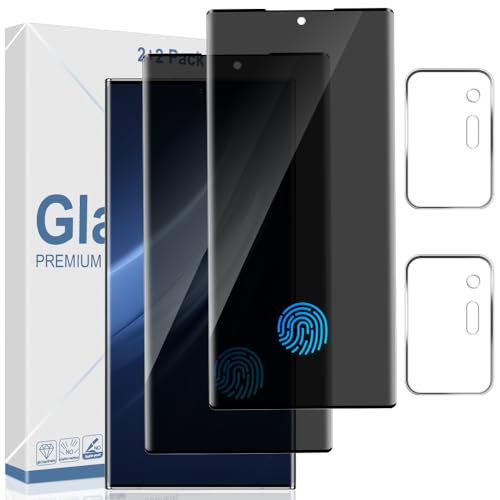
This set is the privacy-focused choice: it includes two screen protectors and two camera lens protectors, unlike the standard clear glass sets. The maker says the screen protector restricts side viewing and provides full touch sensitivity. It suits people who want a privacy filter along with camera lens coverage. Privacy coatings reduce visibility from off-center angles, but they can also make the display harder to see from those angles yourself.
Bottom line: Pick this if restricting side views matters more than a clear, unrestricted viewing angle.
Four-Pack TPU Film
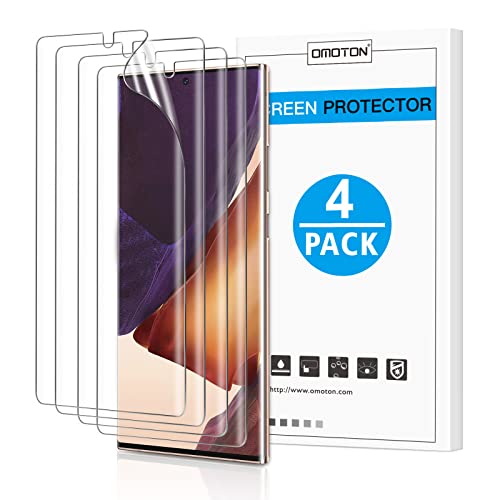
This is the largest screen-only pack and the only option here that specifically includes a scraper for moving bubbles toward the edges during application. Its TPU film is explicitly not tempered glass, and the maker describes it as self-healing for minor scratches and tiny bubbles. It suits buyers who prefer flexible film and want several installation chances. The application process takes more care than simply aligning a rigid glass sheet, and the maker recommends watching its installation video and using the tool kit. The film is not the right pick for someone set on glass.
Bottom line: Choose this if you prefer flexible TPU and want four screen films in the pack.
Supershieldz Two-Pack TPU

The maker says its high-definition film preserves resolution and offers natural touch response; the film is intended to protect against daily scratches, dust and scrapes. It suits buyers who want a basic flexible film rather than a glass protector or privacy coating. As with other TPU films, this choice is not tempered glass, so choose another material if glass is a requirement.
Bottom line: Pick this for a two-piece TPU set that the maker says removes without residue.
How to Choose a Note 20 Ultra Screen Protector
Start with material: tempered glass is rigid, while TPU film is flexible and conforms more readily to curved surfaces. The Note 20 Ultra has a curved display and an ultrasonic in-screen fingerprint reader, so check that a protector is designed for the Ultra model and that fingerprint use is supported if you rely on it. A 0.25 mm or 0.26 mm thickness is a specification, not a universal measure of impact protection. Choose privacy glass only if side-view blocking is worth reduced off-angle visibility. A practical rule: if fingerprint unlocking is essential, select a protector that explicitly claims compatibility and plan to re-register fingerprints after installation.
Glass and TPU Film on Curved Displays
Tempered glass and TPU film solve different fit priorities: glass holds a rigid shape, while film bends around a curved display. Exact edge coverage depends on the protector’s shape and adhesive design, not just whether the material is glass or film. For a curved-edge phone, align the protector from the display center and check that edges remain attached before adding a case. Dust trapped at an edge can create a persistent lift or bubble. Avoid forcing a glass protector flat against a curve; if the edge will not sit down, remove it and use a protector designed for that display geometry.
Fingerprint Reader Setup and Installation
For an ultrasonic in-screen reader, fingerprint compatibility is worth confirming before installation because a protector can change the surface between your finger and the sensor. Clean the display carefully, remove dust, and center the protector over the sensor area; even a small misalignment can affect touch or scanning. After applying a compatible protector, delete and re-register fingerprints so the phone can scan through the new surface. Press out bubbles using the included tool when one is supplied; for film, move bubbles gently toward an edge rather than puncturing the protector. Keep the display dry during installation and follow the protector maker’s curing or settling directions.
Choosing Privacy or Camera Lens Coverage
A privacy filter narrows the viewing angle so a person off to the side sees less of the display, while a clear protector preserves a wider viewing angle. That tradeoff is most useful in crowded settings; it matters less when the phone is usually viewed alone. Camera lens covers are separate pieces from screen protectors, so check pack contents rather than assuming a screen set protects the lenses too. Keep lens covers clean and centered over the camera openings; misalignment or debris can interfere with camera use. A buyer who wants only screen coverage can skip a set whose extra lens pieces are unnecessary.
Common Screen Protector Fit Mistakes
The most common mistake is choosing a protector for the Note 20 or another Galaxy model instead of the Note 20 Ultra 5G; confirm the phone model in Settings under About Phone before opening a pack. Another mistake is applying a protector in a dusty room, where a speck can produce a visible bubble that is difficult to remove. Install on a clean, dry screen with the case removed, then fit the case only after the protector is aligned. If a case pushes an edge upward, the case and protector are not a good fit together; switch to a case-friendly protector rather than pressing the edge repeatedly.
Frequently Asked Questions
Does tempered glass work with the Note 20 Ultra fingerprint reader?
Some protectors claim ultrasonic fingerprint compatibility, but glass can still affect scanning if it is misaligned or poorly adhered. Choose one that explicitly supports the reader and re-register fingerprints after installation.
Should I choose TPU film or glass for curved edges?
TPU film is flexible and can follow curves more readily, while tempered glass is rigid. If edge lift appears after installation, do not press rigid glass down repeatedly; choose a model designed for the curved display.
How do I remove bubbles from a TPU screen film?
Gently push small bubbles toward the nearest edge with a clean scraper or soft card. Dust under the film will not disappear by pushing, so lift the nearby edge carefully and remove the particle rather than puncturing the film.
Can a privacy protector make the screen harder to see?
Yes, privacy filters limit off-angle viewing, which can also make the display less visible to you when you view it from the side. Choose clear glass if broad viewing angles matter more than limiting nearby views.
How can I check that a protector fits my phone?
Check Settings under About Phone and confirm the model is Note 20 Ultra before buying or installing. The Note 20 and Note 20 Ultra are different phone models, so a protector for one should not be assumed to fit the other.