
Best Ultra Thin Monitors: 5 Wide-Screen Picks Compared

For most people, Samsung ViewFinity S50GC 34-inch is the best fit because its 34-inch, 21:9 screen balances extra workspace with a 100Hz refresh rate. Choose LG 34U530A-W 34-inch for its height-adjustable stand and USB-C, or a gaming-focused model if a high refresh rate matters more than office multitasking.
Ultra-thin can refer to a narrow-bezel look rather than a thin cabinet; the specifications emphasize screen format and dimensions, not panel thickness.
We earn a commission if you buy through links on this page. As an Amazon Associate I earn from qualifying purchases. Products are compared on manufacturer specifications, not hands-on testing.
- Best overall: Samsung ViewFinity S50GC 34-inch – The 34-inch 21:9 Ultra-WQHD screen supports broad multitasking and reaches 100Hz.
- Best for adjustable setup: LG 34U530A-W 34-inch – Its stand supports tilt, height adjustment and swivel, and it includes USB-C.
- Best for fast gaming: SANSUI 34-inch UWQHD 200Hz – It combines 200Hz refresh with a 34-inch, 3440 × 1440 curved screen.
| Product | Best for | Screen format | Resolution | Refresh rate | Shop |
|---|---|---|---|---|---|
| Samsung ViewFinity S50GC 34-inch | Office multitasking | 34-inch, 21:9 | Ultra-WQHD | 100Hz | Check Price on Amazon |
| Samsung Odyssey G9 G91F 49-inch | Panoramic gaming | 49-inch, 32:9, 1000R curve | DQHD | 144Hz | Check Price on Amazon |
| LG 34U530A-W 34-inch | Adjustable work setup | 34-inch, 21:9 | 2560 × 1080 | 100Hz | Check Price on Amazon |
| Sceptre C345B-QUT168 34-inch | High-refresh gaming | 34-inch, 21:9, R1500 curve | 3440 × 1440 | Up to 180Hz | Check Price on Amazon |
| SANSUI 34-inch UWQHD 200Hz | 200Hz gaming | 34-inch, 21:9, 1500R curve | 3440 × 1440 | 200Hz | Check Price on Amazon |
Ultra thin monitors compared
Compare screen proportions, resolution and refresh rate first; those determine how each monitor suits your desk and tasks.
Samsung ViewFinity S50GC 34-inch

Samsung ViewFinity S50GC 34-inch is the office-oriented pick among these 34-inch ultrawides, pairing a 21:9 aspect ratio with Ultra-WQHD resolution and a 100Hz refresh rate. Samsung says HDR10 displays over 1 billion colors, and the monitor has a 300 cd/m² typical brightness and 3000:1 static contrast ratio. A light sensor adjusts brightness as workstation lighting changes. Choose it for side-by-side windows and everyday work; buyers seeking a height-adjustable stand or USB-C should consider LG 34U530A-W 34-inch instead.
Bottom line: Pick this for a wide work surface with 100Hz motion.
Samsung Odyssey G9 G91F 49-inch

Samsung Odyssey G9 G91F 49-inch is the largest and most immersive option here, with a 49-inch 32:9 screen that Samsung equates to two side-by-side 16:9 monitors. Its 1000R curve wraps the image around the viewer, while 144Hz refresh and 1ms response target gaming. DisplayHDR 600 is part of the feature set. The wide format suits a desk with enough room and games that support it; for a less demanding desk footprint, the 34-inch models occupy less width. Its 45.18-inch width makes desk measurement essential.
Bottom line: Choose this for a very wide curved gaming setup.
LG 34U530A-W 34-inch
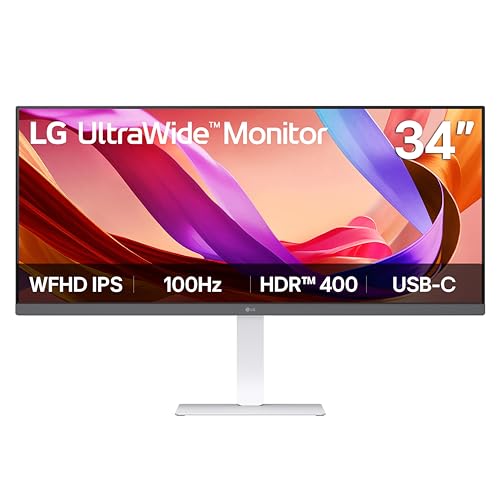
LG 34U530A-W 34-inch stands apart with a height-, tilt- and swivel-adjustable stand plus USB-C, making it the most flexible choice for desk positioning and a modern laptop setup. The 34-inch IPS display uses a 21:9 format at 2560 × 1080 and supports 100Hz. LG describes the design as virtually borderless, which keeps bezels visually restrained without making a claim about cabinet thickness. Choose it for work where positioning and connection options matter; its WFHD resolution is lower than the Ultra-WQHD or 3440 × 1440 alternatives.
Bottom line: Pick this when stand adjustment and USB-C matter most.
Sceptre C345B-QUT168 34-inch

Sceptre C345B-QUT168 34-inch is a curved 34-inch WQHD gaming option with 3440 × 1440 resolution and refresh rates up to 180Hz/165Hz. Its feature set includes two DisplayPort inputs, 99% sRGB coverage, a 1ms MPRT response figure and built-in speakers. The LED lighting is on the backcover, not a measure of display performance. This model suits buyers wanting a high-refresh ultrawide with integrated audio; choose SANSUI 34-inch UWQHD 200Hz if its 200Hz maximum refresh is the deciding requirement. At 31.8 inches wide, it still needs ample desk space.
Bottom line: Choose this for 3440 × 1440 gaming with built-in speakers.
SANSUI 34-inch UWQHD 200Hz

SANSUI 34-inch UWQHD 200Hz has the highest refresh rate among these choices: its 34-inch 1500R curved Fast VA panel reaches 200Hz at 3440 × 1440. The maker also specifies OD 1ms response, AdaptiveSync, VRR support with HDMI 2.1, and two HDMI 2.1 inputs alongside DisplayPort 1.4. Its stand tilts from -5 to 15 degrees and the monitor supports a 100 × 100mm VESA mount. Select it for fast gaming and multiple video-input options; it has no speakers, so audio needs a separate solution.
Bottom line: Pick this when 200Hz matters more than integrated speakers.
How to choose an ultra thin monitor
Start with screen ratio and resolution, because they decide how many windows fit and how sharp text appears. A 21:9 ultrawide provides more horizontal room than a conventional 16:9 display, while 32:9 is close to two 16:9 screens side by side. For office work, 100Hz is already smoother than the common 60Hz baseline; gaming benefits from matching a high refresh monitor with a graphics card that can deliver similar frame rates. Decide what matters most: pixel detail, gaming motion, or desk width. If your usable desk width is under 32 inches, avoid these 34-inch choices and measure carefully even for nominal 34-inch displays, since their cabinets are about 32 inches wide.
Screen size, resolution and desk fit
Resolution and aspect ratio should be considered together: 3440 × 1440 is a 21:9 UWQHD format, while 2560 × 1080 gives a 34-inch screen fewer pixels to spread across. A 49-inch 32:9 screen needs substantially more horizontal room than a 34-inch display. Measure available width and depth, including the stand, before choosing a curved monitor; curve radius and panel width affect how the edges sit in your field of view. For a 34-inch ultrawide, reserve at least 32 inches of desk width, then add room for speakers or other equipment. Curvature is a preference, not a substitute for checking viewing distance and workspace.
| Need | Useful starting point | Trade-off |
|---|---|---|
| Office windows side by side | 34-inch, 21:9 | Check pixel resolution for text detail |
| One very broad gaming view | 49-inch, 32:9 | Requires a wide desk and supported game format |
| Fast gaming motion | 144Hz or higher | Computer must output matching frame rates |
Refresh rate and gaming features
Refresh rate counts how often a monitor can update each second: 144Hz displays up to 144 refreshes per second, while 200Hz allows more frequent updates. The benefit depends on both the computer’s frame output and whether the game supports the selected resolution and aspect ratio. Response-time figures use different methods, so 1ms MPRT and 1ms OD are not automatically equivalent measures. Variable refresh features such as AdaptiveSync or FreeSync can reduce tearing when frame rates fluctuate, but support depends on the connected graphics hardware and input. For general work, prioritize comfortable size and resolution; choose high refresh when smooth motion is a priority and the system can drive it.
Stand, connections and setup checks
Stand adjustment can prevent awkward monitor positioning: height, tilt and swivel help align the display with eye level and the user’s chair. USB-C can simplify laptop connections, but its presence alone does not guarantee power delivery or a particular charging wattage. Before setting up a monitor arm, confirm the VESA pattern and the arm’s supported weight; a 49-inch curved monitor is much heavier than a 34-inch panel. Keep the top of the display near eye level and sit roughly an arm’s length away, adjusting distance for text size and comfort. Make sure cables can reach the ports without tight bends, especially where the monitor swivels or tilts.
Frequently Asked Questions
Is a 34-inch ultrawide wider than a standard monitor?
Yes, a 34-inch 21:9 monitor is wider in proportion than a typical 16:9 screen of the same diagonal. Its actual cabinet width is around 32 inches in these examples, so measure desk space before choosing.
What resolution should a 34-inch monitor have?
A 34-inch 3440 × 1440 display provides more pixels than a 2560 × 1080 model at the same diagonal. Choose the higher resolution for finer text and image detail, provided your computer can drive it.
Does a 200Hz monitor need a 200Hz graphics card?
A monitor does not require a special card, but the computer and game must output enough frames to use its full 200Hz refresh. The achievable rate can fall at high resolutions or in demanding games.
How much desk space does a 49-inch monitor need?
Plan for at least the monitor’s 45.18-inch cabinet width, plus extra room for cables and other equipment. Measure desk depth and stand placement too, because the screen’s curve and base use space beyond its width.
Are curved monitors better for office work?
Curvature is a viewing preference, not a universal office advantage. A 1000R curve is tighter than 1500R; check the viewing distance and whether the curved edges feel comfortable for your tasks.