
Bluetooth Mouse for Tablet: 3 Options Compared

For a tablet, choose AZTZATZ Rechargeable Bluetooth Mouse if you want a rechargeable mouse with Bluetooth and a USB receiver option; its dual modes connect to two devices, one at a time.
A Bluetooth mouse connects directly to a tablet’s wireless radio, while a 2.4 GHz receiver needs a compatible port or adapter. Check your tablet’s pointer support and port compatibility before choosing receiver-based use.
We earn a commission if you buy through links on this page. As an Amazon Associate I earn from qualifying purchases. Products are compared on manufacturer specifications, not hands-on testing.
- Best overall: AZTZATZ Rechargeable Bluetooth Mouse – Offers Bluetooth plus a stored 2.4 GHz receiver and a 500mAh rechargeable battery.
- Best for LED lighting: Afaartcci Rechargeable Bluetooth Mouse – Adds seven color-changing LED lights to Bluetooth and receiver connectivity.
| Product | Best for | Power | Size | Shop |
|---|---|---|---|---|
| AZTZATZ Rechargeable Bluetooth Mouse | Two-device setups | 500mAh rechargeable | 4.4 × 2.3 × 1.1 in | Check Price on Amazon |
| WREANU Rechargeable Dual-Mode Mouse | Tablet and laptop | Rechargeable, 500mAh | 4.4 × 2.3 × 1.1 in | Check Price on Amazon |
| Afaartcci Rechargeable Bluetooth Mouse | Colorful lighting | 500mAh rechargeable | 4.4 in long | Check Price on Amazon |
Bluetooth mouse for tablet options
Compare connection type, power and size to match a mouse to your tablet and other devices.
AZTZATZ Rechargeable Bluetooth Mouse

For a tablet-and-computer setup, this mouse offers Bluetooth and a 2.4 GHz USB receiver, with one device connected through each mode; the modes cannot run simultaneously. Its 500mAh battery recharges over USB-C, and the mouse has a five-minute sleep mode. The maker says a two-hour charge supports more than seven days of continuous use and 30 days of standby. At 4.4 × 2.3 × 1.1 inches, it suits buyers who want rechargeable power and a receiver option. The receiver requires a compatible tablet port or adapter.
Bottom line: Pick this if you want a rechargeable mouse with Bluetooth and a receiver option for a second device.
WREANU Rechargeable Dual-Mode Mouse
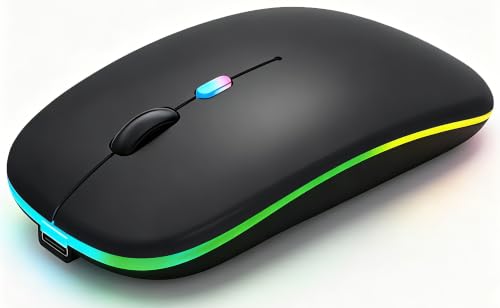
This mouse is expressly described for tablets and iPads, and its dual-mode setup pairs with one device over Bluetooth and another through the included 2.4 GHz receiver. The maker says its wireless connection works up to 33 feet; the receiver is stored inside the mouse. The 4.4 × 2.3-inch footprint suits a portable setup. Choose it if you want to switch between tablet and computer; skip the receiver mode if your tablet lacks a compatible port or adapter.
Bottom line: Choose it for a tablet-and-laptop pairing when you want Bluetooth and an optional receiver.
Afaartcci Rechargeable Bluetooth Mouse

Seven randomly changing LED colors distinguish this rechargeable mouse from the simpler designs in this group. It supports Bluetooth and a 2.4 GHz receiver for separate devices, but the two modes cannot be used at the same time. The maker says a two-hour charge provides over seven days of use or 30 days of standby, and the mouse sleeps after five minutes of inactivity. Its length is 4.4 inches. The lighting suits buyers who want a colorful desk accessory; choose a receiver-free model if avoiding adapters is your priority.
Bottom line: Pick this if colorful lighting matters and you can use Bluetooth or a compatible receiver.
How to choose a Bluetooth mouse for a tablet
Choose by connection first: Bluetooth pairs directly, while a 2.4 GHz mouse needs its USB receiver and a compatible port or adapter. A tablet with fewer ports is usually simpler to pair with a Bluetooth-only mouse. Dual-mode mice can serve a second device through the receiver, but confirm whether switching modes is required; these options do not use both modes simultaneously. Bluetooth operates in the crowded 2.4 GHz band, so nearby wireless devices can affect connection quality. For a receiver-based setup, check the tablet’s port type and whether it supports the required adapter before ordering.
Size and power are the next tradeoffs. Compact models are easier to pack, while a larger body may be preferable if you want more room for your hand. Rechargeable batteries avoid disposable cells but need periodic charging; mice using replaceable batteries are convenient only if you have the right cell on hand.
Tablet pointer support and pairing
Apple added mouse and trackpad support in iPadOS 13.4, so an iPad needs that version or later for standard pointer use. Android tablet behavior depends on the operating-system version and device settings, so verify that the tablet supports an external pointer before pairing. Bluetooth pairing normally starts by putting the mouse into pairing mode, then selecting it in the tablet’s Bluetooth settings. A paired mouse may not show the same pointer controls across operating systems.
For receiver mode, a USB-C or Lightning tablet may need an adapter, and the tablet must support the receiver’s connection. A Bluetooth connection avoids that extra port requirement. If you intend to switch between two devices, check whether the mouse has a clear mode selector; dual-mode connection alone does not mean both devices are controlled simultaneously.
Bluetooth and USB receiver compared
Bluetooth is the more direct choice when the tablet supports mouse input and you want to keep its port free. A 2.4 GHz receiver can be useful with a second computer, but it occupies a port and may need an adapter. The practical difference is the connection path, not a guarantee of better responsiveness: distance, interference and device support all matter.
Use this comparison to match your setup to a connection type:
| Connection | Tablet requirement | Useful when |
|---|---|---|
| Bluetooth | Mouse input and Bluetooth pairing support | You want no USB receiver attached |
| 2.4 GHz receiver | Compatible USB port or adapter | You want to connect a second device by receiver |
Mouse size, comfort and portability
A mouse that is comfortable for long sessions should let your hand rest without reaching awkwardly for the buttons. Smaller models pack more easily, but a compact body can feel cramped for larger hands. Ambidextrous shapes work for either hand; sculpted grips are typically shaped around a particular hand position, so check the fit before choosing one for shared use.
For travel, measure the mouse against the pocket or pouch where it will ride, rather than relying only on labels such as compact or slim. A few inches in length can make a difference in a tightly packed bag. Weight also matters if you carry the mouse daily, but grip and hand size are more useful than choosing solely by the smallest dimensions.
Frequently Asked Questions
Does an iPad work with a Bluetooth mouse?
Yes, iPadOS 13.4 and later support mouse and trackpad input. Pair the mouse in Bluetooth settings, then adjust pointer controls in the iPad settings if needed.
Can one mouse control a tablet and laptop?
A dual-mode mouse can connect to one device over Bluetooth and another through a 2.4 GHz receiver. These modes are not simultaneous, so you must switch the connection mode to change devices.
Will a USB receiver work with my tablet?
Only if the tablet supports the receiver and has a compatible USB port or adapter. A USB-C or Lightning adapter may be needed, so confirm port compatibility before relying on receiver mode.
How far can a Bluetooth mouse work from a tablet?
The practical range depends on the mouse, tablet and obstacles between them; Bluetooth is intended for nearby devices rather than use across a home. Keep the mouse close to the tablet if the pointer becomes intermittent.
Is a rechargeable mouse better for travel?
A rechargeable mouse avoids carrying replacement batteries, but it needs charging before or during a trip. A model with a 500mAh battery is not a promise of a particular runtime unless the maker gives a runtime figure.